|< C++ Encapsulation 2 | Main | C++ Encapsulation 4 >|Site Index |Download |
MODULE 12b
MORE ON ENCAPSULATION CODE EXAMPLES 3
My Training Period: xx hours
This is a continuation from the previous Module. When you copy and paste to the text or compiler editor, make it in one line! This Module is a transition from C to C++ and Topics of C++ such asFunctions,Arrays,Pointers andStructure that have been discussed in C will not be repeated. The source code is available inC++ Encapsulation source code.
The C++ programming skills that should be acquired is: To understand and use the object packaging.
|
| 12.10 Data Hiding
12.11 Abstract Data Type
12.12 The union in C++
|
#include <iostream>
using namespace std;
union Num
{
int ValueI;
float ValueF;
double ValueD;
char ValueC;
};
void main()
{
// optional union keyword, ValueI = 100
Num TestVal = {100};
cout<<"\nInteger = "<<TestVal.ValueI<<endl;
TestVal.ValueF = 2.123L;
cout<<"Float = "<<TestVal.ValueF<<endl;
cout<<"Uninitialized double = "<<TestVal.ValueD<<endl;
cout<<"Some rubbish???"<<endl;
TestVal.ValueC = 'U';
cout<<"Character = "<<TestVal.ValueC<<endl;
}
Output:
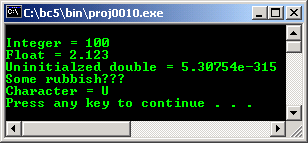
12.13 The struct in C++
Thestruct is still useable in C++ and operates just like it does in ANSI-C with one addition. You can include methods in a structure that operate on data in the same manner as in a class, but methods and data are automatically defaulted to be public at the beginning of a structure.
Of course you can make any of the data or methods private section within the structure. The structure should be used only for constructs that are truly structures. If you are building even the simplest objects, you are advised to use classes to define them.
The following is a program example as used in previous union example.
#include <iostream>
using namespace std;
struct Num
{
int ValueI;
float ValueF;
double ValueD;
char ValueC;
};
void main()
{
struct Num TestVal = {100};
cout<<"\nInteger = "<<TestVal.ValueI<<endl;
TestVal.ValueF = 2.123L;
cout<<"Float = "<<TestVal.ValueF<<endl;
cout<<"Uninitialized double = "<<TestVal.ValueD<<endl;
cout<<"Better than union"<<endl;
TestVal.ValueC = 'U';
cout<<"Character = "<<TestVal.ValueC<<endl;
}
Output:
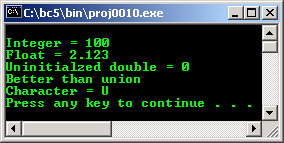
Program Examples and Experiments
Example#1
The following example just to show you the simple program development process using class. We are very familiar with line as a basic object used in drawing. So we would like to create line object. Think simple; first of all just create the program skeleton as shown below. Compile and run, make sure there is no error.
// creating simple class, STEP #1
#include <iostream>
using namespace std;
// class, declaration part
class line
{
public:
line(void);
~line(void);
};
// class implementation part
line::line(void)
{ }
line::~line(void)
{ }
// main program
int main()
{
line LineOne;
cout<<"Just program skeleton\n";
return 0;
}
Output:
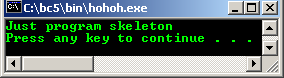
Next step is to add simple functionalities. We add one line attribute, line’s color and line pattern type, with simple implementation returning the color value and user selected pattern type respectively. Compile and run this program without error.
// creating simple class, STEP #2
#include <iostream>
using namespace std;
// class, declaration part
class line
{
char* color;
int pattern;
public:
line(void);
char* LineColor(char*){ return color = "GREEN";};
int LinePattern(int pattern){return pattern;};
~line(void);
};
// class implementation part
line::line(void)
{
// constructor’s value…
pattern = 12;
}
line::~line(void)
{
color = NULL;
pattern = 0;
}
// main program
void main()
{
line LineOne;
int x = 10;
cout<<"Simple Line attribute class\n";
cout<<"Using some user supplied value\n";
cout<<"------------------------------"<<"\n";
cout<<"Line's Color ----> "<<LineOne.LineColor("")<<"\n";
cout<<"Line's pattern type ----> "<<LineOne.LinePattern(x)<<"\n";
}
Output:
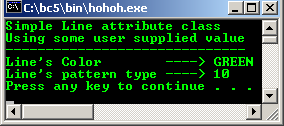
Let do some tweaking to this very simple class, notice the difference output and the program execution flow. Firstly, Change the following red line of code,
int LinePattern(int pattern){return pattern;};
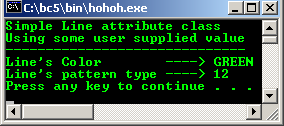
To the following code, re-compile and re-run the program, with no argument supplied, constructor value (12) will be used.
int LinePattern(int){return pattern;};
The output:
Next, change again the same line of code:
int LinePattern(int pattern){return pattern;};
To the following code:
int LinePattern(int){return pattern = 13;};
And delete or comment out the following line of code, recompile and rerun the program, so there is no default constructor value.
pattern = 12;
The output is:

Finally we add other line attributes to complete our line object using class.
// creating simple class, STEP #3, complete
#include <iostream>
using namespace std;
// class, declaration part
class line
{
char* color;
float weight;
float length;
char * arrow;
public:
line(void);
char* LineColor(char* color){return color;};
float LineWeight(float weight){return weight;};
float LineLength(float length){return length;};
char *LineArrow(char* arrow){return arrow = "YES";};
~line(void);
};
// implementation part
line::line(void)
{
//constructors or initial values…
weight = 0.25;
length = 10;
}
line::~line(void)
{
color = NULL;
weight = 0;
length = 0;
arrow = NULL;
}
/ main program
void main()
{
line LineOne;
float x = 1.25, y = 2.25;
char newcolor[10] = "BLUE", *colorptr;
cout<<"Line attributes, very simple\n";
cout<<" class example\n";
cout<<"----------------------------"<<"\n";
colorptr = newcolor;
// just for testing the new attribute values...
cout<<"\nAs normal variables....."<<endl;
cout<<"Test the new line weight = "<<x<<endl;
cout<<"Test the new line length = "<<y<<endl;
cout<<"Test the new line color is = "<<colorptr<<endl;
cout<<"\nUsing class......."<<endl;
cout<<"New line's color ----> "<<LineOne.LineColor(colorptr)<<"\n";
cout<<"New line's weight ----> "<<LineOne.LineWeight(x)<<" unit"<<"\n";
cout<<"New line's length ----> "<<LineOne.LineLength(y)<<" unit""\n";
cout<<"Line's arrow ----> "<<LineOne.LineArrow(" ")<<"\n\n";
}
Output:

Let do some experiment against the constructor and destructor. In this program example we declare a member variable TestVar and a member function DisplayValue() as a tester. Compile and execute this program.
// testing the constructor and destructor
#include <iostream>
using namespace std;
// class declaration part
class TestConsDest
{
// member variable...
public:
int TestVar;
// member functions, constructor and destructor...
public:
TestConsDest();
int DisplayValue();
~TestConsDest();
};
// class implementation part
// constructor...
TestConsDest::TestConsDest()
{
// test how the constructor was invoked...
// static-retain the previous value…
static int x=1;
cout<<"In Constructor, pass #"<<x<<endl;
x++;
}
// a simple function returning a value...
int TestConsDest::DisplayValue()
{
return TestVar = 100;
}
// destructor...
TestConsDest::~TestConsDest()
{
// test how destructor was invoked...
static int y=1;
cout<<"In Destructor, pass #"<<y<<endl;
y++;
// explicitly...
TestVar = 0;
}
// main program
int main()
{
// instantiate two objects...
// constructor should be invoked...
// with proper memory allocation...
TestConsDest Obj1, Obj2;
cout<<"Reconfirm the allocation for Obj2 = "<<&Obj2<<endl;
cout<<"Default constructor value assigned = "<<Obj1.DisplayValue()<<endl;
cout<<"In main(), testing..."<<endl;
cout<<"What about Obj1 allocation? = "<<&Obj1<<endl;
cout<<"Default constructor value assigned = "<<Obj1.DisplayValue()<<endl;
return 0;
}
Output:
---------------------------------------------------------------------------------------------------
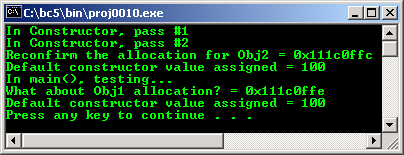
Notice that the constructor has been invoked properly for the objectsObj1 and Obj2 (memory allocation). It has been reconfirmed by checking the memory address of the objects.
Unfortunately from the output, there is no cleanup work done. If the destructor called automatically when the program execution exit the closing brace of the main() program, it is OK. If it is not, then, there should be memory leak somewhere :o).
Fortunately, when this program example compiled and run using Microsoft Visual C++ 6.0®, the destructor properly called for cleanup. The output is shown below:
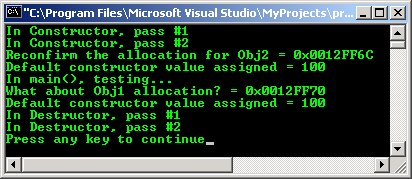
It seems that the destructor called when the execution exit the closing brace because the second time sending message to the DisplayValue(), the value of TestVar = 100 still been displayed although we have set the value to 0 in the destructor.
Final remarks: Think simple!!!
// a class skeleton program
#include <iostream>
using namespace std;
// the base class declaration
class BaseClass
{
// member variables declaration
// declare all your variables here
// with optional access restrictions
public:
int p;
// this keyword will be explained later...
protected:
float q;
private:
char r;
// member functions or methods
// define your functions here also with optional access restrictions
public:
// constructor
BaseClass();
// destructor
~BaseClass();
private:
int Funct1();
protected:
void Funct2();
};
// class implementation part
// define your method here
BaseClass::BaseClass()
{ }
int BaseClass::Funct1()
{return 0;}
// constructor implementation
void BaseClass::Funct2()
{}
// destructor implementation
BaseClass::~BaseClass()
{}
// the main program, start instantiate objects here...
int main(void)
{
cout<<"------class test message----"<<endl;
cout<<"This just a class skeleton..."<<endl;
cout<<"It just simple, think simple!"<<endl;
return 0;
}
Output:

// program class.cpp using class instead of struct
#include <iostream>
using namespace std;
// class declaration part
class item
{
// private by default, it is public in struct
int keep_data;
// public part
public:
void set(int enter_value);
int get_value(void);
};
// class implementation part
void item::set(int enter_value)
{
keep_data = enter_value;
}
int item::get_value(void)
{
return keep_data;
}
// main program
void main()
{
// three objects instantiated of type item class
item John_cat, Joe_cat, Big_cat;
// a normal variable
int garfield;
// assigning values
John_cat.set(111);
Joe_cat.set(222);
Big_cat.set(333);
garfield = 444;
// John_cat.keep_data = 100;
// Joe_cat.keep_data = 110;
// these are illegal because keep_data now, is private by default
cout<<"Accessing data using class\n";
cout<<"==========================\n";
cout<<"Data value for John_cat is "<<John_cat.get_value()<<"\n";
cout<<"Data value for Joe_cat is "<<Joe_cat.get_value()<<"\n";
cout<<"Data value for Big_cat is "<<Big_cat.get_value()<<"\n";
cout<<"\nAccessing data normally\n";
cout<<"=======================\n";
cout<<"Data value for garfield is "<<garfield<<"\n";
}
Output:

A program example compiled usingg++.
///////// -simpleclass.cpp- ////////
/////// FEDORA 3, g++ x.x.x ////////
///// creating a simple class/////
#include <iostream>
using namespace std;
// class, declaration part
class line
{
char* color;
float weight;
float length;
char * arrow;
public:
line(void);
char* LineColor(char* color){return color;};
float LineWeight(float weight){return weight;};
float LineLength(float length){return length;};
char *LineArrow(char* arrow){return arrow = "YES";};
~line(void);
};
// implementation part
line::line(void)
{
// constructors or default initial values.
weight = 0.25;
length = 10;
}
line::~line(void)
{
color = NULL;
weight = 0;
length = 0;
arrow = NULL;
}
// main program
int main()
{
line LineOne;
float x = 1.25, y = 2.25;
char newcolor[10] = "BLUE", *colorptr;
cout<<"Line attributes, very simple\n";
cout<<" class example\n";
cout<<"----------------------------"<<"\n";
colorptr = newcolor;
// just for testing the new attribute values...
cout<<"\nAs normal variables....."<<endl;
cout<<"Test the new line weight = "<<x<<endl;
cout<<"Test the new line length = "<<y<<endl;
cout<<"Test the new line color is = "<<colorptr<<endl;
cout<<"\nUsing class......."<<endl;
cout<<"New line's color ----> "<<LineOne.LineColor(colorptr)<<"\n";
cout<<"New line's weight ----> "<<LineOne.LineWeight(x)<<" unit"<<"\n";
cout<<"New line's length ----> "<<LineOne.LineLength(y)<<" unit""\n";
cout<<"Line's arrow ----> "<<LineOne.LineArrow(" ")<<"\n\n";
return 0;
}
[bodo@bakawali ~]$ g++ simpleclass.cpp -o simpleclass
[bodo@bakawali ~]$ ./simpleclass
Line attributes, very simple
class example
----------------------------
As normal variables.....
Test the new line weight = 1.25
Test the new line length = 2.25
Test the new line color is = BLUE
Using class.......
New line's color ----> BLUE
New line's weight ----> 1.25 unit
New line's length ----> 2.25 unit
Line's arrow ----> YES
Tenouk C++ encapsulation code samples
Further C++ class related reading:
- The source code is available in C++ Encapsulation source code.
- Check the best selling C / C++ books at Amazon.com.
- C++ standards reference:ISO/IEC 14882:1998 on the programming language C++.
- ISO C++ standards reference:ISO C++.
- MFC library class hierarchy chart.