| Main | Basic Data Type 1 >| Site Index | Download |
MODULE 1
INTRODUCTION TO C and C++
| My Training Period: xx hours
The source code for this Module is: C/C++ source codes and the practice worksheet is: Running my first C program and printf(), main(). For other compilers, please check the documentations.
The skills that supposed to be acquired in this session:
1.1 C and C++ Brief History
|
1.2 C and C++ Advantageous
-
Powerful and flexible language - What can be achieved is only limited by your imagination. It is used for Operating System, compilers, parsers, interpreters, word processors, search engine and graphic programs.
-
Portable programming language - C program written for one computer system (an IBM PC, for example) can be compiled and run on another system (a DEC VAX System perhaps with little or no modification).
-
Is a language of less keyword - Handful of terms called keywords in which the language’s functionality is built. A lot of keywords doesn’t mean more powerful than C.
-
Modular - Written in routines called functions and classes (C++), can be reused in other applications or programs.
-
Preferred by professional programmers - So, a variety of C/C++ resources and helpful supports are widely available.
-
Standardized – Many standards have been documented, maintained and updated for C and C++ as standard references for solving the portability and many other issues. For example, the latest version of standard C++ is C++17 and later C++20 ("C++20") and the older version is C++03.
1.3 Very Basic C and C++ Program Development
-
Computer program is designed to solve problem. Nowadays it makes ease a lot of our works.
-
The simple steps to find a solution to problems are the same steps used to write a program and basically can be defined as follows:
Define the problem.
Devise a plan to solve it.
Implement the plan.
Test the result to see whether the problem is solved.
-
When creating a program in C/C++:
Determine the objectives of the program.
Decide which method the program will use to solve the problem while preparing the pseudo code or flowchart.
Translate this pseudo-code or flowchart into a computer program using the C/C++ language.
Run and test the program.
-
Typically, practical steps that might be followed in a simple, small number line of codes for program development are listed below:
| No | Step | Description |
Using an editor to enter the source code | From a simple text editor up to complex Integrated/interactive Development Environment (IDE). Examples: UNIX: ed, ex, edit, emacs and vi. Window OS: notepad, Microsoft Visual Studio/.Net®, Borland® C++, Borland Turbo® C++, Borland Builder C++, BorlandX. MSDOS®: editor and more... | |
| 2 | Using a compiler | Computer can’t understand the roman alphabets like English words. It only can understand machine language, 0’s and 1’s. The compiler perform this task, yields an object code (such as.obj or .o). |
| 3 | Creating an executable file | C/C++ has function library that contains object code (codes that has been compiled) for predefined functions. These codes are ready to be used and can be called in the main program such as printf() function. They perform frequently needed tasks. Executable program can be run or executed. Before the executable program is created, a program called linker (to link other object and library files needed by the main program) performs a process called linking. |
| 4 | Running/executing the program | Running the executable file/image/binary. If there is no error, that is your program! (a running program or a process). |
| 5 | Debugging | Debug, debug and debug, finding program bugs, this is in debug mode. Alfa version - May still contains bugs, pre-release version. Beta / RC, Release Candidate version - May still contains bugs, pre-release version. Final release – Release mode or Retail version (in reality, still having bugs), solved by applying Patches and/or Service Packs (SP).) |
| 6 | Release/Distribution | Creating the installation program/package for distribution. |
-
Typically, these basic steps are illustrated in figure 1.1 and quite a complete story can be found in Assembler, Compiler & Linker.

-
Most of the editor used nowadays called Integrated Development Environment (IDE) that combines the process of compiling, linking, running, debugging, code validation, standard conformance and other functionalities in one environment such as Borland® C++ Builder and Microsoft Visual Studio®/.Net®.
-
Keep in mind that there are other extensions for the C/C++ program other than the .c, .cpp and .h. You have to check your compiler documentations or you can read the story in Compiler, Assembler & Linker of this Tutorial.
-
Bear in mind also the real program development actually consist of a team of programmers, system analysts, project leader etc.
-
Individually, how many lines of codes that we can write huh? So be real when using this Tutorial for learning C and C++ :o).
1.4 C++ Object Oriented Programming
-
C++ is a C superset was developed by Bjarne Stroustrup at Bell Laboratories (some call advanced C) and the ANSI C++ (ISO/IEC C++) standard version is also already available. From ISO/IEC standard, C++ evolved from C++98, C++03 and the latest isC++20.
-
C++ provides a number of features that spruce up the C language mainly in the object-oriented programming aspects and data type safety (which lack in C language). Though if you have studied the C++, you will find that the type safety of the C++ also not so safe :o) actually the secure codes depend on the programmers themselves.
-
Object are essentially reusable software components that model items in the real world.
-
Using a modular, object-oriented design and implementation, can speed up the program development and make the same software development group, up to many times more productive than the conventional programming techniques.
-
Then, the evolution of the C++ continues with the introduction of the Standard Template Library (STL). STL deal mainly with data structure processing and have introduced the using of C++ STL templates. From procedural programming to object oriented programming, STL has introduced generic programming.
-
Then we have Common Language Runtime (CLR) type of the programming language, something like Java (the Java Virtual Machine – JVM) implemented for example, in the .NET Framework programming.
1.5 Sample of Simple Program Examples
-
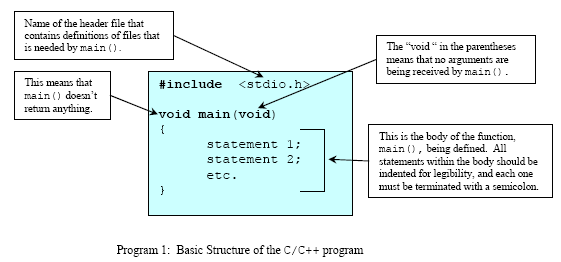
Let explore the basic structure of the C/C++ as shown in following section, before we proceed to the next Module. Don’t worry about what the codes will do; just type or copy-paste and run the program.
-
The program start with what is called preprocessor directive, #include.
-
Then the main program start, with keyword main(), each program must have a main() function.
-
All the coding is included in the body of the main program in the curly braces { } and } end the coding for the program.
-
Try all the sample programs given. Be familiar with the writing codes, compiling, running and your IDE programming environment.
Program Examples – Warming up!
-
Your task is to write the source code, compile and run. Notice that you only have to change some of the codes in the curly braces { } and adding or deleting the preprocessor directive to complete all the examples.
-
Learn how to modify the program source code and re run the program. You will learn a lot more things!
-
Please refer to the Kick Start: Using Compilers section, on how to write, compile and run your Win32 Console Mode Application program using Borland® or Microsoft Visual Studio®/.Net® product or whatever compiler you are familiar with.
Example #1
-
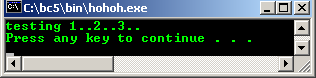
For starting, first step we just create the program skeleton. Try to compile and run the simple program. Make sure there is no error. Notice the line of code that span on multiple lines. Keep it on one line.
-
Don’t worry about any syntax or standard violation; you will be prompted by your compiler through warnings and/or errors :o).
-
Keep in mind that, typing the codes, is dealing with character set, laid out on your keyboard whether it is ASCII, EBCDIC, Unicode or proprietary character set :o).
-
And C/C++ source codes look only dealing with characters, strings and mathematical expressions.
// the simplest program example
// preprocessor directives - header files
#include <iostream>
using namespace std;
// main() function with no argument with int return value…
int main( )
{
cout<<"testing 1..2..3..\n";
// return to operating system, no error
return 0;
}
Output:
-
Next step we add other lines of code. Recompile and rerun.
// a program to calculate total based on the given quantity and price
// preprocessor directives - header files
#include <iostream>
using namespace std;
// main() function with no argument and int return value…
int main(void)
{
// variables declaration and their respective the data types
int quantity;
float price, total;
cout<<"testing 1..2..3..\n";
// standard output - read from user input
cout<<"\nEnter the item's price: RM ";
// standard input - store user's input at variable price
cin>>price;
cout<<"\nEnter the item's quantity: ";
cin>>quantity;
// multiply quantity and price store the result at total…
total = quantity * price;
// print the total value
cout<<"\nTotal price = RM "<<total<<endl;
return 0;
}
Output:

Example #2
// a simple greeting program using an array, pointer and selection
// you will learn more about array, pointer and selection later.
// the following #include … called preprocessor directive/header files.
// include the iostream file so that the compiler can find the definition for the cin and cout
#include <iostream>
using namespace std;
int main(void)
{
// normal variable and array with their respective data type
char name[10], name1[10], sex;
cout<<"\nEnter your first name (max 10 characters): ";
cin>>name;
cout<<"Enter your last name (max 10 characters): ";
cin>>name1;
cout<<"\nEnter your sex (M or F): ";
cin>>sex;
// conditional test whether male or female, if character 'M'
if (sex == 'M')
// then display this...an array name without brackets is the pointer to the first array's element
cout<<"\nHow are you, Mr. "<<name<<" "<<name1<<endl;
// else, if character 'F' display this...
else
cout<<"\nHow are you, Ms/Mrs "<<name<<" "<<name1<<endl;
return 0;
}
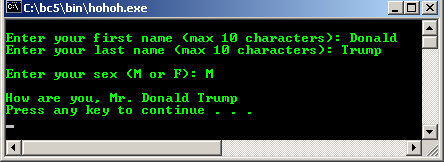
Output:
Example #3
// one line comment in program
/* multiple lines comment, C program to display
square and square root for a given number */
#include <math.h> /* for sqrt() function */
#include <stdio.h>
int main( )
{
/* variable named x with floating-point data type */
float x;
/* standard output writing a positive floating number */
printf("\nEnter one positive number (1, 2, 3. . .): ");
/* standard input reading floating number */
scanf("%f", &x);
printf("\nx = %f ", x);
printf("\nSquare for x is = %f", x * x);
// sqrt() is the predefined function, defined in math.h
printf("\nSquare root for x is = %f\n", sqrt(x));
return 0;
}
Output:

Example #4
/* a simple mathematics calculation */
// C header file…
#include <stdio.h>
// main() function…
int main( )
{
// variables declaration
int x, y, z;
// variables initialization, assign 20 to variable x…
// or put the value of 20 in memory location labeled by x
x = 20;
y = 2;
printf("Given x = 20, y = 2\n");
printf("\nx / y = %d", x / y);
// do some basic calculations
x = x * y;
y = y + y;
printf("\nx = x * y");
printf("\ny = y + y");
printf("\nNew value for x / y = %d", x / y);
z = 20 * y / x;
printf("\nz = 20 * (y / x) = %d\n", z);
return 0;
}
Output:

Example #5
// another simple mathematics calculation
// C++ header file
#include <iostream>
using namespace std;
int main(void)
{
// variables declaration, with variable names and type
float a, b, c;
// variables initialization
a = 2.0;
b = 5.0;
c = b / a;
cout<<"\nGiven a = 2.0, b = 5.0, c = b/a";
cout<<"\nc = "<<c;
c = c + (a/b);
cout<<"\nc = c + (a/b) = "<<c<<endl;
return 0;
}
Output:
---------------------------------------------------------------------------------

Example #6
// another mathematics calculation
#include <iostream>
using namespace std;
int main(void)
{
float x, y, z;
// prompt for user data to standard output, a screen
cout<<"\nKey in 1st positive integer, then press Enter key: ";
// read the data from standard input, a keyboard
cin>>x;
cout<<"Key in 2nd positive integer, then press Enter key: ";
cin>>y;
cout<<"Key in 3rd positive integer, then press Enter key: ";
cin>>z;
cout<<"\nAverage for three numbers is \n";
cout<<"\n = ("<<x<<"+"<<y<<"+"<<z<<")/3 = "<<(x+y+z)/3<<"\n";
return 0;
}
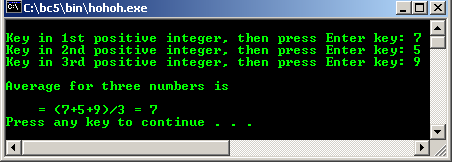
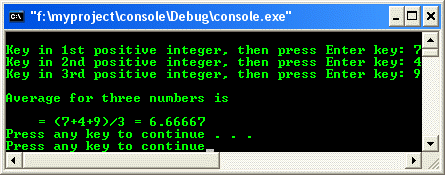
Output:
-
Previous program example compiled using VC++/VC++ .Net. Its header file is C++ wrapper <cstdlib> that wrap the C's <stdlib.h> header file.
// previous example compiled using VC++/VC++ .Net
#include <iostream>
#include <cstdlib>
using namespace std;
int main(void)
{
float x, y, z;
// prompting for user data to standard output, a screen
cout<<"\nKey in 1st positive integer, then press Enter key: ";
// read the data from standard input, a keyboard
cin>>x;
cout<<"Key in 2nd positive integer, then press Enter key: ";
cin>>y;
cout<<"Key in 3rd positive integer, then press Enter key: ";
cin>>z;
cout<<"\nAverage for three numbers is \n";
cout<<"\n = ("<<x<<"+"<<y<<"+"<<z<<")/3 = "<<(x+y+z)/3<<"\n";
system("pause");
return 0;
}
Output:
-
A programming language enforces a set of rules, symbols and special words used to construct a program.
-
A set of rules that precisely state the validity of the instructions used to construct C/C++ program is called syntax or C/C++ grammar.
-
The correctness of the instructions used to write C/C++ program is called semantics.
-
These set of rules for instructions validity and correctness are monitored or guarded by the compilers.
1.6 The main() function
-
According to the C/C++ standard, only two definitions of main() functions are portable:
int main()
{
return 0;
}
-
And
int main (int argc, char* argv[])
{
return 0;
}
-
Where:
| argc | Is an argument count that is the number of command line arguments the program was invoked with. |
| argv[ ] | Is an argument vector that is a pointer to an array of character strings that contain the arguments, one per string. |
-
The following is a program example when you issue echo command at the command prompt.

// echoing command-line arguments program example
#include <stdio.h>
int main(int argc, char *argv[])
{
int x;
// using for loop to iterate all the character...
for(x = 1; x < argc; x++)
printf("%s%s", argv[x],(x<argc-1) ? " ": "");
// go to a new line...
printf("\n");
return 0;
}
-
Note that the return type int is required because the implicit int is deprecated.
-
You may, but are not a mandatory to end main() function with a return statement. Unlike C, for C++ the standard defines an implicit:
return 0;
-
At the end of main() function. Remember that 0 is an integer.
-
This means that every program that leaves main() function without a return statement is assumed successful, that mean returning integer 0 and any value other than 0 represents a failure.
-
Note that some compilers might generate a warning or error message regarding this thing and some compiler may need to explicitly put the void if there is no return or empty return statement as shown below:
void main()
{...}
-
Or something like this:
void main()
{
return;
}
-
The detail discussion of the main() and command line arguments is discussed in main() and command line arguments and Pointers, section 8.9.
-
Steps needed to create a Windows portable executable (PE) file for empty Win32 console mode application is explained in Visual C++ tutorial.
-
The following example shows the compiling, linking and running a C program using gcc. For complete commands and examples for gcc, gdb and g++ please refer to Linux Gcc, gdb and g++ part 1. Other utility and gdb can be found in Linux Gcc, gdb and g++ part 2.
-
Whenever needed, program examples compiled using gcc and g++ also included at the end of each Module of this tenouk.com Tutorial and for this Module is shown in the following example.
[bodo@bakawali ~]$ vi simath.c
/* A very simple mathematics calculation-simath.c */
// C header files.
#include <stdio.h>
// main() function.
int main( )
{
// variables declaration
int x, y, z;
// variables initialization, assign 20 to variable x.
// or put the value of 20 in memory location labeled by x
x = 20;
y = 2;
printf("Given x = 20, y = 2\n");
printf("\nx / y = %d", x / y);
// do some basic calculation
x = x * y;
y = y + y;
printf("\nx = x * y");
printf("\ny = y + y");
printf("\nNew value for x / y = %d", x / y);
z = 20 * y / x;
printf("\nz = 20 * (y / x) = %d\n", z);
return 0;
}
[bodo@bakawali ~]$ gcc simath.c -o simath
[bodo@bakawali ~]$ ./simath
Given x = 20, y = 2
x / y = 10
x = x * y
y = y + y
New value for x / y = 10
z = 20 * (y / x) = 2
-
Quite a complete gcc (GNU Compiler Collection), gdb (GNU Debugger) and Gas (GNU assembler) commands and examples can be found in Linux gcc, gdb and g++ part 1and Linux gcc, gdb and g++ part 2.
C and C++ further reading and digging:
-
Get the latest C/C++ standards reference. You can download or read online the specifications at the following links. These links are very useful if you want the update information such as new features, obsolete items etc. ISO/IEC is covering ANSI and is more general.
a. ISO/IEC 9899 (ISO/IEC 9899:1999) - C Programming language.
b. ISO/IEC 9945-1:2003 POSIX standard.
c. ISO/IEC 14882:1998 on the programming language C++.
d. ISO/IEC 9945:2003, The Single UNIX Specification, Version 4.
-
For the use of the standard and non-standard header files with different compilers and mixing C and C++ codes and libraries, please refer to Namespaces, mainly Section 23.3 and above. If you are a beginner, it is better for you to read this chunk first.
-
Find a lot of information about C++ history and evolution at Bjarne Stroustrup site (http://www.stroustrup.com/).
| Main | Basic Data Type 1 >| Site Index | Download |