Tenouk C & C++ |< Winsock Prog Example 2 | Main | Winsock Prog. Example 4 >| Site Index | Download | Linux Socket | Winsock in .NET
WINSOCK 2
WINDOWS SOCKET: PROGRAM EXAMPLES PART 3
What do we have in this chapter?
-
listen()
-
Return Values
-
Remarks
-
Compatibility Issue
-
Program Example Using socket(), bind() and listen()
-
Another Program Example
-
accept()
-
Return Values
-
Remarks
-
Server Listening Socket Program Example
-
Another Listening Socket Program Example (socket(), bind(), listen() and accept())
-
Client Socket Program Example
-
Testing The Server and Client Programs
Winsock Tutorial
Winsock: Story 1Winsock: Story 2Winsock: Story 3Winsock: Example 1Winsock: Example 2Winsock: Example 3Winsock: Example 4Winsock: Example 5Winsock: Example 6Winsock: Example 7Winsock: Example 8Winsock: Example 9Winsock: Example 10Winsock: Example 11Winsock: Example 12Winsock: Reference 1Winsock: Reference 2Winsock: Reference 3Winsock: Reference 4Another Complete and Advanced C & Winsock2 Programming Tutorial |
My Training Period: hours
Machine’s OS is standalone Windows Xp Pro with SP2 except whenever mentioned. Compiler used was Visual C++ 2003 .Net 1.1. Beware the codes that span more than one line. Program examples have been tested for Non Destructive Test. All information compiled for Windows 2000 (NT5.0) above and...
Abilities:
listen()
Return Values
If no error occurs, listen() returns zero. Otherwise, a value of SOCKET_ERROR is returned, and a specific error code can be retrieved by calling WSAGetLastError().
|
||||||||||||||||||||||||||||||||||||||||||||
|
|
|||||||||||||||||||||||||||||||||||||||||||||
Remarks
To accept connections, a socket is first created with the socket() function and bound to a local address with the bind() function, a backlog for incoming connections is specified with listen(), and then the connections are accepted with the accept() function. Sockets that are connection oriented those of type SOCK_STREAM for example, are used with listen(). The socket s is put into passive mode where incoming connection requests are acknowledged and queued pending acceptance by the process. The listen() function is typically used by servers that can have more than one connection request at a time. If a connection request arrives and the queue is full, the client will receive an error with an indication of WSAECONNREFUSED.
If there are no available socket descriptors, listen() attempts to continue to function. If descriptors become available, a later call to listen() or accept() will refill the queue to the current or most recent backlog, if possible, and resume listening for incoming connections.
An application can call listen() more than once on the same socket. This has the effect of updating the current backlog for the listening socket. Should there be more pending connections than the new backlog value, the excess pending connections will be reset and dropped. For IrDA sockets the af_irda.h header file must be explicitly included.
Compatibility Issue
The backlog parameter is limited (silently) to a reasonable value as determined by the underlying service provider. Illegal values are replaced by the nearest legal value. There is no standard provision to find out the actual backlog value.
Program Example Using socket(), bind() and listen()
// Microsoft Development Environment 2003 - Version 7.1.3088
// Copyright (r) 1987-2002 Microsoft Corporation. All Right Reserved
// Microsoft .NET Framework 1.1 - Version 1.1.4322
// Copyright (r) 1998-2002 Microsoft Corporation. All Right Reserved
//
// Run on Windows XP Pro machine, version 2002, SP 2
//
// <windows.h> already included
// WINVER = 0x0501 for Xp already defined in windows.h
#include <stdio.h>
#include <winsock2.h>
int main()
{
WORD wVersionRequested;
WSADATA wsaData;
int wsaerr;
// Using MAKEWORD macro, Winsock version request 2.2
wVersionRequested = MAKEWORD(2, 2);
wsaerr = WSAStartup(wVersionRequested, &wsaData);
if (wsaerr != 0)
{
/* Tell the user that we could not find a usable */
/* WinSock DLL.*/
printf("The Winsock dll not found!\n");
return 0;
}
else
{
printf("The Winsock dll found!\n");
printf("The status: %s.\n", wsaData.szSystemStatus);
}
/* Confirm that the WinSock DLL supports 2.2.*/
/* Note that if the DLL supports versions greater */
/* than 2.2 in addition to 2.2, it will still return */
/* 2.2 in wVersion since that is the version we */
/* requested. */
if (LOBYTE(wsaData.wVersion) != 2 || HIBYTE(wsaData.wVersion) != 2 )
{
/* Tell the user that we could not find a usable */
/* WinSock DLL.*/
printf("The dll do not support the Winsock version %u.%u!\n", LOBYTE(wsaData.wVersion), HIBYTE(wsaData.wVersion));
WSACleanup();
return 0;
}
else
{
printf("The dll supports the Winsock version %u.%u!\n", LOBYTE(wsaData.wVersion), HIBYTE(wsaData.wVersion));
printf("The highest version this dll can support: %u.%u\n", LOBYTE(wsaData.wHighVersion), HIBYTE(wsaData.wHighVersion));
}
//////////Create a socket////////////////////////
//Create a SOCKET object called m_socket.
SOCKET m_socket;
// Call the socket function and return its value to the m_socket variable.
// For this application, use the Internet address family, streaming sockets, and the TCP/IP protocol.
// using AF_INET family, TCP socket type and protocol of the AF_INET - IPv4
m_socket = socket(AF_INET, SOCK_STREAM, IPPROTO_TCP);
// Check for errors to ensure that the socket is a valid socket.
if (m_socket == INVALID_SOCKET)
{
printf("Error at socket(): %ld\n", WSAGetLastError());
WSACleanup();
return 0;
}
else
{
printf("socket() is OK!\n");
}
////////////////bind()//////////////////////////////
// Create a sockaddr_in object and set its values.
sockaddr_in service;
// AF_INET is the Internet address family.
service.sin_family = AF_INET;
// "127.0.0.1" is the local IP address to which the socket will be bound.
service.sin_addr.s_addr = inet_addr("127.0.0.1");
// 55555 is the port number to which the socket will be bound.
service.sin_port = htons(55555);
// Call the bind function, passing the created socket and the sockaddr_in structure as parameters.
// Check for general errors.
if (bind(m_socket, (SOCKADDR*)&service, sizeof(service)) == SOCKET_ERROR)
{
printf("bind() failed: %ld.\n", WSAGetLastError());
closesocket(m_socket);
return 0;
}
else
{
printf("bind() is OK!\n");
}
// Call the listen function, passing the created socket and the maximum number of allowed
// connections to accept as parameters. Check for general errors.
if (listen( m_socket, 1) == SOCKET_ERROR)
printf("listen(): Error listening on socket %ld.\n", WSAGetLastError());
else
{
printf("listen() is OK, I'm waiting for connections...\n");
}
return 0;
}
Sample output:

Figure 1
Another example that demonstrates the use of the listen() function.
Another Program Example
#include <stdio.h>
#include <winsock2.h>
int main()
{
// Initialize Winsock
WSADATA wsaData;
int iResult = WSAStartup(MAKEWORD(2,2), &wsaData);
if (iResult != NO_ERROR)
printf("Server: Error at WSAStartup().\n");
else
printf("Server: WSAStartup() is OK!\n");
// Create a SOCKET for listening for incoming connection requests.
SOCKET ListenSocket;
ListenSocket = socket(AF_INET, SOCK_STREAM, IPPROTO_TCP);
if (ListenSocket == INVALID_SOCKET)
{
printf("Server: Error at socket(): %ld\n", WSAGetLastError());
WSACleanup();
return 0;
}
else
printf("Server: socket() is OK.\n");
// The sockaddr_in structure specifies the address family,
// IP address, and port for the socket that is being bound.
sockaddr_in service;
service.sin_family = AF_INET;
service.sin_addr.s_addr = inet_addr("127.0.0.1");
service.sin_port = htons(55555);
if (bind(ListenSocket, (SOCKADDR*)&service, sizeof(service)) == SOCKET_ERROR)
{
printf("Server: bind() failed.\n");
closesocket(ListenSocket);
return 0;
}
else
printf("Server: bind() is OK.\n");
// Listen for incoming connection requests on the created socket
if (listen(ListenSocket, 1) == SOCKET_ERROR)
printf("Server: listen(): Error listening on socket.\n");
printf("Server: I'm listening on socket, waiting for connection...\n");
WSACleanup();
return 0;
}
Sample output:

Figure 2
At this time our server is listening for connection on port 55555 but it still can’t accept (establish) connection from clients or other servers.
accept()
|
Item |
Description |
|
Function |
accept(). |
|
Use |
Permits an incoming connection attempt on a socket. |
|
Prototype |
SOCKET accept(SOCKET s, struct sockaddr* addr, int* addrlen); |
|
Parameters |
s - [in] Descriptor that identifies a socket that has been placed in a listening state with the listen() function. The connection is actually made with the socket that is returned by accept. addr - [out] Optional pointer to a buffer that receives the address of the connecting entity, as known to the communications layer. The exact format of the addr parameter is determined by the address family that was established when the socket from the sockaddr() structure was created. addrlen - [in, out] Optional pointer to an integer that contains the length of addr. |
|
Return value |
Se below. |
|
Include file |
<winsock2.h> |
|
Library |
ws2_32.lib |
|
Remark |
See below. |
|
Table 3 |
|
Return Values
If no error occurs, accept() returns a value of type SOCKET that is a descriptor for the new socket. This returned value is a handle for the socket on which the actual connection is made. Otherwise, a value of INVALID_SOCKET is returned, and a specific error code can be retrieved by calling WSAGetLastError(). The integer referred to by addrlen initially contains the amount of space pointed to by addr. On return it will contain the actual length in bytes of the address returned.
|
Error code |
Meaning |
WSANOTINITIALISED |
A successful WSAStartup() call must occur before using this function. |
WSAECONNRESET |
An incoming connection was indicated, but was subsequently terminated by the remote peer prior to accepting the call. |
WSAEFAULT |
The addrlen parameter is too small or addr is not a valid part of the user address space. |
WSAEINTR |
A blocking Windows Sockets 1.1 call was canceled through WSACancelBlockingCall(). |
WSAEINVAL |
The listen() function was not invoked prior to accept. |
WSAEINPROGRESS |
A blocking Windows Sockets 1.1 call is in progress, or the service provider is still processing a callback function. |
WSAEMFILE |
The queue is nonempty upon entry to accept and there are no descriptors available. |
WSAENETDOWN |
The network subsystem has failed. |
WSAENOBUFS |
No buffer space is available. |
WSAENOTSOCK |
The descriptor is not a socket. |
WSAEOPNOTSUPP |
The referenced socket is not a type that supports connection-oriented service. |
WSAEWOULDBLOCK |
The socket is marked as non-blocking and no connections are present to be accepted. |
|
Table 4 |
|
|
Remarks
The accept() function extracts the first connection on the queue of pending connections on socket s. It then creates and returns a handle to the new socket. The newly created socket is the socket that will handle the actual connection; it has the same properties as socket s, including the asynchronous events registered with the WSAAsyncSelect() or WSAEventSelect() functions. The accept() function can block the caller until a connection is present if no pending connections are present on the queue, and the socket is marked as blocking. If the socket is marked as non-blocking and no pending connections are present on the queue, accept() returns an error as described in the following. After the successful completion of accept() returns a new socket handle, the accepted socket cannot be used to accept more connections. The original socket remains open and listens for new connection requests. The parameter addr is a result parameter that is filled in with the address of the connecting entity, as known to the communications layer. The exact format of the addr parameter is determined by the address family in which the communication is occurring. The addrlen is a value-result parameter; it should initially contain the amount of space pointed to by addr; on return it will contain the actual length (in bytes) of the address returned. The accept() function is used with connection-oriented socket types such as SOCK_STREAM. If addr and/or addrlen are equal to NULL, then no information about the remote address of the accepted socket is returned. |
Server Listening Socket Program Example
// Microsoft Development Environment 2003 - Version 7.1.3088
// Copyright (r) 1987-2002 Microsoft Corporation. All Right Reserved
// Microsoft .NET Framework 1.1 - Version 1.1.4322
// Copyright (r) 1998-2002 Microsoft Corporation. All Right Reserved
//
// Run on Windows XP Pro machine, version 2002, SP 2
//
// <windows.h> already included
// WINVER = 0x0501 for Xp already defined in windows.h
#include <stdio.h>
#include <winsock2.h>
int main()
{
WORD wVersionRequested;
WSADATA wsaData;
int wsaerr;
// Using MAKEWORD macro, Winsock version request 2.2
wVersionRequested = MAKEWORD(2, 2);
wsaerr = WSAStartup(wVersionRequested, &wsaData);
if (wsaerr != 0)
{
/* Tell the user that we could not find a usable WinSock DLL.*/
printf("Server: The Winsock dll not found!\n");
return 0;
}
else
{
printf("Server: The Winsock dll found!\n");
printf("Server: The status: %s.\n", wsaData.szSystemStatus);
}
/* Confirm that the WinSock DLL supports 2.2.*/
/* Note that if the DLL supports versions greater */
/* than 2.2 in addition to 2.2, it will still return */
/* 2.2 in wVersion since that is the version we */
/* requested. */
if (LOBYTE(wsaData.wVersion) != 2 || HIBYTE(wsaData.wVersion) != 2 )
{
/* Tell the user that we could not find a usable WinSock DLL.*/
printf("Server: The dll do not support the Winsock version %u.%u!\n", LOBYTE(wsaData.wVersion), HIBYTE(wsaData.wVersion));
WSACleanup();
return 0;
}
else
{
printf("Server: The dll supports the Winsock version %u.%u!\n", LOBYTE(wsaData.wVersion), HIBYTE(wsaData.wVersion));
printf("Server: The highest version this dll can support: %u.%u\n", LOBYTE(wsaData.wHighVersion), HIBYTE(wsaData.wHighVersion));
}
//////////Create a socket////////////////////////
//Create a SOCKET object called m_socket.
SOCKET m_socket;
// Call the socket function and return its value to the m_socket variable.
// For this application, use the Internet address family, streaming sockets, and the TCP/IP protocol.
// using AF_INET family, TCP socket type and protocol of the AF_INET - IPv4
m_socket = socket(AF_INET, SOCK_STREAM, IPPROTO_TCP);
// Check for errors to ensure that the socket is a valid socket.
if (m_socket == INVALID_SOCKET)
{
printf("Server: Error at socket(): %ld\n", WSAGetLastError());
WSACleanup();
return 0;
}
else
{
printf("Server: socket() is OK!\n");
}
////////////////bind//////////////////////////////
// Create a sockaddr_in object and set its values.
sockaddr_in service;
// AF_INET is the Internet address family.
service.sin_family = AF_INET;
// "127.0.0.1" is the local IP address to which the socket will be bound.
service.sin_addr.s_addr = inet_addr("127.0.0.1");
// 55555 is the port number to which the socket will be bound.
// using the htons for big-endian
service.sin_port = htons(55555);
// Call the bind function, passing the created socket and the sockaddr_in structure as parameters.
// Check for general errors.
if (bind(m_socket, (SOCKADDR*)&service, sizeof(service)) == SOCKET_ERROR)
{
printf("Server: bind() failed: %ld.\n", WSAGetLastError());
closesocket(m_socket);
return 0;
}
else
{
printf("Server: bind() is OK!\n");
}
// Call the listen function, passing the created socket and the maximum number of allowed
// connections to accept as parameters. Check for general errors.
if (listen(m_socket, 1) == SOCKET_ERROR)
printf("Server: listen(): Error listening on socket %ld.\n", WSAGetLastError());
else
{
printf("Server: listen() is OK, I'm waiting for connections...\n");
}
// Create a temporary SOCKET object called AcceptSocket for accepting connections.
SOCKET AcceptSocket;
// Create a continuous loop that checks for connections requests. If a connection
// request occurs, call the accept function to handle the request.
printf("Server: Waiting for a client to connect...\n");
printf("***Hint: Server is ready...run your client program...***\n");
// Do some verification...
while (1)
{
AcceptSocket = SOCKET_ERROR;
while (AcceptSocket == SOCKET_ERROR)
{
AcceptSocket = accept(m_socket, NULL, NULL);
}
// else, accept the connection...
// When the client connection has been accepted, transfer control from the
// temporary socket to the original socket and stop checking for new connections.
printf("Server: Client Connected!\n");
m_socket = AcceptSocket;
break;
}
return 0;
}
Sample output:
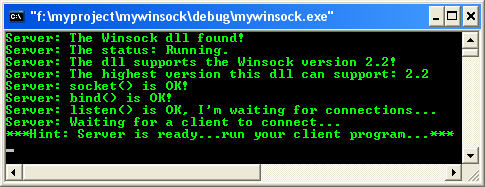
Figure 3
We can verify the connection listening and waiting using netstat command on Windows console as shown below. Make sure you do not terminate the previous program.

Figure 4
The following is another example demonstrates the use of the accept() function. Press the Ctrl + C to terminate the server program.
Another Listening Socket Program Example (socket(), bind(), listen() and accept())
#include <stdio.h>
#include <winsock2.h>
int main()
{
// Initialize Winsock.
WSADATA wsaData;
int iResult = WSAStartup(MAKEWORD(2, 2), &wsaData);
if (iResult != NO_ERROR)
printf("Server: Error at WSAStartup().\n");
else
printf("Server: WSAStartup() is OK.\n");
// Create a SOCKET for listening for
// incoming connection requests.
SOCKET ListenSocket;
ListenSocket = socket(AF_INET, SOCK_STREAM, IPPROTO_TCP);
if (ListenSocket == INVALID_SOCKET)
{
printf("Server: Error at socket(): %ld\n", WSAGetLastError());
WSACleanup();
return 0;
}
else
printf("Server: socket() is OK.\n");
// The sockaddr_in structure specifies the address family,
// IP address, and port for the socket that is being bound.
sockaddr_in service;
service.sin_family = AF_INET;
service.sin_addr.s_addr = inet_addr("127.0.0.1");
service.sin_port = htons(55555);
if (bind(ListenSocket, (SOCKADDR*) &service, sizeof(service)) == SOCKET_ERROR)
{
printf("Server: bind() failed.\n");
closesocket(ListenSocket);
return 0;
}
else
printf("Server: bind() is OK.\n");
// Listen for incoming connection requests on the created socket
if (listen(ListenSocket, 10) == SOCKET_ERROR)
printf("Server: Error listening on socket.\n");
else
printf("Server: listen() is OK.\n");
// Create a SOCKET for accepting incoming requests.
SOCKET AcceptSocket;
printf("Server: Waiting for client to connect...\n");
// Accept the connection if any...
while(1)
{
AcceptSocket = SOCKET_ERROR;
while(AcceptSocket == SOCKET_ERROR)
{
AcceptSocket = accept(ListenSocket, NULL, NULL);
}
printf("Server: accept() is OK.\n");
printf("Server: Client connected...ready for communication.\n");
ListenSocket = AcceptSocket;
break;
}
WSACleanup();
return 0;
}
Sample output:
---------------------------------------------------------------------------------------

Figure 5
Now we can test our client-server communication by running both, the server and the client programs. In this example we test both programs on the same computer. You can try testing them on the network computer or Internet domain by changing the IP address (you can use hostname as well by adding some codes such as gethostname() etc.). Create a new project for the client program.
Client Socket Program Example
// Microsoft Development Environment 2003 - Version 7.1.3088
// Copyright (r) 1987-2002 Microsoft Corporation. All Right Reserved
// Microsoft .NET Framework 1.1 - Version 1.1.4322
// Copyright (r) 1998-2002 Microsoft Corporation. All Right Reserved
//
// Run on Windows XP Pro machine, version 2002, SP 2
//
// <windows.h> already included
// WINVER = 0x0501 for Xp already defined in windows.h
// A sample of client program
#include <stdio.h>
#include <winsock2.h>
int main()
{
// Initialize Winsock.
WSADATA wsaData;
int iResult = WSAStartup(MAKEWORD(2,2), &wsaData);
if (iResult != NO_ERROR)
printf("Client: Error at WSAStartup().\n");
else
printf("Client: WSAStartup() is OK.\n");
// Create a socket.
SOCKET m_socket;
m_socket = socket(AF_INET, SOCK_STREAM, IPPROTO_TCP);
if (m_socket == INVALID_SOCKET)
{
printf("Client: socket() - Error at socket(): %ld\n", WSAGetLastError());
WSACleanup();
return 0;
}
else
printf("Client: socket() is OK.\n");
// Connect to a server.
sockaddr_in clientService;
clientService.sin_family = AF_INET;
clientService.sin_addr.s_addr = inet_addr("127.0.0.1");
clientService.sin_port = htons(55555);
if (connect(m_socket, (SOCKADDR*)&clientService, sizeof(clientService)) == SOCKET_ERROR)
{
printf("Client: connect() - Failed to connect.\n");
WSACleanup();
return 0;
}
// Send and receive data.
int bytesSent;
int bytesRecv = SOCKET_ERROR;
// Be careful with the array bound, provide some checking mechanism
char sendbuf[200] = "Client: Sending some test string to server...";
char recvbuf[200] = "";
bytesSent = send(m_socket, sendbuf, strlen(sendbuf), 0);
printf("Client: send() - Bytes Sent: %ld\n", bytesSent);
while(bytesRecv == SOCKET_ERROR)
{
bytesRecv = recv(m_socket, recvbuf, 32, 0);
if (bytesRecv == 0 || bytesRecv == WSAECONNRESET)
{
printf("Client: Connection Closed.\n");
break;
}
else
printf("Client: recv() is OK.\n");
if (bytesRecv < 0)
return 0;
else
printf("Client: Bytes received - %ld.\n", bytesRecv);
}
return 0;
}
When we just run the client program, the following is the output.
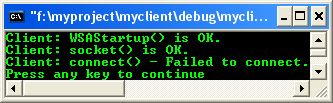
Figure 6
Testing The Server and Client Programs
Next, run the previous server program and then run the client program. The Windows console outputs for the server and the client are shown below. In this example the server just accepts the connection from client and do not read the client’s sent string (data).
Server console output sample:
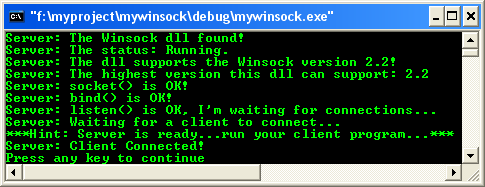
Figure 7
Client console output sample: The error code 10054 is WSAECONNRESET- “An existing connection was forcibly closed by the remote host”. That is OK for the error at this stage because the server program does not ready yet to read (and write) the sent data (there is no data reading part on the server).

Figure 8
Further reading and digging:
-
Linux Sockets: Story and program examples.
-
A complete info on Windows socket reference from MSDN which include managed and unmanaged API doc.
-
Structure, enum, union and typedef story can be found struct, enum, union & typedef tutorial.
-
For Multi bytes, Unicode characters and Localization please refer to Multibyte, Unicode and wide characters (Story) and Win32 Windows & Users tutorial (Implementation).
-
Windows data type information is Win32 - Windows data types.
-
Check the best selling C / C++ and Windows books at Amazon.com.
Tenouk C & C++ |< Winsock Prog Example 2 | Main | Winsock Prog. Example 4 >| Site Index | Download | Linux Socket | Winsock in .NET