|< Windows Access Control Programming 9 | Main | Windows Access Control Programming 11 >| Site Index | Download |
MODULE J
WINDOWS OS SECURITY
::ACCESS CONTROL::
PART 10 - EXAMPLES
What are in this Module?
-
Creating a DACL from a scratch program example
-
Creating DACL and SACL program example: Privilege
|
| My Training Period: xx hours. This is continuation from Windows Access Control Programming 9. Before you begin, read some instruction here.
Before you begin, some notes for Windows XP:
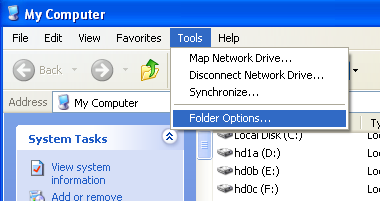
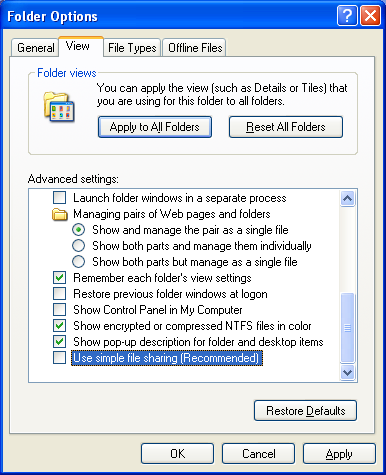
For the default setting of the Win XP installation, to view the Security tab of the Windows object you have to disable the "Use simple file sharing" in the folder options setting as shown in the following figures.
Launch the Windows Explorer → Click the Tools menu → Select the Folder Options…
Figure 1. Then, click the View tab and uncheck the "Use simple file sharing (Recommended)" check box. Click the OK button.
Figure 2.
|
Creating a DACL from a scratch
The following example shows how to properly construct a DACL during the Windows’s object creation. The example contains a function, CreateMyDACL(), that uses the security descriptor definition language (sddl) to define the granted and denied access control in a DACL and then set the access control on the newly created directory. To provide different access for your application's objects, modify the CreateMyDACL() function as needed. In the example:
-
The main() function passes an address of a SECURITY_ATTRIBUTES structure to the CreateMyDACL() function.
-
The CreateMyDACL() function uses SDDL strings to:
- Deny all access to built-in Administrators group.
- Allow read/write/execute access to authenticated users.
- Allow full control to anonymous.
- Allow full control to built-in guest.
- The CreateMyDACL() function calls the ConvertStringSecurityDescriptorToSecurityDescriptor() function to convert the SDDL strings to a security descriptor. The security descriptor is pointed to by the lpSecurityDescriptor member of the SECURITY_ATTRIBUTES structure. CreateMyDACL() sends the return value from ConvertStringSecurityDescriptorToSecurityDescriptor() to the main function.
- The main() function uses the updated SECURITY_ATTRIBUTES structure to specify the DACL for a new folder that is created by the CreateDirectory() function.
- When the main() function is finished using the SECURITY_ATTRIBUTES structure, the main() function frees the memory allocated for the lpSecurityDescriptor member by calling the LocalFree() function.
To successfully compile SDDL functions such as ConvertStringSecurityDescriptorToSecurityDescriptor(), you must define the _WIN32_WINNT constant as 0x0500 or greater (please refer to _WIN32_WINNT constant for more detail).
#define _WIN32_WINNT 0x0500
#include <windows.h>
#include <sddl.h>
#include <stdio.h>
// Prototype
BOOL CreateMyDACL(SECURITY_ATTRIBUTES *);
TCHAR DirName[20] = "C:\\MyDirectory";
int main()
{
SECURITY_ATTRIBUTES sa;
// The SECURITY_ATTRIBUTE structure size
sa.nLength = sizeof(SECURITY_ATTRIBUTES);
// The return handle not inherited
sa.bInheritHandle = FALSE;
// Call CreateMyDACL() function to set the DACL. The DACL is set in the SECURITY_ATTRIBUTES lpSecurityDescriptor member.
if(!CreateMyDACL(&sa))
{
//Error encountered; generate message and just exit.
printf("Failed CreateMyDACL()\n");
exit(1);
}
else
printf("CreateMyDACL() is OK\n");
// Use the updated SECURITY_ATTRIBUTES to specify security attributes for securable objects.
// This example uses security attributes during creation of a new directory.
if(CreateDirectory(DirName, &sa) == 0)
{
// Error encountered; generate message and exit.
printf("CreateDirectory() failed lol!\n");
exit(1);
}
else
printf("CreateDirectory() is OK.\n");
// Release the memory allocated for the SECURITY_DESCRIPTOR.
if(LocalFree(sa.lpSecurityDescriptor) != NULL)
{
// Error encountered; generate message and exit.
printf("LocalFree() failed.\n");
exit(1);
}
else
printf("LocalFree() is OK.\n");
return 0;
}
// CreateMyDACL.
// Create a security descriptor that contains the DACL you want.
// This function uses SDDL to make Deny and Allow ACEs.
//
// Parameter:
// SECURITY_ATTRIBUTES * pSA
// Pointer to a SECURITY_ATTRIBUTES structure. It is the caller's
// responsibility to properly initialize the structure and to free the structure's lpSecurityDescriptor member when the caller has
// finished using it. To free the structure's lpSecurityDescriptor member, call the LocalFree function.
//
// Return value:
// FALSE if the address to the structure is NULL. Otherwise, this function returns the value from the
// ConvertStringSecurityDescriptorToSecurityDescriptor function.
BOOL CreateMyDACL(SECURITY_ATTRIBUTES * pSA)
{
// Define the SDDL for the DACL. This example sets the following access:
// Deny all for built-in Administrators group Allow read/write/execute to Authenticated users
// Allow all to anonymous logon Allow all to built-in guests. This is not a proper setting, how come you deny the Administrator lol!!!
// But this example just for fun...
TCHAR * szSD = TEXT("D:") // Discretionary ACL
TEXT("(D;OICI;GA;;;BA)") // Deny all for built-in Administrators group :o)
TEXT("(D;OICI;GRGWGX;;;AU)") // Allow read/write/execute to Authenticated users
TEXT("(A;OICI;GA;;;AN)") // Allow all to anonymous logon
TEXT("(A;OICI;GA;;;BG)"); // Allow all to built-in guests
if(pSA == NULL)
return FALSE;
PULONG nSize = 0;
// Do some verification
printf("The ACE strings: %s \n", szSD);
printf("The converted string is at: %p \n", &(pSA->lpSecurityDescriptor));
// Convert the string to the security descriptor binary and return
return ConvertStringSecurityDescriptorToSecurityDescriptor(
szSD, // The ACE strings
SDDL_REVISION_1, // Standard revision level
&(pSA->lpSecurityDescriptor), // Pointer to the converted security descriptor
nSize); // The size in byte the converted security descriptor
}
A sample output:
The ACE strings: D:(D;OICI;GA;;;BA)(D;OICI;GRGWGX;;;AU)(A;OICI;GA;;;AN)(A;OICI;GA;;;BG)
The converted string is at: 0012FED0
CreateMyDACL() is OK
CreateDirectory() is OK
LocalFree() is OK
Press any key to continue
Verify through the MyDirectory property pages.
 |
Figure 3.
Try deleting the MyDirectory directory. Because the DENY take precedence and the ACEs is based on the “First found first served and forget the rest”, you cannot delete the directory in this case. However, in this case the computer used to run this program is logged by user Mike, who is a member of the Administrators group. So he still has permission to modify the Allow, Deny Access permission. Tick the Allow tick box under the Full Control of Permissions for Administrators to enable the MyDirectory deletion. It looks funny isn’t it? You can’t delete but you can change the permission so that you can delete! Then click the Advanced button. The following Advanced Security Settings is shown. It shows the permission entries in more detail.
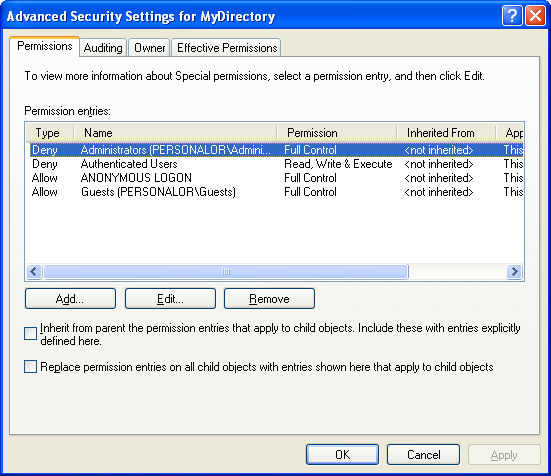
Figure 4.
Creating DACL and SACL: Privilege
The following program example try to create an ACL that contains both the DACL and SACL For the SACL we need to enable the SeSecurityPrivilege privilege by using the AdjustTokenPrivileges().
//Creating an ACL-DACL & SACL, need the required privilege for SACL
//The following #define must be the 1st statement
#define _WIN32_WINNT 0x0500
#include <windows.h>
#include <sddl.h>
#include <stdio.h>
//******************* Enabling the privilege *******************
BOOL SetPrivilege(
HANDLE hToken, // access token handle
LPCTSTR lpszPrivilege, // name of privilege to enable/disable
BOOL bEnablePrivilege // to enable (or disable privilege)
)
{
TOKEN_PRIVILEGES tp;
LUID luid;
if(!LookupPrivilegeValue(
NULL, // lookup privilege on local system
lpszPrivilege, // privilege to lookup
&luid)) // receives LUID of privilege
{
printf("LookupPrivilegeValue() error: %u\n", GetLastError());
return FALSE;
}
else
printf("LookupPrivilegeValue() is OK\n");
tp.PrivilegeCount = 1;
tp.Privileges[0].Luid = luid;
// Don't forget to disable the privilege after you enable them,
if(bEnablePrivilege)
{
tp.Privileges[0].Attributes = SE_PRIVILEGE_ENABLED;
// Just a verification here...
printf("tp.Privileges[0].Attributes = SE_PRIVILEGE_ENABLED\n");
}
else
{
tp.Privileges[0].Attributes = 0;
printf("tp.Privileges[0].Attributes = 0\n");
}
// Enable the privilege (or disable all privileges).
if(!AdjustTokenPrivileges(
hToken,
FALSE, // If TRUE, function disables all privileges, if FALSE the function modifies privileges based on the tp
&tp,
sizeof(TOKEN_PRIVILEGES),
(PTOKEN_PRIVILEGES) NULL,
(PDWORD) NULL))
{
printf("AdjustTokenPrivileges() error: %u\n", GetLastError());
return FALSE;
}
else
printf("AdjustTokenPrivileges() is OK, last error if any: %u\n", GetLastError());
return TRUE;
}
//********************** Create the ACL *****************
// CreateMyACL() routine.
// The return value is FALSE if the address to the structure is NULL.
// Otherwise, this function returns the value from the
// ConvertStringSecurityDescriptorToSecurityDescriptor function.
BOOL CreateMyACL(SECURITY_ATTRIBUTES * pSA)
{
// Define the SDDL for the DACL & SACL.
TCHAR * szSD = TEXT("D:") // DACL
TEXT("(D;OICI;GRLOFR;;;AN)") // Deny Anonymous some rights
TEXT("(A;;RPWPCCDCLCRCWOWDSDSW;;;SY)") // Allow System some rights
TEXT("(A;OICI;GACCFA;;;LA)") // Allow Built-in Administrator some rights
TEXT("(A;OICI;GACCFA;;;S-1-5-11)") // Allow Authenticated user some rights
TEXT("S:") // SACL
TEXT("(OU;SAFA;RPWPCCDCLCRCWOWDSDSW;;;S-1-5-18)") // Object audit success/fail, Local systems, using a SID string
TEXT("(OU;SAFA;GACCFA;;;AU)") // Object audit success/fail, Authenticated users
TEXT("(OU;SAFA;GAWPFW;;;LA)"); // Object audit success/fail, Built-in Administrator
// Verify
if(pSA == NULL)
return FALSE;
// Do some verification
printf("The ACE strings: %s \n", szSD);
// Convert to security descriptor binary and return
return ConvertStringSecurityDescriptorToSecurityDescriptor(
szSD, // The ACE strings
SDDL_REVISION_1, // Standard revision level
&(pSA->lpSecurityDescriptor), // Pointer to the converted security descriptor
NULL); // The size in byte the converted security descriptor
}
//******************* main *******************
int main()
{
TCHAR DirName[30] = "H:\\MyTestDir";
SECURITY_ATTRIBUTES sa;
//******************* Enable the privilege first *******************
LPCTSTR lpszPrivilege = "SeSecurityPrivilege";
// Change this BOOL value to set/unset the SE_PRIVILEGE_ENABLED attribute
BOOL bEnablePrivilege = TRUE;
// Handle to the running process that is this (running) program
HANDLE hToken;
//*************** Get the handle to the process ****************
// Open a handle to the access token for the calling process. That is this running program
if(!OpenProcessToken(GetCurrentProcess(), TOKEN_ADJUST_PRIVILEGES, &hToken))
{
printf("OpenProcessToken() error %u\n", GetLastError());
return FALSE;
}
else
printf("OpenProcessToken() is OK\n");
//********************* Enabling (Disabling) privilege ***************************
// Call the user defined SetPrivilege() function to enable privilege
BOOL test = SetPrivilege(hToken, lpszPrivilege, bEnablePrivilege);
// Verify
printf("The SetPrivilage() return value: %d\n\n", test);
//*********************** End enabling privilege *********************
// The SECURITY_ATTRIBUTE structure size
sa.nLength = sizeof(SECURITY_ATTRIBUTES);
// The return handle not inherited
sa.bInheritHandle = FALSE;
// Call CreateMyACL() function to set the DACL and SACL, is set in the SECURITY_ATTRIBUTES lpSecurityDescriptor member.
if(!CreateMyACL(&sa))
{
// Error encountered; generate message and just exit.
printf("CreateMyACL() is not OK, error %u.\n", GetLastError());
exit(1);
}
else
printf("CreateMyACL() is OK.\n");
// Use the updated SECURITY_ATTRIBUTES to specify security attributes for securable objects.
// This example uses security attributes during creation of a new directory.
if(CreateDirectory(DirName, &sa) == 0)
{
// Error encountered; generate message and just exit.
printf("CreateDirectory() is not OK lol!\n");
exit(1);
}
else
printf("CreateDirectory() is OK.\n\n");
//***************** Disable the privilege ********************
bEnablePrivilege = FALSE;
SetPrivilege(hToken, lpszPrivilege, bEnablePrivilege);
// Verify
printf("The SetPrivilage() return value: %d\n\n", test);
//****************** Clean up ********************************
// Release the memory allocated for the SECURITY_DESCRIPTOR.
// This means release back the used memory to the system
if(LocalFree(sa.lpSecurityDescriptor) != NULL)
{
// Error encountered; generate message and just exit.
printf("LocalFree() is not OK.\n");
exit(1);
}
else
printf("LocalFree() is OK.\n");
return 0;
}
A sample output:
OpenProcessToken() is OK
LookupPrivilegeValue() is OK
tp.Privileges[0].Attributes = SE_PRIVILEGE_ENABLED
AdjustTokenPrivileges() is OK, last error if any: 0
The SetPrivilage() return value: 1
The ACE strings: D:(D;OICI;GRLOFR;;;AN)(A;;RPWPCCDCLCRCWOWDSDSW;;;SY)(A;OICI;GACCFA;;;LA)(A;OICI;GACCFA;;
;S-1-5-11)S:(OU;SAFA;RPWPCCDCLCRCWOWDSDSW;;;S-1-5-18)(OU;SAFA;GACCFA;;;AU)(OU;SAFA;GAWPFW;;;LA)
CreateMyACL() is OK.
CreateDirectory() is OK.
LookupPrivilegeValue() is OK
tp.Privileges[0].Attributes = 0
AdjustTokenPrivileges() is OK, last error if any: 0
The SetPrivilage() return value: 1
LocalFree() is OK.
Press any key to continue
Then, let verify through the MyTestDir property pages.
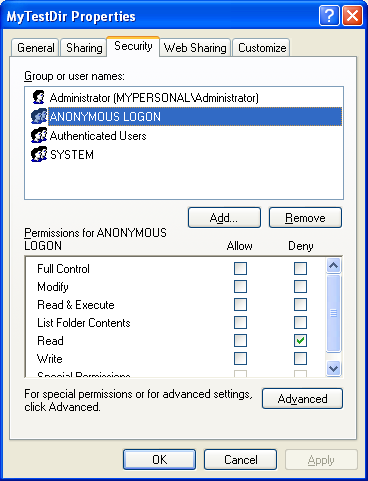
Figure 5.

Figure 6.
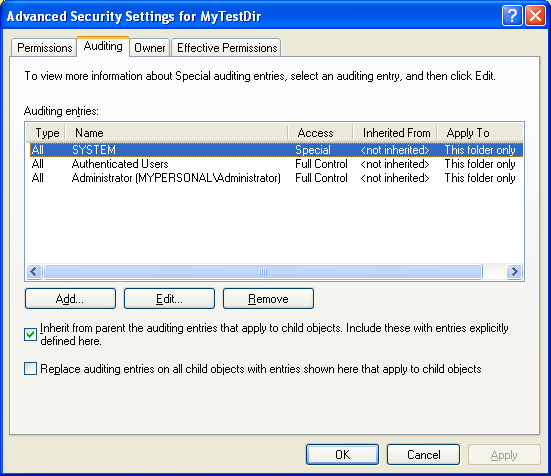
Figure 7.
Further reading and digging:
-
Structure, enum, union and typedef story can be found C/C++ struct, enum, union & typedef.
-
Notation used in MSDN is Hungarian Notation instead of CamelCase and is discussed Windows programming notations.
-
Check the best selling C, C++ and Windows books at Amazon.com.
Microsoft C references, online MSDN.
Microsoft Visual C++, online MSDN.
ReactOS - Windows binary compatible OS - C/C++ source code repository, Doxygen.
Linux Access Control Lists (ACL) info can be found atAccess Control Lists.
-
For Multibytes, Unicode characters and Localization please refer to Locale, wide characters & Unicode (Story) and Windows users & groups programming tutorials (Implementation).
-
Windows data type information is in Windows data types used in Win32 programming.
|< Windows Access Control Programming 9 | Main | Windows Access Control Programming 11 >| Site Index | Download |
C & C++ Programming Tutorial | C Programming Practice