|< Windows Access Control Programming 10 | Main | Windows Access Control Programming 12 >|Site Index |Download |
MODULE J1
WINDOWS OS SECURITY
::ACCESS CONTROL::
PART 11 - EXAMPLES
What are in this Module?
-
Empty DACL program example.
-
NULL DACL program example.
-
Modifying existing DACLs of an Object program example.
My Training Period: xx hours. This is continuation fromWindows Access Control Programming 10. Before you begin, read someinstruction here.
Before you begin, some notes for Windows XP
For the default setting of the Win XP installation, to view the Security tab of the Windows object you have to disable the"Use simple file sharing" in the folder options setting as shown in the following figures.
Launch the Windows Explorer→ Click the Tools menu → Select the Folder Options…
An Empty DACL
By using the previous program example, in the following program example we try to demonstrate creating an empty DACL.
// Using the same program, but in this program we try to demonstrate creating an empty DACL #define _WIN32_WINNT 0x0500 #include <windows.h> #include <sddl.h> #include <stdio.h>
// Prototype BOOL CreateMyDACL(SECURITY_ATTRIBUTES *);
TCHAR DirName[20] = "C:\\MyDirectory";
int main() { SECURITY_ATTRIBUTES sa; // The SECURITY_ATTRIBUTE structure size sa.nLength =sizeof(SECURITY_ATTRIBUTES); // The return handle not inherited sa.bInheritHandle = FALSE; // Call CreateMyDACL() function to set the DACL. The DACL // is set in the SECURITY_ATTRIBUTES // lpSecurityDescriptor member. |
if(!CreateMyDACL(&sa))
{
//Error encountered; generate message and just exit.
printf("Failed CreateMyDACL()\n");
exit(1);
}
else
printf("CreateMyDACL() is OK\n");
// Use the updated SECURITY_ATTRIBUTES to specify
// security attributes for securable objects.
// This example uses security attributes during
// creation of a new directory.
if(CreateDirectory(DirName, &sa) == 0)
{
// If error encountered; generate message and exit.
printf("CreateDirectory() for %s failed lol!\n", DirName);
exit(1);
}
else
printf("CreateDirectory() for %s is OK.\n", DirName);
// Release the memory allocated for the SECURITY_DESCRIPTOR.
if(LocalFree(sa.lpSecurityDescriptor) != NULL)
{
// Error encountered; generate message and exit.
printf("LocalFree() failed.\n");
exit(1);
}
else
printf("LocalFree() is OK.\n");
return 0;
}
// Create a security descriptor that contains the DACL you want.
BOOL CreateMyDACL(SECURITY_ATTRIBUTES * pSA)
{
TCHAR * szSD =TEXT("D:"); // An empty DACL
if(pSA == NULL)
return FALSE;
PULONG nSize = 0;
// Do some verification
printf("The ACE strings: %s \n", szSD);
printf("The converted string is at: %p \n", &(pSA->lpSecurityDescriptor));
// Convert the string to the security descriptor binary and return
return ConvertStringSecurityDescriptorToSecurityDescriptor(
szSD, // The ACE strings
SDDL_REVISION_1, // Standard revision level
&(pSA->lpSecurityDescriptor), // Pointer to the converted security descriptor
nSize); // The size in byte the converted security descriptor
}
A sample output:
The ACE strings: D:
The converted string is at: 0012FED0
CreateMyDACL() is OK
CreateDirectory() for C:\MyDirectory is OK.
LocalFree() is OK.
Press any key to continue
In this case, when userMike (a member of an Administrators group) tries to open (or delete) theMyDirectory directory, the following message displayed.

Figure 8.
When we verify through theMyDirectory’s property page, there is no ACE at all. Do not create an empty DACL. By the way, Administrator still has the permission to modify the permission or he/she can take the ownership of this directory object.

Figure 9.
NULL DACL
In the following program example we will demonstrate how to create a NULL DACL.
// Using the same program, but in this program we try to demonstrate creating a NULL DACL
#define _WIN32_WINNT 0x0500
#include <windows.h>
#include <sddl.h>
#include <stdio.h>
// Prototype
BOOL CreateMyDACL(SECURITY_ATTRIBUTES *);
TCHAR DirName[20] = "C:\\MyDirectory";
int main()
{
SECURITY_ATTRIBUTES sa;
// The SECURITY_ATTRIBUTE structure size
sa.nLength =sizeof(SECURITY_ATTRIBUTES);
// The return handle not inherited
sa.bInheritHandle = FALSE;
// Call CreateMyDACL() function to set the DACL. The DACL
// is set in the SECURITY_ATTRIBUTES
// lpSecurityDescriptor member.
if(!CreateMyDACL(&sa))
{
//Error encountered; generate message and just exit.
printf("Failed CreateMyDACL()\n");
exit(1);
}
else
printf("CreateMyDACL() is OK\n");
// Here we just set a NULL DACL lol!
if(CreateDirectory(DirName, NULL) == 0)
{
// Error encountered; generate message and exit.
printf("CreateDirectory() for %s failed lol!\n", DirName);
exit(1);
}
else
printf("CreateDirectory() for %s is OK.\n", DirName);
// Release the memory allocated for the SECURITY_DESCRIPTOR.
if(LocalFree(sa.lpSecurityDescriptor) != NULL)
{
// Error encountered; generate message and exit.
printf("LocalFree() failed.\n");
exit(1);
}
else
printf("LocalFree() is OK.\n");
return 0;
}
// Create a security descriptor that contains the DACL you want.
BOOL CreateMyDACL(SECURITY_ATTRIBUTES * pSA)
{
TCHAR * szSD = TEXT("D:") // Discretionary ACL
TEXT("(D;OICI;GA;;;BA)") // Deny all for built-in Administrators group :o)
TEXT("(D;OICI;GRGWGX;;;AU)")// Allow read/write/execute to Authenticated users
TEXT("(A;OICI;GA;;;AN)") // Allow all to anonymous logon
TEXT("(A;OICI;GA;;;BG)"); // Allow all to built-in guests
if(pSA == NULL)
return FALSE;
PULONG nSize = 0;
// Do some verification
printf("The ACE strings: %s \n", szSD);
printf("The converted string is at: %p \n", &(pSA->lpSecurityDescriptor));
// Convert the string to the security descriptor binary and return
return ConvertStringSecurityDescriptorToSecurityDescriptor(
szSD, // The ACE strings
SDDL_REVISION_1, // Standard revision level
&(pSA->lpSecurityDescriptor), // Pointer to the converted security descriptor
nSize); // The size in byte the converted security descriptor
}
A sample output:
The ACE strings: D:(D;OICI;GA;;;BA)(D;OICI;GRGWGX;;;AU)(A;OICI;GA;;;AN)(A;OICI;GA;;;BG)
The converted string is at: 0012FED0
CreateMyDACL() is OK
CreateDirectory() for C:\MyDirectory is OK.
LocalFree() is OK.
Press any key to continue
When we verify through theMyDirectory’s property page, Everyone has a full control permission! It is very dangerous.

Figure 10.
Modifying existing DACLs of an Object
The following example adds an ACE to the DACL of an object. The AccessMode parameter, a member of the EXPLICIT_ACCESS structure determines the type of new ACE and how the new ACE is combined with any existing ACEs for the specified trustee. You can use theGRANT_ACCESS,SET_ACCESS,DENY_ACCESS, orREVOKE_ACCESS flags in the AccessMode parameter. Similar code can be used to work with a SACL. SpecifySACL_SECURITY_INFORMATION in the GetNamedSecurityInfo() and SetNamedSecurityInfo() functions to get and set the SACL for the object. Use theSET_AUDIT_SUCCESS,SET_AUDIT_FAILURE, and REVOKE_ACCESS flags in the AccessMode parameter. This code example can be used to add an object-specific ACE to the DACL of a directory service object. To specify the GUIDs in an object-specific ACE, set the TrusteeForm parameter to TRUSTEE_IS_OBJECTS_AND_NAME or TRUSTEE_IS_OBJECTS_AND_SID and set the pszTrustee parameter to be a pointer to anOBJECTS_AND_NAME orOBJECTS_AND_SID structure. This example uses the GetNamedSecurityInfo() function to get the existing DACL. Then it fills anEXPLICIT_ACCESS structure with information about an ACE and uses the SetEntriesInAcl() function to merge the new ACE with any existing ACEs in the DACL. Finally, the example calls the SetNamedSecurityInfo() function to attach the new DACL to the security descriptor of the object. The following figures are theTestdir directory property pages before the program been run.
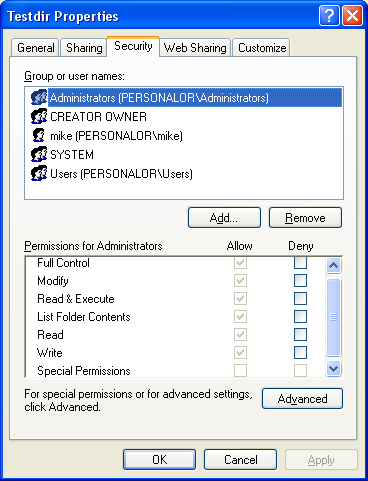 |
Figure 11.

Figure 12.
// Modifying DACL of an object. In ACL there are ACEs...
// So add or remove ACEs lol. Here we are going to add deny standard right access for Administrators group
// This Win XP machine is logged in by user named Mike who is a member of Administrators group...
#include <windows.h>
#include <accctrl.h>
#include <aclapi.h>
#include <stdio.h>
// Clean up the buffer function
void Cleanup(PSECURITY_DESCRIPTOR pSD, PACL pNewDACL)
{
if(pSD != NULL)
LocalFree((HLOCAL) pSD);
else
printf("pSD cleaning is OK\n");
if(pNewDACL != NULL)
LocalFree((HLOCAL) pNewDACL);
else
printf("pNewDACL cleaning is OK\n");
}
int main()
{
// name of object, here we will add ACE for a directory
// the directory is already created...
LPTSTR pszObjName = "C:\\Testdir";
// type of object, file or directory. Here we test on directory
SE_OBJECT_TYPE ObjectType = SE_FILE_OBJECT;
// access mask for new ACE equal to 0x001F0000 flags (bit 0 till 15)
DWORD dwAccessRights = STANDARD_RIGHTS_ALL;
// type of ACE, Access denied ACE
ACCESS_MODE AccessMode = DENY_ACCESS;
// inheritance flags for new the ACE. The OBJECT_INHERIT_ACE and CONTAINER_INHERIT_ACE flags are
// not propagated to an inherited ACE.
DWORD dwInheritance = NO_PROPAGATE_INHERIT_ACE;
// format of trustee structure, the trustee is name
TRUSTEE_FORM TrusteeForm = TRUSTEE_IS_NAME;
// trustee for new ACE. This just for fun...When you run once, only one
// element will take effect. By changing the first array element we
// can change to other trustee and re run the program....
// Other than Mike, they are all well known trustees
char pszTrustee[4][15] = {"Administrators", "System", "Users", "Mike"};
// Result
DWORD dwRes = 0;
// Existing and new DACL pointers...
PACL pOldDACL = NULL, pNewDACL = NULL;
// Security descriptor
PSECURITY_DESCRIPTOR pSD = NULL;
// EXPLICIT_ACCESS structure. For more than one entries, declare an array of the EXPLICIT_ACCESS structure
EXPLICIT_ACCESS ea;
// Verify the object name validity
if(pszObjName == NULL)
return ERROR_INVALID_PARAMETER;
else
printf("The object name is OK\n");
// Some verification...just for fun...Verify that our new trustee strings is OK
for(int i = 0; i <= 3; i++)
printf("Test pointer #%d: %s\n", i, pszTrustee[i]);
// Get a pointer to the existing DACL.
dwRes = GetNamedSecurityInfo(pszObjName, ObjectType,DACL_SECURITY_INFORMATION, NULL, NULL, &pOldDACL, NULL, &pSD);
// Verify
if(dwRes != ERROR_SUCCESS)
{
printf("GetNamedSecurityInfo() error %u\n", dwRes);
Cleanup(pSD, pNewDACL);
}
else
printf("GetNamedSecurityInfo() is OK\n");
// Initialize an EXPLICIT_ACCESS structure for the new ACE.
// For more entries, declare an array of the EXPLICIT_ACCESS structure
ZeroMemory(&ea, sizeof(EXPLICIT_ACCESS));
ea.grfAccessPermissions = dwAccessRights;
ea.grfAccessMode = AccessMode;
ea.grfInheritance= dwInheritance;
ea.Trustee.TrusteeForm = TrusteeForm;
// Test for Administrators group, a new trustee for the ACE
// For other trustees, you can try changing the array index to 1, 2 and 3 and rerun, see the effect
ea.Trustee.ptstrName = (LPTSTR)(pszTrustee[0]);
// Create a new ACL that merges the new ACE into the existing DACL.
dwRes = SetEntriesInAcl(1, &ea, pOldDACL, &pNewDACL);
// Verify
if(dwRes != ERROR_SUCCESS)
{
printf("SetEntriesInAcl() Error %u\n", dwRes);
Cleanup(pSD, pNewDACL);
}
else
printf("SetEntriesInAcl() is OK\n");
// Attach the new ACL as the object's DACL.
dwRes = SetNamedSecurityInfo(pszObjName, ObjectType, DACL_SECURITY_INFORMATION, NULL, NULL, pNewDACL, NULL);
if(dwRes != ERROR_SUCCESS)
{
printf("SetNamedSecurityInfo() Error %u\n", dwRes);
Cleanup(pSD, pNewDACL);
}
printf("SetNamedSecurityInfo() is OK\n");
return 0;
}
A sample output:
The object name is OK
Test pointer #0: Administrators
Test pointer #1: System
Test pointer #2: Users
Test pointer #3: Mike
GetNamedSecurityInfo() is OK
SetEntriesInAcl() is OK
SetNamedSecurityInfo() is OK
Press any key to continue
Then verify through theTestdir directory property pages again.
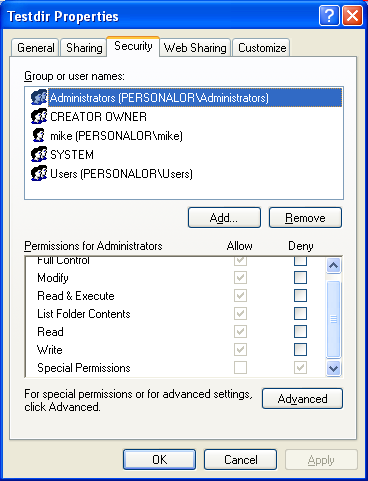
Figure 13.
Under thePermission for Administrators group, the Special Permissions is ticked for the Deny permission. Keep in mind that Deny overwrites the Allow permission. The following figure also confirmed that our new ACE for the Deny is not inherited.

Figure 14.
Remember that, DENY overwrites ALLOW permission. For this case because Mike is a member of the Administrators group, then he cannot delete or open theTestdir directory. We have to log off and login again as otherAdministrators group user or create another user that is a member of Administrators or take the object’s ownership or just edit the permission entries. Well, it funny isn’t it? When we try to delete the folder, the following message was displayed.

Figure 15.
It is same when we want to open the folder, it is not accessible. So, what ever it is, please don’t mess up your machine. The following program example tries to modify the SACL. Figures shown are theTestdir3 property pages before the program is run.

Figure 16.

Figure 17.
// Modifying ACL of an object. Here we are going to add Allow standard right access and SACL.
// This Win XP machine is logged in by user named Mike who is a member of Administrators group...
// To access a SACL using the GetNamedSecurityInfo() or SetNamedSecurityInfo() functions, we have to enable
// the SE_SECURITY_NAME privilege.
#include <windows.h>
#include <accctrl.h>
#include <aclapi.h>
#include <stdio.h>
// Clean up routine
void Cleanup(PSECURITY_DESCRIPTOR pSS, PACL pNewSACL)
{
if(pSS != NULL)
LocalFree((HLOCAL) pSS);
else
printf("pSS cleaning is OK\n");
if(pNewSACL != NULL)
LocalFree((HLOCAL) pNewSACL);
else
printf("pNewSACL cleaning is OK\n");
}
int main()
{
// name of object, here we will add an ACE for a directory
LPTSTR pszObjName = "C:\\Testdir2\\Testdir3";
// type of object, file or directory, a directory
SE_OBJECT_TYPE ObjectType = SE_FILE_OBJECT;
// access mask for new ACE equal to 0X11000000 - GENERIC_ALL and ACCESS_SYSTEM_SECURITY
DWORD dwAccessRights = 0X11000000;
// type of ACE, set audit for success
ACCESS_MODE AccessMode = SET_AUDIT_SUCCESS;
// inheritance flags for new ACE. The OBJECT_INHERIT_ACE and CONTAINER_INHERIT_ACE flags are
// not propagated to an inherited ACE.
DWORD dwInheritance = NO_PROPAGATE_INHERIT_ACE;
// format of trustee structure, the trustee is name
TRUSTEE_FORM TrusteeForm = TRUSTEE_IS_NAME;
// the new trustee for the ACE is set to testuser, a normal user
LPTSTR pszTrustee = "testuser";
// Result
DWORD dwRes = 0;
// Existing and new SACL pointers...
PACL pOldSACL = NULL, pNewSACL = NULL;
// Security descriptor
PSECURITY_DESCRIPTOR pSS = NULL;
// EXPLICIT_ACCESS structure
EXPLICIT_ACCESS ea;
// Verify the object name validity
if(pszObjName == NULL)
return ERROR_INVALID_PARAMETER;
else
printf("The object name is OK\n");
//******************************************************
// Get the privilege first!!!
// Privilege routine here
//******************************************************
// Get a pointer to the existing SACL.
dwRes = GetNamedSecurityInfo(pszObjName, ObjectType,SACL_SECURITY_INFORMATION, NULL, NULL, NULL, &pOldSACL, &pSS);
// Verify
if(dwRes != ERROR_SUCCESS)
{
printf("GetNamedSecurityInfo() error %u\n", dwRes);
Cleanup(pSS, pNewSACL);
}
else
printf("GetNamedSecurityInfo() is OK\n");
// Initialize an EXPLICIT_ACCESS structure for the new ACE. If more entries needed, you can create an array
// of the ea variable of the EXPLICIT_ACCESS
ZeroMemory(&ea, sizeof(EXPLICIT_ACCESS));
ea.grfAccessPermissions = dwAccessRights;
ea.grfAccessMode = AccessMode;
ea.grfInheritance= dwInheritance;
ea.Trustee.TrusteeForm = TrusteeForm;
// Other structure elements...
// ea.Trustee.TrusteeType = TRUSTEE_IS_GROUP;
// ea.Trustee.TrusteeType = TRUSTEE_IS_USER;
// The trustee is testuser
ea.Trustee.ptstrName = pszTrustee;
// Create a new ACL that merges the new ACE into the existing ACL.
dwRes = SetEntriesInAcl(1, &ea, pOldSACL, &pNewSACL);
if(dwRes != ERROR_SUCCESS)
{
printf("SetEntriesInAcl() error %u\n", dwRes);
Cleanup(pSS, pNewSACL);
}
else
printf("SetEntriesInAcl() is OK\n");
// Attach the new ACL as the object's SACL.
dwRes = SetNamedSecurityInfo(pszObjName, ObjectType, SACL_SECURITY_INFORMATION, NULL, NULL, NULL, pNewSACL);
if(dwRes != ERROR_SUCCESS)
{
printf("SetNamedSecurityInfo() error %u\n", dwRes);
Cleanup(pSS, pNewSACL);
}
else
printf("SetNamedSecurityInfo() is OK\n");
return 0;
}
A sample output:
The object name is OK
GetNamedSecurityInfo() error 1314
pSS cleaning is OK
pNewSACL cleaning is OK
SetEntriesInAcl() is OK
SetNamedSecurityInfo() error 1314
pSS cleaning is OK
Press any key to continue
1314 - This is an ERROR_PRIVILEGE_NOT_HELD, a required privilege is not held by the client.
From the program output and the Advanced Security Setting for Testdir3 directory property pages as shown below, we failed to add the SACL in the ACE. We need to enable the related and required privilege to set the SACL in the ACE as demonstrated in the previous"Creating the DACL" program example and is left for your assignment.

Figure 18.
-------------------------------Windows Access Control program examples, Part III---------------------------
Further reading and digging:
Windows data type information is inWindows data types used in Win32 programming.
Check the best selling C, C++ and Windows books at Amazon.com.
Microsoft C references, online MSDN.
Microsoft Visual C++, online MSDN.
ReactOS - Windows binary compatible OS - C/C++ source code repository, Doxygen.
Linux Access Control Lists (ACL) info can be found atAccess Control Lists.
For Multi bytes, Unicode characters and Localization please refer to Locale, wide characters & Unicode (Story) and Windows users & groups programming tutorials (Implementation).
Structure, enum, union and typedef story can be foundC/C++ struct, enum, union & typedef.
Notation used in MSDN is Hungarian Notation instead of CamelCase and is discussedWindows programming notations.