|< Windows Access Control Programming 14 | Main | Windows User Accounts & Groups Programming 1 >|Site Index |Download |
MODULE L1
WINDOWS OS SECURITY
::ACCESS CONTROL::
PART 15 - EXAMPLES
What do we have in this Module?
Log on a user to a machine.
Simple Impersonation.
Creating a Security Descriptor from Scratch for a New Object - a Registry key.
Verifying Client Access with ACLs: Not complete.
My Training Period: xx hours. Before you begin, read someinstruction here. This is continuation fromWindows Access Control Programming 14. All the program examples run in the Debug mode, the WinXp machine logged as normal/restricted userMike, who is a member of Administrators group except whenever mentioned. Beware the codes that span more than one line.
Log on a user to a machine
The following program example demonstrates how to log on a user to a machine through program. It uses theLogonUser() function.
// Log a user on to the local computer. This computer is logged on as Mike, user with Administrators group, then // this program try to log on a restricted user named "testuser". // For Win Xp #define _WIN32_WINNT 0x0501 #include <windows.h> #include <stdio.h>
int main() { // "testuser" is restrictive user created in the XP machine that runs this program LPTSTR lpszUsername = "testuser"; // Local account database LPTSTR lpszDomain = "."; LPTSTR lpszPassword = "testuser"; DWORD dwLogonType = LOGON32_LOGON_INTERACTIVE; DWORD dwLogonProvider = LOGON32_PROVIDER_WINNT50; // Some dummy to avoid the NULL pointer of the phToken PVOID myhandle; PHANDLE phToken = (PHANDLE)&myhandle;
if(LogonUser( lpszUsername, // Username lpszDomain, // Domain or server where the Username is reside lpszPassword, // Plaintext password dwLogonType, // Type of logon dwLogonProvider, // The logon provider phToken // Pointer to handle that received the token )) printf("Well, \"%s\" user logged on to this machine successfully!\n", lpszUsername); |
else
{
printf("%s failed to log on to this machine! error %u\n", lpszUsername, GetLastError());
exit(-1);
}
PVOID hToken = (PVOID)phToken;
if(CloseHandle(hToken) != 0)
printf("The handle that received the token has been closed.\n");
else
printf("Something wrong, the handle cannot be closed! error: %u\n", GetLastError());
// Arrgghhh the handle cannot be closed, time for you to solve. The CloseHandle() accept
// HANDLE to an object, but here phToken is a pointer to HANDLE...
return 0;
}
A sample output:
Well, "testuser" user logged on to this machine successfully!
Something wrong, the handle cannot be closed! error: 6
Press any key to continue
Simple Impersonation
The following example shows simple impersonation usingImpersonateLoggedOnUser().
// For Win Xp
#define _WIN32_WINNT 0x0501
#include <windows.h>
#include <stdio.h>
int main()
{
// Handle to token
HANDLE hToken;
// Open a handle to the access token for the calling process that is the currently login access token
if(!OpenProcessToken(GetCurrentProcess(), TOKEN_ALL_ACCESS, &hToken))
{
printf("OpenProcessToken()-Getting the handle to access token failed: %u\n", GetLastError());
}
else
printf("OpenProcessToken()-Getting the handle to access token is OK\n");
// Lets the calling process impersonate the security context of a logged-on user.
if(ImpersonateLoggedOnUser(hToken))
printf("ImpersonateLoggedOnUser() is OK.\n");
else
{
printf("ImpersonateLoggedOnUser() is not OK, error %u.\n", GetLastError());
exit(-1);
}
// Do other tasks
// ...
// Terminates the impersonation of a client.
if(RevertToSelf())
printf("Impersonation is terminated.\n");
// Close the handle
if(CloseHandle(hToken))
printf("Handle to an access token closed.\n");
return 0;
}
A sample output:
OpenProcessToken()-Getting the handle to access token is OK
ImpersonateLoggedOnUser() is OK.
Impersonation is terminated.
Handle to an access token closed.
Press any key to continue
Creating a Security Descriptor from Scratch for a New Object, aRegistry key
The following example creates a security descriptor for a new registry key using the following steps. Similar code can be used to create a security descriptor for other object types.
-
The example fills an array ofEXPLICIT_ACCESS structures with the information for two ACEs. One ACE allows read access to everyone; the other ACE allows full access to administrators.
-
The EXPLICIT_ACCESS array is passed to the SetEntriesInAcl() function to create a DACL for the security descriptor.
-
After allocating memory for the security descriptor, the example calls the InitializeSecurityDescriptor() and SetSecurityDescriptorDacl() functions to initialize the security descriptor and attach the DACL.
-
The security descriptor is then stored in aSECURITY_ATTRIBUTES structure and passed to theRegCreateKeyEx() function, which attaches the security descriptor to the newly created key.
| // Creating a security descriptor for a new object, a registry key... #include <windows.h> #include <stdio.h> #include <aclapi.h>
// Buffer clean up routine void Cleanup(PSID pEveryoneSID, PSID pAdminSID, PACL pACL, PSECURITY_DESCRIPTOR pSD, HKEY hkSub) { if(pEveryoneSID) FreeSid(pEveryoneSID); if(pAdminSID) FreeSid(pAdminSID); if(pACL) LocalFree(pACL); if(pSD) LocalFree(pSD); if(hkSub) RegCloseKey(hkSub); } |
int main()
{
DWORD dwRes, dwDisposition;
PSID pEveryoneSID = NULL, pAdminSID = NULL;
PACL pACL = NULL;
PSECURITY_DESCRIPTOR pSD = NULL;
// An array of EXPLICIT_ACCESS structure
EXPLICIT_ACCESS ea[2];
SID_IDENTIFIER_AUTHORITY SIDAuthWorld = SECURITY_WORLD_SID_AUTHORITY;
SID_IDENTIFIER_AUTHORITY SIDAuthNT = SECURITY_NT_AUTHORITY;
SECURITY_ATTRIBUTES sa;
LONG lRes;
HKEY hkSub = NULL;
// Create a well-known SID for the Everyone group.
if(!AllocateAndInitializeSid(&SIDAuthWorld, 1, SECURITY_WORLD_RID, 0, 0, 0, 0, 0, 0, 0, &pEveryoneSID))
{
printf("AllocateAndInitializeSid() error %u\n", GetLastError());
Cleanup(pEveryoneSID, pAdminSID, pACL, pSD, hkSub);
}
else
printf("AllocateAndInitializeSid() for the Everyone group is OK\n");
// Initialize an EXPLICIT_ACCESS structure for an ACE.
// The ACE will allow Everyone read access to the key.
ZeroMemory(&ea, 2 *sizeof(EXPLICIT_ACCESS));
ea[0].grfAccessPermissions = KEY_READ;
ea[0].grfAccessMode = SET_ACCESS;
ea[0].grfInheritance= NO_INHERITANCE;
ea[0].Trustee.TrusteeForm = TRUSTEE_IS_SID;
ea[0].Trustee.TrusteeType = TRUSTEE_IS_WELL_KNOWN_GROUP;
ea[0].Trustee.ptstrName = (LPTSTR) pEveryoneSID;
// Create a SID for the BUILTIN\Administrators group.
if(!AllocateAndInitializeSid(&SIDAuthNT, 2, SECURITY_BUILTIN_DOMAIN_RID, DOMAIN_ALIAS_RID_ADMINS, 0, 0, 0, 0, 0, 0, &pAdminSID))
{
printf("AllocateAndInitializeSid() error %u\n", GetLastError());
Cleanup(pEveryoneSID, pAdminSID, pACL, pSD, hkSub);
}
else
printf("AllocateAndInitializeSid() for the BUILTIN\\Administrators group is OK\n");
// Initialize an EXPLICIT_ACCESS structure for an ACE.
// The ACE will allow the Administrators group full access to the key.
ea[1].grfAccessPermissions = KEY_ALL_ACCESS;
ea[1].grfAccessMode = SET_ACCESS;
ea[1].grfInheritance= NO_INHERITANCE;
ea[1].Trustee.TrusteeForm = TRUSTEE_IS_SID;
ea[1].Trustee.TrusteeType = TRUSTEE_IS_GROUP;
ea[1].Trustee.ptstrName = (LPTSTR) pAdminSID;
// Create a new ACL that contains the new ACEs.
dwRes = SetEntriesInAcl(2, ea, NULL, &pACL);
if(dwRes != ERROR_SUCCESS)
{
printf("SetEntriesInAcl() error %u\n", GetLastError());
Cleanup(pEveryoneSID, pAdminSID, pACL, pSD, hkSub);
}
else
printf("SetEntriesInAcl() for the Administrators group is OK\n");
// Initialize a security descriptor.
pSD = (PSECURITY_DESCRIPTOR) LocalAlloc(LPTR, SECURITY_DESCRIPTOR_MIN_LENGTH);
if(pSD == NULL)
{
printf("LocalAlloc() error %u\n", GetLastError());
Cleanup(pEveryoneSID, pAdminSID, pACL, pSD, hkSub);
}
else
printf("LocalAlloc() is OK\n");
if(!InitializeSecurityDescriptor(pSD, SECURITY_DESCRIPTOR_REVISION))
{
printf("InitializeSecurityDescriptor Error %u\n", GetLastError());
Cleanup(pEveryoneSID, pAdminSID, pACL, pSD, hkSub);
}
else
printf("InitializeSecurityDescriptor() is OK\n");
// Add the ACL to the security descriptor.
if(!SetSecurityDescriptorDacl(pSD,
TRUE, // bDaclPresent flag
pACL,
FALSE)) // not a default DACL
{
printf("SetSecurityDescriptorDacl() Error %u\n", GetLastError());
Cleanup(pEveryoneSID, pAdminSID, pACL, pSD, hkSub);
}
else
printf("SetSecurityDescriptorDacl() is OK\n");
// Initialize a security attributes structure.
sa.nLength =sizeof (SECURITY_ATTRIBUTES);
sa.lpSecurityDescriptor = pSD;
sa.bInheritHandle = FALSE;
// Use the security attributes to set the security descriptor when you create a registry key.
lRes = RegCreateKeyEx(HKEY_CURRENT_USER,// handle to an open key
"mytestkey", // name of the subkey
0, // Reserved
"", // class or object type of this key, may be ignored
0, // Options
KEY_READ | KEY_WRITE, // Access right for the key
&sa, // Pointer to security attribute structure, can be inherited or not. NULL is not inherited
&hkSub, // variable that receives a handle to the opened or created key
&dwDisposition); // variable that receives:
// REG_CREATED_NEW_KEY - create new key (non-exist)
// REG_OPENED_EXISTING_KEY - just open the existing key(already exist)
// If successful
if(lRes == 0)
{
printf("The value of the \'&dwDisposition\': %u\n", dwDisposition);
printf("HKEY_CURRENT_USER\\mytestkey successfully created.\n");
}
else
printf("Creating and opening HKEY_CURRENT_USER\\mytestkey is failed.\n");
return 0;
}
A sample output:
AllocateAndInitializeSid() for the Everyone group is OK
AllocateAndInitializeSid() for the BUILTIN\Administrators group is OK
SetEntriesInAcl() for the Administrators group is OK
LocalAlloc() is OK
InitializeSecurityDescriptor() is OK
SetSecurityDescriptorDacl() is OK
The value of the '&dwDisposition': 1
HKEY_CURRENT_USER\mytestkey successfully created.
Press any key to continue
Then, let verify through theregedt32/regedit.
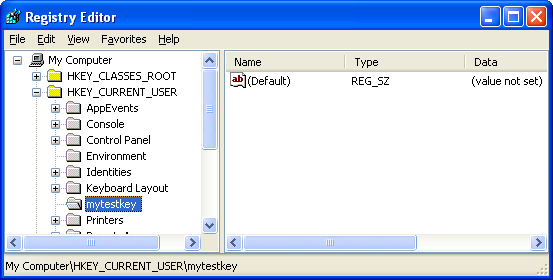
Figure 1
We will learn more detail about Windows Registry in another Module. Don’t forget to delete the registry key that has been created.
Verifying Client Access with ACLs
The following example shows how a server could check the access rights that a security descriptor allows for a client. The example uses the ImpersonateNamedPipeClient() function; however, it would work the same using any of the other impersonation functions. After impersonating the client, the example calls theOpenThreadToken() function to get the impersonation token. Then, it calls theMapGenericMask() function to convert any generic access rights to the corresponding specific and standard rights according to the mapping specified in theGENERIC_MAPPING structure.
The AccessCheck() function checks the requested access rights against the rights allowed for the client in the DACL of the security descriptor. To check access and generate an entry in the security event log, use theAccessCheckAndAuditAlarm() function.
// Don't have time to complete this example :o(
// Have to dig more on pipe story...
// Tips to complete and make this example useable: Fill up all the ImpersonateAndCheckAccess() parameters.
#include <windows.h>
#include <stdio.h>
#include <aclapi.h>
void Cleanup(HANDLE hToken)
{
RevertToSelf();
if(hToken != INVALID_HANDLE_VALUE)
CloseHandle(hToken);
}
BOOL ImpersonateAndCheckAccess(
HANDLE hNamedPipe, // handle of pipe to impersonate
PSECURITY_DESCRIPTOR pSD, // security descriptor to check
DWORD dwAccessDesired, // access rights to check
PGENERIC_MAPPING pGeneric, // generic mapping for object
PDWORD pdwAccessAllowed // returns allowed access rights
)
{
HANDLE hToken;
PRIVILEGE_SET PrivilegeSet;
DWORD dwPrivSetSize =sizeof(PRIVILEGE_SET);
BOOL fAccessGranted=FALSE;
// Impersonate the client.
if(!ImpersonateNamedPipeClient(hNamedPipe))
return FALSE;
// Get an impersonation token with the client's security context.
if(!OpenThreadToken(GetCurrentThread(), TOKEN_ALL_ACCESS, TRUE, &hToken))
Cleanup(hToken);
// Use the GENERIC_MAPPING structure to convert any generic access rights to object-specific access rights.
MapGenericMask(&dwAccessDesired, pGeneric);
// Check the client's access rights.
if(!AccessCheck(
pSD, // security descriptor to check
hToken, // impersonation token
dwAccessDesired, // requested access rights
pGeneric, // pointer to GENERIC_MAPPING
&PrivilegeSet, // receives privileges used in check
&dwPrivSetSize, // size of PrivilegeSet buffer
pdwAccessAllowed, // receives mask of allowed access rights
&fAccessGranted )) // receives results of access check
Cleanup(hToken);
return fAccessGranted;
}
int main()
{
// TODO: Call ImpersonateAndCheckAccess() with appropriate parameters.
return 0;
}
This final example left for you as an assignment. May need it be run on server. Please make it functional and usable.
-------------------------------Windows Access Control program examples, final, Part V---------------------------
Further reading and digging:
Check the best selling C, C++ and Windows books at Amazon.com.
Microsoft C references, online MSDN.
Microsoft Visual C++, online MSDN.
ReactOS - Windows binary compatible OS - C/C++ source code repository, Doxygen.
Linux Access Control Lists (ACL) info can be found atAccess Control Lists.
For Multi-bytes, Unicode characters and Localization please refer to Locale, wide characters & Unicode (Story) and Windows users & groups programming tutorials (Implementation).
Structure, enum, union and typedef story can be foundC/C++ struct, enum, union & typedef.
Notation used in MSDN is Hungarian Notation instead of CamelCase and is discussedWindows programming notations.
Windows data type information is inWindows data types used in Win32 programming.
|< Windows Access Control Programming 14 | Main | Windows User Accounts & Groups Programming 1 >|Site Index |Download |
C & C++ Programming Tutorial |C Programming Practice