|< Windows User Accounts & Groups Programming 4 | Main | Windows Registry Tutorial 2 >| Site Index | Download |
MODULE O
WINDOWS OS
.:: REGISTRY: STORY & PROGRAM EXAMPLES ::.
PART 1
What are in this Module?
-
Introduction
-
Structure of the Registry
-
Registry Storage Space
-
Windows Server 2003 and Windows XP
-
Windows 2000 and Windows NT
-
Predefined Keys
-
Registry Hives
-
Categories of Data
-
Opening, Creating, and Closing Keys
-
Writing and Deleting Registry Data
-
Retrieving Data from the Registry
-
Registry Files
-
Registry Key Security and Access Rights
My Training Period: xx hours. Before you begin, read some instruction here. Program examples compiled using Visual C++ .Net (Visual studio .Net 2003) except whenever mentioned.
|
| The expected skills:
Introduction
The registry is a system-defined database in which applications and system components store and retrieve configuration data. The data stored in the registry varies according to the version of Microsoft® Windows®. Applications use the registry API to retrieve, modify, or delete registry data. You should not edit registry data that does not belong to your application unless it is absolutely necessary. If there is an error in the registry, your system may not function properly. If this happens, you can restore the registry to the state it was in when you last started the computer successfully.
Structure of the Registry
The registry stores data in a tree format. Each node in the tree is called a key. Each key can contain both subkeys and data entries called values. Sometimes, the presence of a key is all the data that an application requires; other times, an application opens a key and uses the values associated with the key. A key can have any number of values, and the values can be in any form. Each key has a name consisting of one or more printable characters. Key names cannot include a backslash (\), but any other printable or unprintable character can be used. The name of each subkey is unique with respect to the key that is immediately above it in the hierarchy. Key names are not localized into other languages, although values may be. The following figure is an example registry key structure as displayed by the Registry Editor (regedit.exe).
Figure 1: Registry Editor.
|

Each of the trees under My Computer is a key. The HKEY_LOCAL_MACHINE key has the following subkeys: HARDWARE, SAM, SECURITY, SOFTWARE, and SYSTEM. Each value consists of a value name and its associated data, if any. MaxObjectNumber and VgaCompatible are values under the DEVICEMAP\VIDEO subkey that contain data.
Registry Storage Space
Although there are few technical limits to the type and size of data an application can store in the registry, certain practical guidelines exist to promote system efficiency. An application should store configuration and initialization data in the registry, and store other kinds of data elsewhere. Generally, data consisting of more than one or two kilobytes (KB) should be stored as a file and referred to by using a key in the registry rather than being stored as a value. Instead of duplicating large pieces of data in the registry, an application should save the data as a file and refer to the file. Executable binary code should never be stored in the registry. A value entry uses much less registry space than a key. To save space, an application should group similar data together as a structure and store the structure as a value rather than storing each of the structure members as a separate key. Storing the data in binary form allows an application to store data in one value that would otherwise be made up of several incompatible types.
Windows Server 2003 and Windows XP
Views of the registry files are mapped in the computer cache address space. Therefore, regardless of the size of the registry data, it is not charged more than 4 megabytes (MB). There are no longer any explicit limits on the total amount of space that may be consumed by hives in paged pool memory, and in disk space. The size of the system hive is limited only by physical memory.
Windows 2000 and Windows NT
Registry data is stored in the paged pool, an area of physical memory used for system data that can be written to disk when not in use. The RegistrySizeLimit value establishes the maximum amount of paged pool that can be consumed by registry data from all applications. This value is located in the following registry key:
HKEY_LOCAL_MACHINE
System
CurrentControlSet
Control
By default, the registry size limit is 25 percent of the paged pool. The default size of the paged pool is 32 MB, so this is 8 MB. The system ensures that the minimum value of RegistrySizeLimit is 4 MB and the maximum is approximately 80 percent of the PagedPoolSize value. If the value of this entry is greater than 80 percent of the size of the paged pool, the system sets the maximum size of the registry to 80 percent of the size of the paged pool. This prevents the registry from consuming space needed by processes. Note that setting this value does not allocate space in the paged pool, nor does it assure that the space will be available if needed. The paged pool size is determined by the PagedPoolSize value in the following registry key:
HKEY_LOCAL_MACHINE
System
CurrentControlSet
Control
SessionManager
MemoryManagement
-
Windows 2000: The maximum paged pool is approximately 300,470 MB so the registry size limit is 240-376 MB. However, if the /3GB switch is used, the maximum paged pool size is 192 MB, so the registry can be a maximum of 153.6 MB.
-
Windows NT 4.0: The maximum paged pool size is 192 MB, so the registry size limit is 153.6 MB.
-
Windows NT 3.51 and earlier: The maximum paged pool is 128 MB, so the registry size limit is 102 MB.
Predefined Keys
An application must open a key before it can add data to the registry. To open a key, an application must supply a handle to another key in the registry that is already open. The system defines predefined keys that are always open. Predefined keys help an application navigate in the registry and make it possible to develop tools that allow a system administrator to manipulate categories of data. Applications that add data to the registry should always work within the framework of predefined keys, so administrative tools can find and use the new data.
An application can use handles to these keys as entry points to the registry. These handles are valid for all implementations of the registry, although the use of the handles may vary from platform to platform. In addition, other predefined handles have been defined for specific platforms. The following are handles to the predefined keys.
| Handle | Description |
| HKEY_CLASSES_ROOT | Registry entries subordinate to this key define types (or classes) of documents and the properties associated with those types. Shell and COM applications use the information stored under this key. This key also provides backward compatibility with the Windows 3.1 registration database by storing information for DDE and OLE support. File viewers and user interface extensions store their OLE class identifiers in HKEY_CLASSES_ROOT, and in-process servers are registered in this key. This handle should not be used in a service or an application that impersonates different users. |
| HKEY_CURRENT_CONFIG | Contains information about the current hardware profile of the local computer system. The information under HKEY_CURRENT_CONFIG describes only the differences between the current hardware configuration and the standard configuration. Information about the standard hardware configuration is stored under the Software and System keys of HKEY_LOCAL_MACHINE. HKEY_CURRENT_CONFIG is an alias for HKEY_LOCAL_MACHINE\System\CurrentControlSet\Hardware Profiles\Current. Windows NT 3.51 and earlier: This key does not exist. |
| HKEY_CURRENT_USER | Registry entries subordinate to this key define the preferences of the current user. These preferences include the settings of environment variables, data about program groups, colors, printers, network connections, and application preferences. This key makes it easier to establish the current user's settings; the key maps to the current user's branch in HKEY_USERS. In HKEY_CURRENT_USER, software vendors store the current user-specific preferences to be used within their applications. Microsoft, for example, creates the HKEY_CURRENT_USER\Software\Microsoft key for its applications to use, with each application creating its own subkey under the Microsoft key. This handle should not be used in a service or an application that impersonates different users. Instead, call the RegOpenCurrentUser() function. |
| HKEY_DYN_DATA | Windows Me/98/95: Registry entries subordinate to this key allow you to collect performance data. |
| HKEY_LOCAL_MACHINE | Registry entries subordinate to this key define the physical state of the computer, including data about the bus type, system memory, and installed hardware and software. It contains subkeys that hold current configuration data, including Plug and Play information (the Enum branch, which includes a complete list of all hardware that has ever been on the system), network logon preferences, network security information, software-related information (such as server names and the location of the server), and other system information. |
| HKEY_PERFORMANCE_DATA | Registry entries subordinate to this key allow you to access performance data. The data is not actually stored in the registry; the registry functions cause the system to collect the data from its source. Windows Me/98/95: This key is not supported. |
| HKEY_PERFORMANCE_NLSTEXT | Registry entries subordinate to this key reference the text strings that describe counters in the local language of the area in which the computer system is running. These entries are not available to Regedit.exe and Regedt32.exe. Windows 2000/NT, Windows Me/98/95: This key is not supported. |
| HKEY_PERFORMANCE_TEXT | Registry entries subordinate to this key reference the text strings that describe counters in US English. These entries are not available to Regedit.exe and Regedt32.exe. For Windows 2000/NT, Windows Me/98/95: This key is not supported. |
| HKEY_USERS | Registry entries subordinate to this key define the default user configuration for new users on the local computer and the user configuration for the current user. |
|
Table 1. | |
The RegOverridePredefKey() function enables you to map a predefined registry key to a specified key in the registry. For instance, a software installation program could remap a predefined key before installing a DLL component. This enables the installation program to easily examine the information that the DLL's installation procedure writes to the predefined key.

Figure 2: HKEY_CLASSES_ROOT registry key.
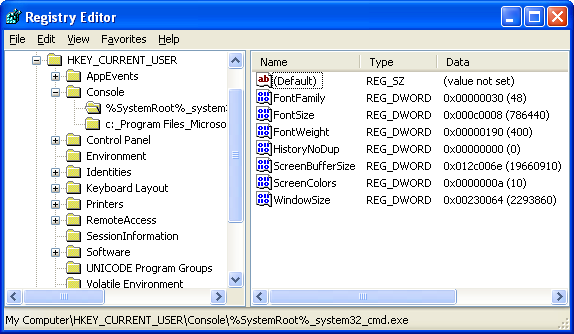
Figure 3: HKEY_CURRENT_USER registry key.

Figure 4: HKEY_LOCAL_MACHINE registry key.
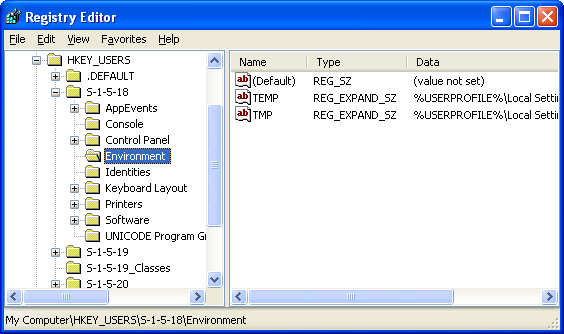
Figure 5: HKEY_USERS registry key.
|
Figure 6: HKEY_CURRENT_CONFIG registry key. |

Registry Hives
A hive is a group of keys, subkeys, and values in the registry that has a set of supporting files containing backups of its data. The setup phase of the Windows boot process automatically retrieves data from these supporting files. You can also retrieve data manually using the Import Registry File menu item of the Registry Editor (Regedit.exe). When you shut down Windows, the operating system automatically writes the hive data to the supporting files. You can also back up the hive data manually using the Export Registry File menu item of the Registry Editor.
The supporting files for all hives except HKEY_CURRENT_USER are in the %SystemRoot%\System32\Config directory; the supporting files for HKEY_CURRENT_USER are in the %SystemRoot%\Documents and Settings\Username directory and for Windows NT it is in %SystemRoot%\Profiles\Username directory. The file name extensions of the files in these directories, and in some cases a lack of an extension, indicate the type of data they contain. The following table lists these extensions along with a description of the data in the file.
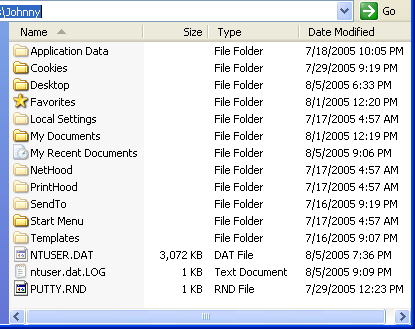
Figure 7: The C:\Documents and Settings\Johnny directory, user supporting files.
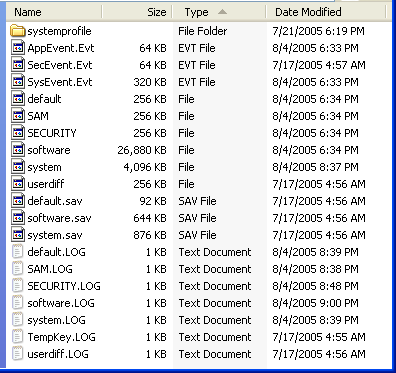
Figure 8: C:\WINDOWS\system32\config directory, supporting files for all hives.
| Extension | Description |
| No extension | A complete copy of the hive data. |
| .alt | A backup copy of the critical HKEY_LOCAL_MACHINE\System hive. Only the System key has an .alt file. |
| .log | A transaction log of changes to the keys and value entries in the hive. |
| .sav | Copies of the hive files as they looked at the end of the text-mode stage in Setup. Setup has two stages: text mode and graphics mode. The hive is copied to a .sav file after the text-mode stage of setup to protect it from errors that might occur if the graphics-mode stage of setup fails. If setup fails during the graphics-mode stage, only the graphics-mode stage is repeated when the computer is restarted; the .sav file is used to restore the hive data. |
|
Table 2. | |
The following table lists the standard hives and their supporting files.
| Registry hive | Supporting files |
| HKEY_CURRENT_CONFIG | System, System.alt, System.log, System.sav |
| HKEY_CURRENT_USER | Ntuser.dat, Ntuser.dat.log |
| HKEY_LOCAL_MACHINE\SAM | Sam, Sam.log, Sam.sav |
| HKEY_LOCAL_MACHINE\Security | Security, Security.log, Security.sav |
| HKEY_LOCAL_MACHINE\Software | Software, Software.log, Software.sav |
| HKEY_LOCAL_MACHINE\System | System, System.alt, System.log, System.sav |
| HKEY_USERS\.DEFAULT | Default, Default.log, Default.sav |
|
Table 3. | |
Each time a new user logs on to a computer, a new hive is created for that user with a separate file for the user profile. This is called the user profile hive. A user's hive contains specific registry information pertaining to the user's application settings, desktop, environment, network connections, and printers. User profile hives are located under the HKEY_USERS key. The supporting file for the user profile hive for a particular user is located in HKEY_LOCAL_MACHINE\Software\Microsoft\Windows NT\ CurrentVersion\ProfileList\SID\ProfileImagePath, and is named Ntuser.dat. The value of ProfileImagePath is a binary representation of the directory name of the user's profile, which includes the user's name. Use the Registry Editor to display this binary value as a string.
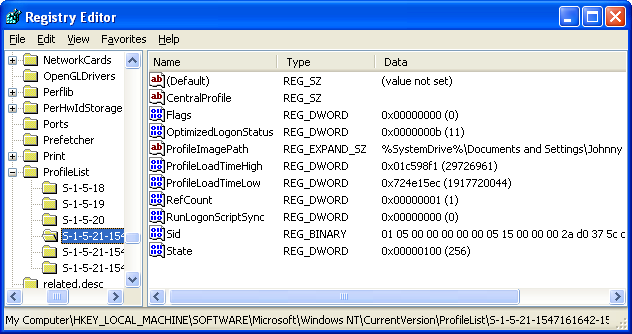
Figure 9: User (Johnny) profile hives under ProfileList key.
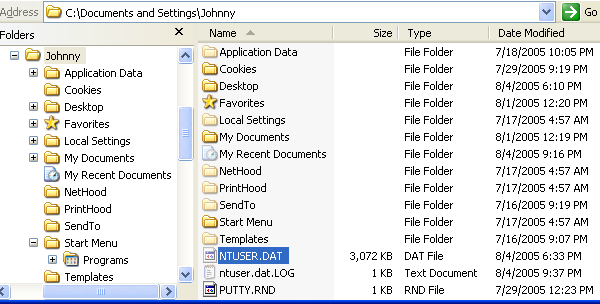
Figure 10: Ntuser.dat, the supporting file for the user (Johnny) profile hive.
Categories of Data
Before putting data into the registry, an application should divide the data into two categories:
-
Computer-specific data and
-
User-specific data.
By making this distinction, an application can support multiple users, and yet locate user-specific data over a network and use that data in different locations, allowing location-independent user profile data. A user profile is a set of configuration data saved for every user. When the application is installed, it should record the computer-specific data under the HKEY_LOCAL_MACHINE key. In particular, it should create keys for the company name, product name, and version number, as shown in the following example:
HKEY_LOCAL_MACHINE\Software\MyCompany\MyProduct\1.0
If the application supports COM, it should record that data under HKEY_LOCAL_MACHINE\Software\Classes. An application should record user-specific data under the HKEY_CURRENT_USER key, as shown in the following example:
HKEY_CURRENT_USER\Software\MyCompany\MyProduct\1.0
Opening, Creating, and Closing Keys
Before an application can add data to the registry, it must create or open a key. To create or open a key, an application always refers to the key as a subkey of a currently open key. The following predefined keys are always open:
-
HKEY_LOCAL_MACHINE.
-
HKEY_CLASSES_ROOT.
-
HKEY_USERS and
-
HKEY_CURRENT_USER.
An application uses the RegOpenKeyEx() function to open a key and the RegCreateKeyEx() function to create a key.
An application can use the RegCloseKey() function to close a key and write the data it contains into the registry. RegCloseKey() does not necessarily write the data to the registry before returning; it can take as much as several seconds for the cache to be flushed to the hard disk. If an application must explicitly write registry data to the hard disk, it can use the RegFlushKey() function. RegFlushKey(), however, uses many system resources and should be called only when absolutely necessary.
Writing and Deleting Registry Data
An application can use the RegSetValueEx() function to associate a value and its data with a key. To delete a value from a key, an application can use the RegDeleteValue() function. To delete a key, it can use the RegDeleteKey() function. A deleted key is not removed until the last handle to it has been closed. Subkeys and values cannot be created under a deleted key. It is not possible to lock a registry key during a write operation to synchronize access to the data. However, you can control access to a registry key using security attributes.
Retrieving Data from the Registry
To retrieve data from the registry, an application typically enumerates the subkeys of a key until it finds a particular one and then retrieves data from the value or values associated with it. An application can call the RegEnumKeyEx() function to enumerate the subkeys of a given key. To retrieve detailed data about a particular subkey, an application can call the RegQueryInfoKey() function. The RegGetKeySecurity() function retrieves a copy of the security descriptor protecting a key. An application can use the RegEnumValue() function to enumerate the values for a given key, and RegQueryValueEx() function to retrieve a particular value for a key. An application typically calls RegEnumValue() to determine the value names and then RegQueryValueEx() to retrieve the data for the names.
The RegQueryMultipleValues() function retrieves the type and data for a list of value names associated with an open registry key. This function is useful for dynamic key providers because it assures consistency of data by retrieving multiple values in an atomic operation. Because other applications can change the data in a registry value between the time your application can read a value and use it, you may need to ensure your application has the latest data. You can use the RegNotifyChangeKeyValue() function to notify the calling thread when there are changes to the attributes or contents of a registry key, or if the key is deleted. The function signals an event object to notify the caller. If the thread that calls RegNotifyChangeKeyValue() exits, the event is signaled and the monitoring of the registry key is stopped. You can control or specify what changes should be reported through the use of a notify filter or flag. Usually, changes are reported by signaling an event that you specify to the function. Note that the RegNotifyChangeKeyValue() function does not work with remote handles.
Registry Files
Applications can save part of the registry in a file and then load the contents of the file back into the registry. A registry file is useful when a large amount of data is being manipulated, when many entries are being made in the registry, or when the data is transitory and must be loaded and then unloaded again. Applications that back up and restore parts of the registry are likely to use registry files. To save a key and its subkeys and values to a registry file, an application can call the RegSaveKey() function. RegSaveKey() creates the file with the following information, depending upon which operating system it is running on.
| System | File attributes | Location if no path is specified | Error returned if file already exists |
| Windows Me/98/95 | Archive, hidden, read-only system | Created in the Windows directory for both local and remote keys. | Error code 1016, ERROR_REGISTRY_IO_FAILED |
| Windows Server 2003, Windows XP/2000/NT | Archive | Created in the current directory of the process for a local key, and in the %systemroot%\system32 directory for a remote key. | Error code 183, ERROR_ALREADY_EXISTS |
|
Table 4. | |||
To write the registry file back to the registry, an application can use the RegLoadKey(), RegReplaceKey(), or RegRestoreKey() function. RegLoadKey() loads registry data from a specified file into a specified subkey under HKEY_USERS or HKEY_LOCAL_MACHINE on the calling application's computer or on a remote computer. The function creates the specified subkey if it does not already exist. After calling this function, an application can use the RegUnLoadKey() function to restore the registry to its previous state. RegReplaceKey() replaces a key and all its subkeys and values in the registry with the data contained in a specified file. The new data takes effect the next time the system is started.
RegRestoreKey() loads registry data from a specified file into a specified key on the calling application's computer or on a remote computer. This function replaces the subkeys and values below the specified key with the subkeys and values that follow the top-level key in the file. The RegConnectRegistry() function establishes a connection to a predefined registry handle on another computer. An application uses this function primarily to access information from a remote registry on other machines in a network environment, which you can also do by using the Registry Editor. You might want to access a remote registry to back up a registry or regulate network access to it. Note that you must have appropriate permissions to access a remote registry using this function.
Registry Key Security and Access Rights
The Windows security model enables you to control access to registry keys. You can specify a security descriptor for a registry key when you call the RegCreateKeyEx() or RegSetKeySecurity() function. If you specify NULL, the key gets a default security descriptor. The ACLs in a default security descriptor for a key are inherited from its direct parent key. To get the security descriptor of a registry key, call the GetNamedSecurityInfo() or GetSecurityInfo() function. The valid access rights for registry keys include the DELETE, READ_CONTROL, WRITE_DAC, and WRITE_OWNER standard access rights. Registry keys do not support the SYNCHRONIZE standard access right. The following table lists the specific access rights for registry key objects.
| Value | Meaning |
| KEY_ALL_ACCESS | Combines the STANDARD_RIGHTS_REQUIRED, KEY_QUERY_VALUE, KEY_SET_VALUE, KEY_CREATE_SUB_KEY, KEY_ENUMERATE_SUB_KEYS, KEY_NOTIFY, and KEY_CREATE_LINK access rights. |
| KEY_CREATE_LINK | Reserved for system use. |
| KEY_CREATE_SUB_KEY | Required to create a subkey of a registry key. |
| KEY_ENUMERATE_SUB_KEYS | Required to enumerate the subkeys of a registry key. |
| KEY_EXECUTE | Equivalent to KEY_READ. |
| KEY_NOTIFY | Required to request change notifications for a registry key or for subkeys of a registry key. |
| KEY_QUERY_VALUE | Required to query the values of a registry key. |
| KEY_READ | Combines the STANDARD_RIGHTS_READ, KEY_QUERY_VALUE, KEY_ENUMERATE_SUB_KEYS, and KEY_NOTIFY values. |
| KEY_SET_VALUE | Required to create, delete, or set a registry value. |
| KEY_WOW64_64KEY | Enables a 64- or 32-bit application to open a 64-bit key on 64-bit Windows. This flag must be combined using the OR operator with the other flags in this table that either query or access registry values. |
| KEY_WOW64_32KEY | Enables a 64- or 32-bit application to open a 32-bit key on 64-bit Windows. This flag must be combined using the OR operator with the other flags in this table that either query or access registry values. |
| KEY_WRITE | Combines the STANDARD_RIGHTS_WRITE, KEY_SET_VALUE, and KEY_CREATE_SUB_KEY access rights. |
|
Table 5. | |
When you call the RegOpenKeyEx() function, the system checks the requested access rights against the key's security descriptor. If the user does not have the correct access to the registry key, the open operation fails. If an administrator needs access to the key, the solution is to enable the SE_TAKE_OWNERSHIP_NAME privilege and open the registry key with WRITE_OWNER access. You can request the ACCESS_SYSTEM_SECURITY access right to a registry key if you want to read or write the key's SACL.
Further reading and digging:
-
For Multibytes, Unicode characters and Localization please refer to Locale, wide characters & Unicode (Story) and Windows users & groups programming tutorials (Implementation).
-
Structure, enum, union and typedef story can be found C/C++ struct, enum, union & typedef.
-
Notation used in MSDN is Hungarian Notation instead of CamelCase and is discussed Windows programming notations.
-
Windows data type information is in Windows data types used in Win32 programming.
-
Check the best selling C, C++ and Windows books at Amazon.com.
Microsoft C references, online MSDN.
Microsoft Visual C++, online MSDN.
ReactOS - Windows binary compatible OS - C/C++ source code repository, Doxygen.
Linux Access Control Lists (ACL) info can be found atAccess Control Lists.
|< Windows User Accounts & Groups Programming 4 | Main | Windows Registry Tutorial 2 >| Site Index | Download |