| Tenouk C & C++ | MFC Home | Structured Storage, DLL & COM 3 | OLE & Containers 1 | Download | Site Index |
Structured Storage 4
Program examples compiled using Visual C++ 6.0 compiler on Windows XP Pro machine with Service Pack 2. Topics and sub topics for this tutorial are listed below. Don’t forget to read Tenouk’s small disclaimer. The supplementary notes for this tutorial are statstg, Thread.h, ReadThread.cpp and WriteThread.cpp.
-
The MYMFC31C Example: A Persistent Storage Client Program
-
The MYMFC31C From Scratch
-
Compound File Fragmentation
-
Other Compound File Advantages
|
|
The MYMFC31 Project Example: A Persistent Storage Client Program
This program is similar to MYMFC31A in function, indeed, the storage files are compatible. Internally, however, both worker threads use the persistent COM class CText (MYMFC31B) for loading and storing text. To prepare MYMFC31C, open the mymfc31c.dsw workspace and build the project. Run the program from the debugger, first choosing Write from the Storage menu and then choosing Read. Observe the output in the Debug window or you can start it from scratch.
The MYMFC31C From Scratch
This is an SDI application without Automation and ActiveX Controls support.
Figure 32: MYMFC31C – Visual C++ new project dialog. |


Figure 33: MYMFC31C – AppWizard step 1 of 6, select Single document.

Figure 34: MYMFC31C – AppWizard step 2 of 6.
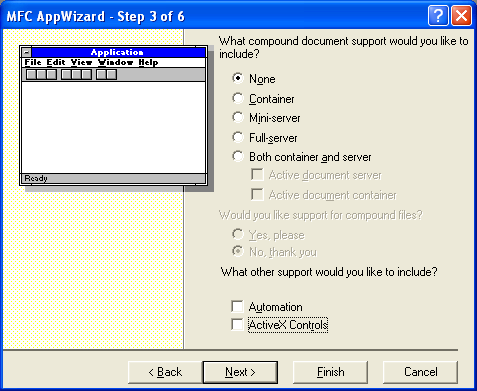
Figure 35: MYMFC31C – AppWizard step 3 of 6, deselect Automation and ActiveX Controls.
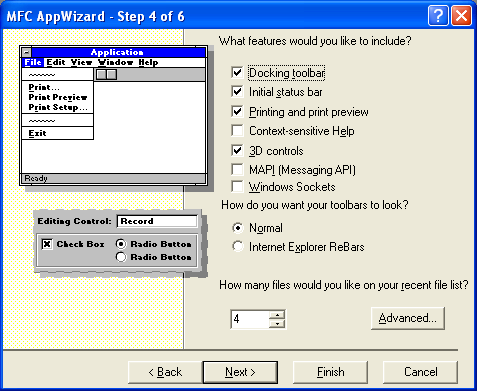
Figure 36: MYMFC31C – AppWizard step 4 of 6.
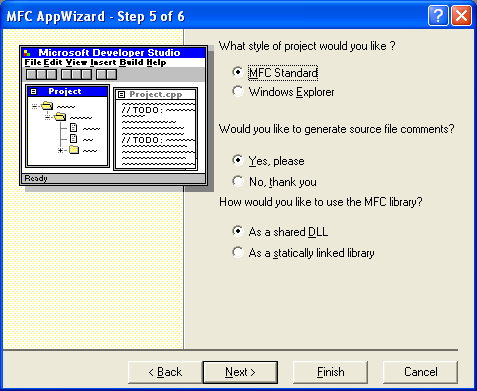
Figure 37: MYMFC31C – AppWizard step 5 of 6.
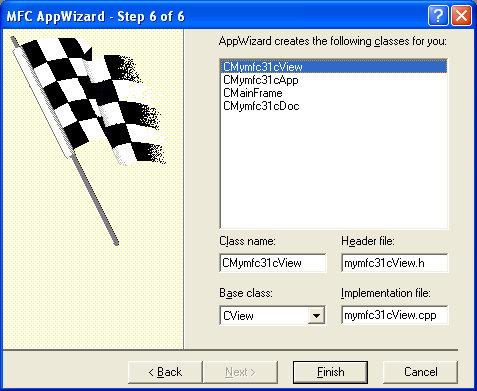
Figure 38: MYMFC31C – AppWizard step 6 of 6.

Figure 39: MYMFC31C project summary.
Add the following menu items.
|
ID |
Caption |
|
- |
Storage |
|
ID_STORAGE_READ |
Read |
|
ID_STORAGE_WRITE |
Write |
|
Table 12. |
|
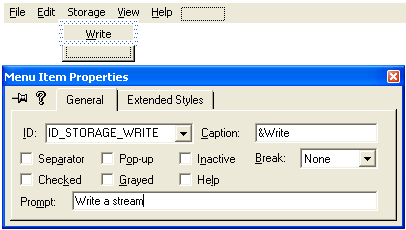
Figure 40: Adding Write menu item.
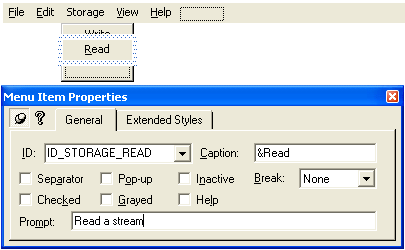
Figure 41: Adding Read menu item.

Figure 42: A completed MYMFC31C menus.
Use ClassWizard to add command handlers for the previous menu items as shown in the following Table to CMymfc31cView class.
|
ID |
Type |
Function |
|
ID_STORAGE_READ |
Command |
OnStorageRead() |
|
ID_STORAGE_WRITE |
Command |
OnStorageWrite() |
|
Table 13. |
||
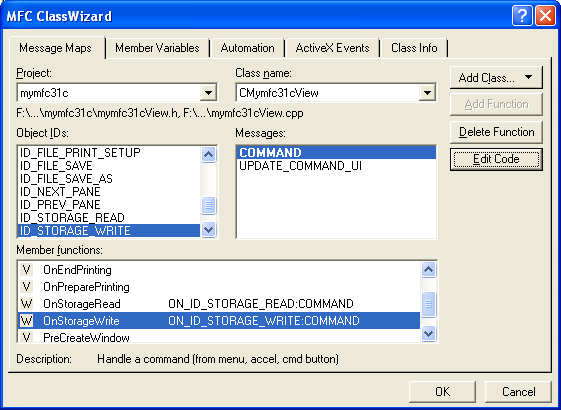
Figure 43: Adding command handlers to CMymfc31cView class.
Add codes to the command handlers.
void CMymfc31cView::OnStorageRead()
{
// TODO: Add your command handler code here
CWinThread* pThread = AfxBeginThread(ReadThreadProc, GetSafeHwnd());
}
void CMymfc31cView::OnStorageWrite()
{
// TODO: Add your command handler code here
CWinThread* pThread = AfxBeginThread(WriteThreadProc, GetSafeHwnd());
}
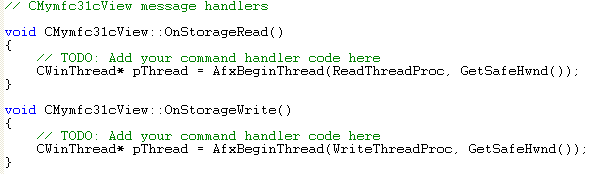
Listing 8.
Add the #include directive to mymfc31aView.cpp.
#include "Thread.h"

Listing 9.
Add Thread.h, WriteThread.cpp and ReadThread.cpp files, the modified version of MYMFC31A to the project. Copy and paste the codes (provided in the following Listings) to the respective files.
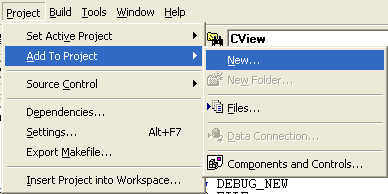
Figure 44: Adding new files to project.
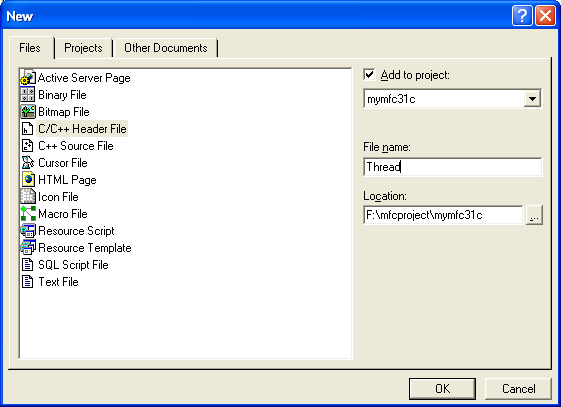
Figure 45: Adding Thread.h file to MYMFC31C. Repeat for other two source files.
Add the following lines in your StdAfx.h file:
#include <afxole.h>
#include <afxpriv.h> // for wide-character conversion
Then delete the following line (or commented out):
#define VC_EXTRALEAN

Listing 10.
Add MYMFC31B class from the type library to the project. Click Add Class button in ClassWizard and select From a type library button.
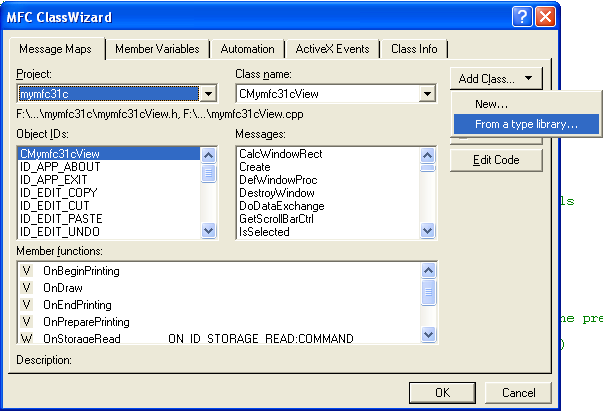
Figure 46: Adding new class from type library.
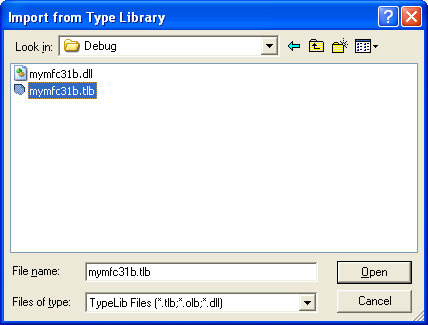
Figure 47: Browsing and selecting the mymfc31b.tlb type library file.
|
Figure 48: IText class from MYMFC31B addition confirmation dialog. |

You can verify the added class through ClassView.
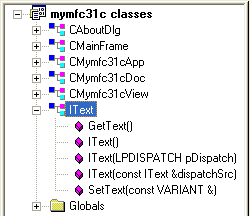
Figure 49: Verifying the added class through ClassView.
Build and run in debug mode. Click the Write menu.
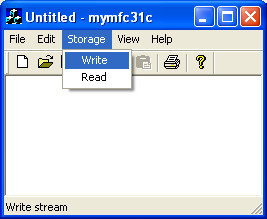
Figure 50: MYMFC31C in action.
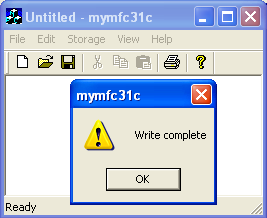
Figure 51: The write operation message box displayed.
Then, click the Read menu.

Figure 52: testing the Read menu, provided the previous write operation was successful.
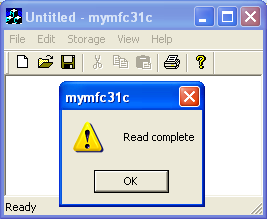
Figure 53: The completed read operation message box.
Check the Debug window. It will look something like this (the storage and stream should be different with yours).
Storage = mfcjadik
Storage = final
Stream = \mfcjadik\final\log.txt
Loaded 'C:\WINDOWS\system32\xpsp2res.dll', no matching symbolic information found.
Warning: CreateDispatch returning scode = REGDB_E_CLASSNOTREG ($80040154).
Storage = myscribble
Storage = Debug
Stream = \mfcjadik\myscribble\ReadMe.txt
========================================================================
Warning: CreateDispatch returning scode = REGDB_E_CLASSNOTREG ($80040154).
Storage = res
Storage = mfcproject
Storage = bkup
Storage = mymfc29A
Storage = Debug
Stream = \mfcproject\bkup\mymfc29A\ReadMe.txt
========================================================================
…
[Trimmed]
…
========================================================================
Warning: CreateDispatch returning scode = REGDB_E_CLASSNOTREG ($80040154).
Storage = res
Storage = myproject
Storage = childprocess
Storage = Debug
Storage = console
Storage = Debug
Storage = crtexecprog
…
[Trimmed]
…
Storage = Debug
Storage = Release
Storage = testmydllruntime
Storage = Debug
Storage = testsharedll
Storage = Debug
Storage = win32prog
Storage = Debug
Storage = myuserprog
Storage = myuserprog
Storage = Debug
Storage = RECYCLER
Storage = NPROTECT
Storage = S-1-5-21-1343024091-1647877149-
Storage = S-1-5-21-1547161642-1580818891-
Storage = Df1
Storage = Debug
Stream = \RECYCLER\S-1-5-21-1547161642-1580818891-725345543-1003\Df1\ReadMe.txt
========================================================================
Warning: CreateDispatch returning scode = REGDB_E_CLASSNOTREG ($80040154).
Storage = res
Storage = S-1-5-21-1547161642-1580818891-
Storage = S-1-5-21-1757981266-1202660629-
Storage = S-1-5-21-448539723-1364589140-8
Storage = S-1-5-21-448539723-1364589140-8
Storage = S-1-5-21-602162358-1682526488-8
Storage = System Volume Information
The thread 0x968 has exited with code 0 (0x0).
The thread 0x970 has exited with code 0 (0x0).
The thread 0x8C has exited with code 0 (0x0).
The thread 0xBCC has exited with code 0 (0x0).
The thread 0x8E4 has exited with code 0 (0x0).
The thread 0x8DC has exited with code 0 (0x0).
The program 'F:\mfcproject\mymfc31c\Debug\mymfc31c.exe' has exited with code 0 (0x0).
Verify the directdll.stg file creation.
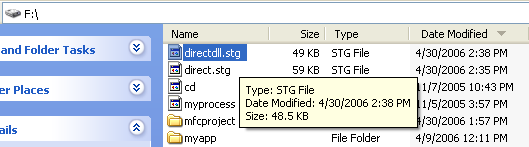
Figure 54: Verifying the directdll.stg file creation during the previous write operation.
The menu, the view class, and the application class are the same as the MYMFC31A versions. Only the thread code is different. Listing 11 lists the code for both the WriteThread.cpp and the ReadThread.cpp files.
|
WRITETHREAD.CPP
// WriteThread.cpp (MYMFC31C)
#include "StdAfx.h" #include "Thread.h" #include "itext.h"
CLSID g_clsid; // for the Text server int g_nIndent = 0; const char* g_szBlanks = " "; const char* g_szRootStorageName = "\\directdll.stg";
UINT WriteThreadProc(LPVOID pParam) { USES_CONVERSION; LPSTORAGE pStgRoot = NULL; g_nIndent = 0; ::CoInitialize(NULL); ::CLSIDFromProgID(L"MYMFC31B.TEXT", &g_clsid); VERIFY(::StgCreateDocfile(T2COLE(g_szRootStorageName), STGM_READWRITE | STGM_SHARE_EXCLUSIVE | STGM_CREATE, 0, &pStgRoot) == S_OK); ReadDirectory("\\", pStgRoot); pStgRoot->Release(); AfxMessageBox("Write complete"); return 0; }
void ReadDirectory(const char* szPath, LPSTORAGE pStg) { // recursive function USES_CONVERSION; WIN32_FIND_DATA fData; HANDLE h; char szNewPath[MAX_PATH]; char szStorageName[100]; char szStreamName[100]; char szData[81]; char* pch = NULL;
LPSTORAGE pSubStg = NULL; LPSTREAM pStream = NULL; LPPERSISTSTREAM pPersistStream = NULL;
g_nIndent++; strcpy(szNewPath, szPath); strcat(szNewPath, "*.*"); h = ::FindFirstFile(szNewPath, &fData); if (h == (HANDLE) 0xFFFFFFFF) return; // can't find directory do { if (!strcmp(fData.cFileName, "..") || !strcmp(fData.cFileName, ".")) continue; while((pch = strchr(fData.cFileName, '!')) != NULL) { *pch = '|'; } if (fData.dwFileAttributes & FILE_ATTRIBUTE_DIRECTORY) { // It's a directory, so make a storage strcpy(szNewPath, szPath); strcat(szNewPath,fData.cFileName); strcat(szNewPath, "\\");
strcpy(szStorageName, fData.cFileName); szStorageName[31] = '\0'; // limit imposed by OLE TRACE("%0.*sStorage = %s\n", (g_nIndent - 1) * 4, g_szBlanks, szStorageName); VERIFY(pStg->CreateStorage(T2COLE(szStorageName), STGM_CREATE | STGM_READWRITE | STGM_SHARE_EXCLUSIVE, 0, 0, &pSubStg) == S_OK); ASSERT(pSubStg != NULL); ReadDirectory(szNewPath, pSubStg); pSubStg->Release(); } else { if ((pch = strrchr(fData.cFileName, '.')) != NULL) { if (!stricmp(pch, ".TXT")) { // It's a text file, so make a stream strcpy(szStreamName, fData.cFileName); strcpy(szNewPath, szPath); strcat(szNewPath, szStreamName); szStreamName[32] = '\0'; // OLE max length TRACE("%0.*sStream = %s\n", (g_nIndent - 1) * 4, g_szBlanks, szNewPath); CStdioFile file(szNewPath, CFile::modeRead); // Ignore zero-length files if(file.ReadString(szData, 80)) { TRACE("%s\n", szData); VERIFY(pStg->CreateStream(T2COLE(szStreamName), STGM_CREATE | STGM_READWRITE | STGM_SHARE_EXCLUSIVE, 0, 0, &pStream) == S_OK); ASSERT(pStream != NULL); // Include the null terminator in the stream IText text; //VERIFY if(text.CreateDispatch(g_clsid)) //; { text.m_lpDispatch->QueryInterface(IID_IPersistStream, (void**) &pPersistStream); ASSERT(pPersistStream != NULL); text.SetText(COleVariant(szData)); pPersistStream->Save(pStream, TRUE); pPersistStream->Release(); pStream->Release(); } } } } } } while (::FindNextFile(h, &fData)); g_nIndent--; }
--------------------------------------------------------------------------------------------------------------------------------------------------------------------------------------------------------
READTHREAD.CPP
// ReadThread.cpp (MYMFC31C)
#include "StdAfx.h" #include "Thread.h" #include "itext.h"
#ifdef _DEBUG #define new DEBUG_NEW #undef THIS_FILE static char THIS_FILE[ ] = __FILE__; #endif
UINT ReadThreadProc(LPVOID pParam) { g_nIndent = 0; ::CoInitialize(NULL); ::CLSIDFromProgID(L"MYMFC31B.TEXT", &g_clsid); LPSTORAGE pStgRoot = NULL; if(::StgOpenStorage(L"\\DIRECTDLL.STG", NULL, STGM_READ|STGM_SHARE_EXCLUSIVE, NULL, 0, &pStgRoot) == S_OK) { ASSERT(pStgRoot!= NULL); ReadStorage(pStgRoot); pStgRoot->Release(); } else { AfxMessageBox("Storage file not available or not readable"); } AfxMessageBox("Read complete"); return 0; }
void ReadStorage(LPSTORAGE pStg) // reads one storage -- recursive calls for substorages { LPSTORAGE pSubStg = NULL; LPSTREAM pStream = NULL; LPENUMSTATSTG pEnum = NULL; STATSTG statstg; LPPERSISTSTREAM pPersistStream = NULL;
g_nIndent++; if(pStg->EnumElements(0, NULL, 0, &pEnum) != NOERROR) { ASSERT(FALSE); return; } while(pEnum->Next(1, &statstg, NULL) == NOERROR) { if(statstg.type == STGTY_STORAGE) { VERIFY(pStg->OpenStorage(statstg.pwcsName, NULL, STGM_READ|STGM_SHARE_EXCLUSIVE, NULL, 0, &pSubStg) == S_OK); ASSERT(pSubStg != NULL); ReadStorage(pSubStg); pSubStg->Release(); } else if(statstg.type == STGTY_STREAM) { VERIFY(pStg->OpenStream(statstg.pwcsName, NULL, STGM_READ|STGM_SHARE_EXCLUSIVE, 0, &pStream) == S_OK); ASSERT(pStream != NULL); IText text; //VERIFY if(text.CreateDispatch(g_clsid)) //; { text.m_lpDispatch->QueryInterface(IID_IPersistStream, (void**) &pPersistStream); ASSERT(pPersistStream != NULL); pPersistStream->Load(pStream); pPersistStream->Release(); COleVariant va = text.GetText(); ASSERT(va.vt == VT_BSTR); CString str = va.bstrVal; TRACE("%s\n", str); pStream->Release(); } } else { ASSERT(FALSE); // LockBytes? } ::CoTaskMemFree(statstg.pwcsName); } pEnum->Release(); g_nIndent--; }
|
Listing 11: The code listing for the two worker threads in MYMFC31C.
Look at the second half of the ReadDirectory() function in the WriteThread.cpp file in Figure 27-5. For each TXT file, the program constructs a CText object by constructing an IText driver object and then calling CreateDispatch(). Then it calls the SetText() member function to write the first line of the file to the object. After that, the program calls IPersistStream::Save to write the object to the compound file. The CText object is deleted after the IPersistStream pointer is released and after the IText object is deleted, releasing the object's IDispatch pointer.
Now look at the second half of the ReadStorage() function in the ReadThread.cpp file. Like ReadDirectory(), it constructs an IText driver object and calls CreateDispatch(). Then it calls QueryInterface() to get the object's IPersistStream pointer, which it uses to call Load(). Finally, the program calls GetText() to retrieve the line of text for tracing. As you've learned already, a COM component usually implements IPersistStorage, not IPersistStream. The CText class could have worked this way, but then the compound file would have been more complex because each TXT file would have needed both a storage element (to support the interface) and a subsidiary stream element (to hold the text).
Now get ready to take a giant leap. Suppose you have a true creatable-by-CLSID COM component that supports the IPersistStorage interface. Recall the IStorage functions for class IDs. If a storage element contains a class ID, together with all the data an object needs, COM can load the server, use the class factory to construct the object, get an IPersistStorage pointer, and call Load() to load the data from a compound file. This is a preview of compound documents, which you'll see in Module 27.
Compound File Fragment
Structured storage has a dark side. Like the disk drive itself, compound files can become fragmented with frequent use. If a disk drive becomes fragmented, however, you still have the same amount of free space. With a compound file, space from deleted elements isn't always recovered. This means that compound files can keep growing even if you delete data. Fortunately, there is a way to recover unused space in a compound file. You simply create a new file and copy the contents. The IStorage::CopyTo function can do the whole job in one call if you use it to copy the root storage. You can either write a stand-alone utility or build a file regeneration capability into your application.
Other Compound File Advantages
You've seen how compound files add a kind of random access capability to your programs, and you can appreciate the value of transactioning. Now consider the brave new world in which every program can read any other program's documents. We're not there yet, but we have a start. Compound files from Microsoft applications have a stream under the root storage named \005SummaryInformation. This stream is formatted as a property set, as defined for ActiveX controls. If you can decode the format for this stream, you can open any conforming file and read the summary. Visual C++ comes with a compound file viewing utility named DocFile Viewer (Dfview.exe), which uses a tree view to display the file's storages and streams.

Figure 55: Using DocFile Viewer to view structured storage file.
Here is the DocFile Viewer output for the structured storage file generated by MYMFC31C (directdll.stg).
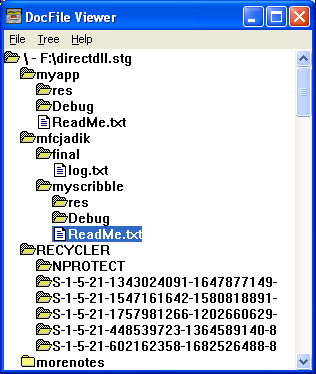
Figure 56: MYMFC31C’s directdll.stg structured storage file content.
As a matter of fact, you can use DocFile Viewer to view the structure of any compound file. Are you starting to see the potential of this "universal file format?"
---------------------End------------------
Further reading and digging:
-
Win32 process, thread and synchronization story can be found starting from Module R.
-
MSDN What's New (MFC Feature Pack) - feature pack.
-
DCOM at MSDN.
-
COM+ at MSDN.
-
COM at MSDN.
-
Unicode and Multi-byte character set: Story and program examples.