| Tenouk C & C++ | MFC Home | Structured Storage 2 | Structured Storage 4 | Download | Site Index |
Structured Storage, DLL & COM 3
Program examples compiled using Visual C++ 6.0 compiler on Windows XP Pro machine with Service Pack 2. Topics and sub topics for this tutorial are listed below. Don’t forget to read Tenouk’s small disclaimer. The supplementary notes for this tutorial are statstg, Thread.h, ReadThread.cpp and WriteThread.cpp.
-
Structured Storage and Persistent COM Objects
-
The IPersistStorage Interface
-
IPersistStream
-
IPersistStream Programming
-
The MYMFC31B Example: A Persistent DLL Component
-
The MYMFC31B From Scratch
|
The Structured Storage and Persistent COM Objects
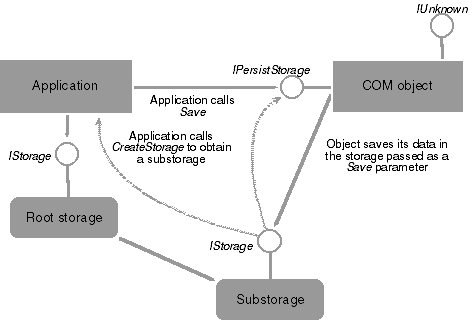
The MYMFC31A program explicitly called member functions of IStorage and IStream to write and read a compound file. In the object-oriented world, objects should know how to save and load themselves to and from a compound file. That's what the IPersistStorage and IPersistStream interfaces are for. If a COM component implements these interfaces, a container program can "connect" the object to a compound file by passing the file's IStorage pointer as a parameter to the Save() and Load() member functions of the IPersistStorage interface. Such objects are said to be persistent. Figure 22 shows the process of calling the IPersistStorage::Save function. A COM component is more likely to work with an IStorage interface than an IStream interface. If the COM object is associated with a particular storage, the COM component can manage sub-storages and streams under that storage once it gets the IStorage pointer. A COM component uses the IStream interface only if it stores all its data in an array of bytes. ActiveX controls implement the IStream interface for storing and loading property values.
Figure 22: Calling IPersistStorage::Save.
|
|
The IPersistStorage Interface
When an OLE container creates a new object, loads an existing object from storage, or inserts a new object in a clipboard or a drag-and-drop operation, the container uses the IPersistStorage interface to initialize the object and put it in the loaded or running state. When an object is loaded or running, an OLE container calls other IPersistStorage methods to instruct the object to perform various save operations or to release its storage. Typically, applications use helper functions such as OleLoad() or OleCreate(), rather than calling the IPersistStorage::Load or IPersistStorage::InitNew methods directly. Similarly, applications typically call the OleSave() helper function rather than calling IPersistStorage::Save directly. Methods/functions in IPersistStorage is listed below.
|
IUnknown Methods |
Description |
|
QueryInterface() |
Returns pointers to supported interfaces. |
|
AddRef() |
Increments reference count. |
|
Release() |
Decrements reference count. |
|
Table 6. |
|
|
IPersist Method |
Description |
|
GetClassID() |
Returns the class identifier (CLSID) for the object on which it is implemented. |
|
Table 7. |
|
|
IPersistStorage Methods |
Description |
|
IsDirty() |
Indicates whether the object has changed since it was last saved to its current storage. |
|
InitNew() |
Initializes a new storage object. |
|
Load() |
Initializes an object from its existing storage. |
|
Save() |
Saves an object, and any nested objects that it contains, into the specified storage object. The object enters NoScribble mode. |
|
SaveCompleted() |
Notifies the object that it can revert from NoScribble or HandsOff mode, in which in must not write to its storage object, to Normal mode in which it can. |
|
HandsOffStorage() |
Instructs the object to release all storage objects that have been passed to it by its container and to enter HandsOffAfterSave or HandsOffFromNormal mode. |
|
Table 8. |
|
Both the IPersistStorage and IPersistStream interfaces are derived from IPersist, which contributes the GetClassID() member function. Of course the IUnknown member function also included. Here's a summary of the important IPersistStorage member functions in detail.
HRESULT GetClassID(CLSID* pClsid);
Returns the COM component's 128-bit class identifier.
HRESULT InitNew(IStorage* pStg);
Initializes a newly created object. The component might need to use the storage for temporary data, so the container must provide an IStorage pointer that's valid for the life of the object. The component should call AddRef() if it intends to use the storage. The component should not use this IStorage pointer for saving and loading; it should wait for Save() and Load() calls and then use the passed-in IStorage pointer to call IStorage::Write and Read().
HRESULT IsDirty(void);
Returns S_OK if the object has changed since it was last saved; otherwise, returns S_FALSE.
HRESULT Load(IStorage* pStg);
Loads the COM object's data from the designated storage.
HRESULT Save(IStorage* pStg, BOOL fSameAsLoad);
Saves the COM object's data in the designated storage.
The IPersistStream Interface
Here's a summary of the IPersistStream member functions:
HRESULT GetClassID(CLSID* pClsid);
Returns the COM component's 128-bit class identifier.
HRESULT GetMaxSize(ULARGE_INTEGER* pcbSize);
Returns the number of bytes needed to save the object.
HRESULT IsDirty(void);
Returns S_OK if the object has changed since it was last saved; otherwise, returns S_FALSE.
HRESULT Load(IStream* pStm);
Loads the COM object's data from the designated stream.
HRESULT Save(IStream* pStm, BOOL fClearDirty);
Saves the COM object's data to the designated stream. If the fClearDirty parameter is TRUE, Save clears the object's dirty flag.
IPersistStream
The IPersistStream interface provides methods for saving and loading objects that use a simple serial stream for their storage needs. The IPersistStream interface inherits its definition from the IPersist interface, and so includes the GetClassID method of IPersist. Call methods of IPersistStream from a container application to save or load objects that are contained in a simple stream. When used to save or load monikers, typical applications do not call the methods directly, but allow the default link handler to make the calls to save and load the monikers that identify the link source. These monikers are stored in a stream in the storage for the linked object. If you are writing a custom link handler for your class of objects, you would call the methods of IPersistStream to implement the link handler. Methods/functions available for IPersistStream are listed below.
|
IUnknown Methods |
Description |
|
QueryInterface() |
Returns pointers to supported interfaces. |
|
AddRef() |
Increments the reference count. |
|
Release() |
Decrements the reference count. |
|
Table 9. |
|
|
IPersist Method |
Description |
|
GetClassID() |
Returns the class identifier (CLSID) for the component object. |
|
Table 10. |
|
|
IPersistStream Methods |
Description |
|
IsDirty() |
Checks the object for changes since it was last saved. |
|
Load() |
Initializes an object from the stream where it was previously saved. |
|
Save() |
Saves an object into the specified stream and indicates whether the object should reset its dirty flag. |
|
GetSizeMax() |
Return the size in bytes of the stream needed to save the object. |
|
Table 11. |
|
IPersistStream Programming
The following container program code fragment creates a stream and saves a COM object's data in it. Both the IPersistStream pointer for the COM object and the IStorage pointer are set elsewhere.
extern IStorage* pStg;
extern IPersistStream* pPersistStream;
IStream* pStream;
if (pStg->CreateStream(L"MyStreamName", STGM_CREATE | STGM_READWRITE | STGM_SHARE_EXCLUSIVE, 0, 0, &pStream) == S_OK)
{
ASSERT(pStream != NULL);
pPersistStream->Save(pStream, TRUE);
pStream->Release();
}
If you program your own COM class for use in a container, you'll need to use the MFC interface macros to add the IPersistStream interface. Too bad there's not an "interface wizard" to do the job.
The MYMFC31B Project Example: A Persistent DLL Component
The MYMFC31B program, which is used by MYMFC31C, is a COM DLL that contains the CText component. This is a simple COM class that implements the IDispatch and IPersistStream interfaces. The IDispatch interface allows access to the component's one and only property, Text, and the IPersistStream interface allows an object to save and load that Text property to and from a structured storage file.
To prepare MYMFC31B, open the mymfc31b.dsw workspace and build the project. Use regsvr32 to register the DLL. Listing 5 lists the code for the CText class in Text.h and Text.cpp.
|
TEXT.H
#if !defined(AFX_TEXT_H__14635AFC_DF23_4875_B984_BFC39089C60F__INCLUDED_) #define AFX_TEXT_H__14635AFC_DF23_4875_B984_BFC39089C60F__INCLUDED_
#if _MSC_VER > 1000 #pragma once #endif // _MSC_VER > 1000 // Text.h : header file //
///////////////////////////////////////////////////////////////////////////// // CText command target
class CText : public CCmdTarget { DECLARE_DYNCREATE(CText) CText(); // protected constructor used by dynamic creation
// Attributes public:
// Operations public:
// Overrides // ClassWizard generated virtual function overrides //{{AFX_VIRTUAL(CText) public: virtual void OnFinalRelease(); //}}AFX_VIRTUAL
// Implementation protected: virtual ~CText();
// Generated message map functions //{{AFX_MSG(CText) // NOTE - the ClassWizard will add and remove member functions here. //}}AFX_MSG
DECLARE_MESSAGE_MAP() DECLARE_OLECREATE(CText)
// Generated OLE dispatch map functions //{{AFX_DISPATCH(CText) afx_msg VARIANT GetText(); afx_msg void SetText(const VARIANT FAR& newValue); //}}AFX_DISPATCH DECLARE_DISPATCH_MAP() DECLARE_INTERFACE_MAP()
BEGIN_INTERFACE_PART(PersistStream, IPersistStream) STDMETHOD(GetClassID)(LPCLSID); STDMETHOD(IsDirty)(); STDMETHOD(Load)(LPSTREAM); STDMETHOD(Save)(LPSTREAM, BOOL); STDMETHOD(GetSizeMax)(ULARGE_INTEGER FAR*); END_INTERFACE_PART(PersistStream)
private: char* m_pchText; };
/////////////////////////////////////////////////////////////////////////////
//{{AFX_INSERT_LOCATION}} // Microsoft Visual C++ will insert additional declarations immediately before the previous line.
#endif // !defined(AFX_TEXT_H__14635AFC_DF23_4875_B984_BFC39089C60F__INCLUDED_)
-------------------------------------------------------------------------------------------------------------------------------------------------------------------------------------------------
TEXT.CPP // Text.cpp : implementation file //
#include "stdafx.h" #include "mymfc31b.h" #include "Text.h"
#ifdef _DEBUG #define new DEBUG_NEW #undef THIS_FILE static char THIS_FILE[] = __FILE__; #endif
///////////////////////////////////////////////////////////////////////////// // CText
IMPLEMENT_DYNCREATE(CText, CCmdTarget)
CText::CText() { EnableAutomation();
// To keep the application running as long as an OLE automation // object is active, the constructor calls AfxOleLockApp. AfxOleLockApp(); }
CText::~CText() { // To terminate the application when all objects created with // with OLE automation, the destructor calls AfxOleUnlockApp. AfxOleUnlockApp(); }
void CText::OnFinalRelease() { // When the last reference for an automation object is released // OnFinalRelease is called. The base class will automatically // deletes the object. Add additional cleanup required for your object before calling the base class. CCmdTarget::OnFinalRelease(); }
BEGIN_MESSAGE_MAP(CText, CCmdTarget) //{{AFX_MSG_MAP(CText) // NOTE - the ClassWizard will add and remove mapping macros here. //}}AFX_MSG_MAP END_MESSAGE_MAP()
BEGIN_DISPATCH_MAP(CText, CCmdTarget) //{{AFX_DISPATCH_MAP(CText) DISP_PROPERTY_EX(CText, "Text", GetText, SetText, VT_VARIANT) //}}AFX_DISPATCH_MAP END_DISPATCH_MAP()
// Note: we add support for IID_IText to support typesafe binding // from VBA. This IID must match the GUID that is attached to the dispinterface in the .ODL file.
// {84D30689-5963-400D-8D4C-19CA756679B1} static const IID IID_IText = { 0x84d30689, 0x5963, 0x400d, { 0x8d, 0x4c, 0x19, 0xca, 0x75, 0x66, 0x79, 0xb1 } };
BEGIN_INTERFACE_MAP(CText, CCmdTarget) INTERFACE_PART(CText, IID_IPersistStream, PersistStream) INTERFACE_PART(CText, IID_IText, Dispatch) END_INTERFACE_MAP()
// {B34965D8-9295-45E9-A4C6-EC0B51EBD1BD} IMPLEMENT_OLECREATE(CText, "mymfc31b.Text", 0xb34965d8, 0x9295, 0x45e9, 0xa4, 0xc6, 0xec, 0xb, 0x51, 0xeb, 0xd1, 0xbd)
///////////////////////////////////////////////////////////////////////////// // CText message handlers
VARIANT CText::GetText() { return COleVariant(m_pchText).Detach(); }
void CText::SetText(const VARIANT FAR& newValue) { // TODO: Add your property handler here CString strTemp; ASSERT(newValue.vt == VT_BSTR); if(m_pchText != NULL) { delete [ ] m_pchText; } strTemp = newValue.bstrVal; // converts to narrow chars m_pchText = new char[strTemp.GetLength() + 1]; strcpy(m_pchText, strTemp); }
////////////////////////////////////////////////////////////////////////
STDMETHODIMP_(ULONG) CText::XPersistStream::AddRef() { METHOD_PROLOGUE(CText, PersistStream) return (ULONG) pThis->ExternalAddRef(); }
STDMETHODIMP_(ULONG) CText::XPersistStream::Release() { METHOD_PROLOGUE(CText, PersistStream) return (ULONG) pThis->ExternalRelease(); }
STDMETHODIMP CText::XPersistStream::QueryInterface(REFIID iid, void FAR* FAR* ppvObj) { METHOD_PROLOGUE(CText, PersistStream) // ExternalQueryInterface looks up iid in the macro-generated tables return (HRESULT) pThis->ExternalQueryInterface(&iid, ppvObj); }
/////////////////////////////////////////////////////////////////////////////
STDMETHODIMP CText::XPersistStream::GetClassID(LPCLSID lpClassID) { TRACE("Entering CText::XPersistStream::GetClassID\n"); METHOD_PROLOGUE(CText, PersistStream) ASSERT_VALID(pThis); *lpClassID = CText::guid; return NOERROR; }
STDMETHODIMP CText::XPersistStream::IsDirty() { TRACE("Entering CText::XPersistStream::IsDirty\n"); METHOD_PROLOGUE(CText, PersistStream) ASSERT_VALID(pThis); return NOERROR; }
STDMETHODIMP CText::XPersistStream::Load(LPSTREAM pStm) { ULONG nLength; STATSTG statstg;
METHOD_PROLOGUE(CText, PersistStream) ASSERT_VALID(pThis); if(pThis->m_pchText != NULL) { delete [ ] pThis->m_pchText; } // don't need to free statstg.pwcsName because of NONAME flag VERIFY(pStm->Stat(&statstg, STATFLAG_NONAME) == NOERROR); int nSize = statstg.cbSize.LowPart; // assume < 4 GB if(nSize > 0) { pThis->m_pchText = new char[nSize]; pStm->Read(pThis->m_pchText, nSize, &nLength); } return NOERROR; }
STDMETHODIMP CText::XPersistStream::Save(LPSTREAM pStm, BOOL fClearDirty) { METHOD_PROLOGUE(CText, PersistStream) ASSERT_VALID(pThis); int nSize = strlen(pThis->m_pchText) + 1; pStm->Write(pThis->m_pchText, nSize, NULL); return NOERROR; }
STDMETHODIMP CText::XPersistStream::GetSizeMax(ULARGE_INTEGER FAR* pcbSize) { TRACE("Entering CText::XPersistStream::GetSizeMax\n"); METHOD_PROLOGUE(CText, PersistStream) ASSERT_VALID(pThis); pcbSize->LowPart = strlen(pThis->m_pchText) + 1; pcbSize->HighPart = 0; // assume < 4 GB return NOERROR; } |
Listing 5: The code listing for the CText class in Text.h and Text.cpp.
The MYMFC31B From Scratch
This is DLL application with Automation support.
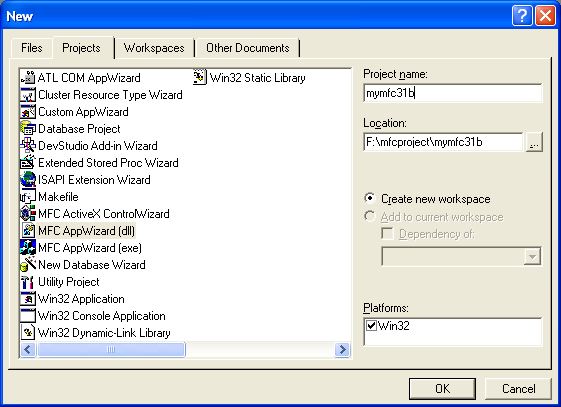
Figure 23: MYMFC31B – Visual C++ new project dialog, select MFC AppWizard (dll) project.

Figure 24: MYMFC31B – AppWizard step 1 of 1, select the Automation option.

Figure 1: MYMFC31B project summary.
Add new class using ClassWizard. Click the Add Class button.
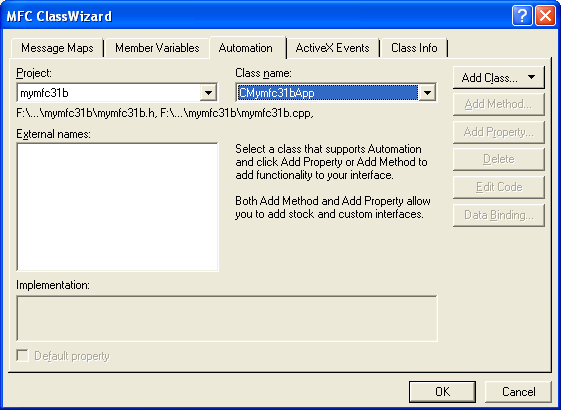
Figure 25: Adding new class using ClassWizard.
Fill up the CText class information and don’t forget to select Creatable by type ID option.
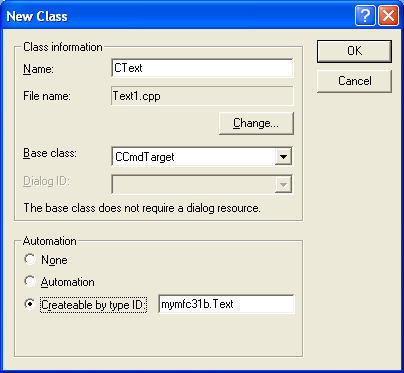
Figure 26: Entering CText class information.
Add/override OnFinalRelease() function to CMymfc31bApp class.

Figure 27: Adding OnFinalRelease() function to CMymfc31bApp class.
Add property to CText class. In the Automation page of ClassWizard, click the Add Property button. Make sure CText class is selected in the Class name combo box. Fill up the following information. This is a Get/Set method.

Figure 28: Adding Text property to CText class.
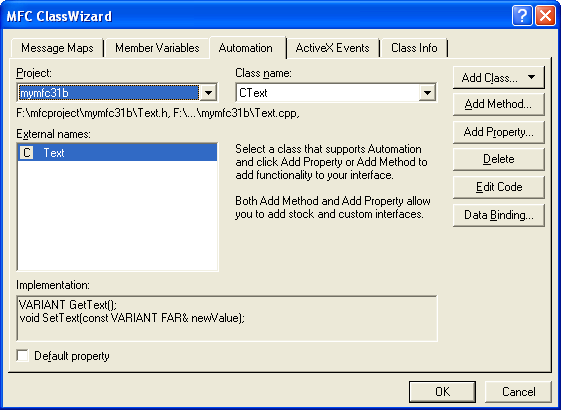
Figure 29: The added Text property.
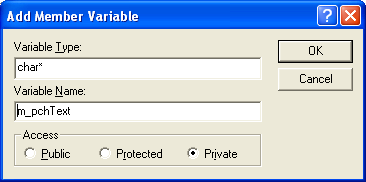
Add a private variable to CText class as shown below.
private:
char* m_pchText;
|
Figure 30: Adding a private member variable to CText class. |
Add manually the following in the Text.h.
BEGIN_INTERFACE_PART(PersistStream, IPersistStream)
STDMETHOD(GetClassID)(LPCLSID);
STDMETHOD(IsDirty)();
STDMETHOD(Load)(LPSTREAM);
STDMETHOD(Save)(LPSTREAM, BOOL);
STDMETHOD(GetSizeMax)(ULARGE_INTEGER FAR*);
END_INTERFACE_PART(PersistStream)
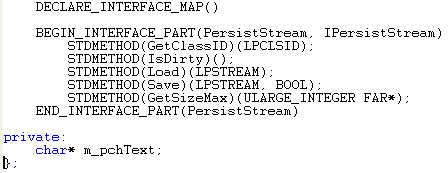
Listing 6.
Then, add the following PersistStream interface in Text.cpp
INTERFACE_PART(CText, IID_IPersistStream, PersistStream)
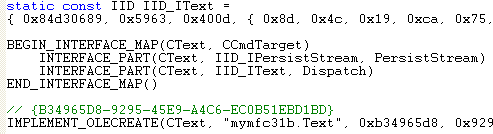
Listing 7.
Next, add the following PersistStream member function codes at the end of the Text.cpp.
STDMETHODIMP_(ULONG) CText::XPersistStream::AddRef()
{
METHOD_PROLOGUE(CText, PersistStream)
return (ULONG) pThis->ExternalAddRef();
}
STDMETHODIMP_(ULONG) CText::XPersistStream::Release()
{
METHOD_PROLOGUE(CText, PersistStream)
return (ULONG) pThis->ExternalRelease();
}
STDMETHODIMP CText::XPersistStream::QueryInterface(REFIID iid,void FAR* FAR* ppvObj)
{
METHOD_PROLOGUE(CText, PersistStream)
// ExternalQueryInterface looks up iid in the macro-generated tables
return (HRESULT) pThis->ExternalQueryInterface(&iid, ppvObj);
}
/////////////////////////////////////////////////////////////////////////////
STDMETHODIMP CText::XPersistStream::GetClassID(LPCLSID lpClassID)
{
TRACE("Entering CText::XPersistStream::GetClassID\n");
METHOD_PROLOGUE(CText, PersistStream)
ASSERT_VALID(pThis);
*lpClassID = CText::guid;
return NOERROR;
}
STDMETHODIMP CText::XPersistStream::IsDirty()
{
TRACE("Entering CText::XPersistStream::IsDirty\n");
METHOD_PROLOGUE(CText, PersistStream)
ASSERT_VALID(pThis);
return NOERROR;
}
STDMETHODIMP CText::XPersistStream::Load(LPSTREAM pStm)
{
ULONG nLength;
STATSTG statstg;
METHOD_PROLOGUE(CText, PersistStream)
ASSERT_VALID(pThis);
if(pThis->m_pchText != NULL)
{ delete [] pThis->m_pchText; }
// don't need to free statstg.pwcsName because of NONAME flag
VERIFY(pStm->Stat(&statstg, STATFLAG_NONAME) == NOERROR);
int nSize = statstg.cbSize.LowPart; // assume < 4 GB
if(nSize > 0) {
pThis->m_pchText = new char[nSize];
pStm->Read(pThis->m_pchText, nSize, &nLength);
}
return NOERROR;
}
STDMETHODIMP CText::XPersistStream::Save(LPSTREAM pStm, BOOL fClearDirty)
{
METHOD_PROLOGUE(CText, PersistStream)
ASSERT_VALID(pThis);
int nSize = strlen(pThis->m_pchText) + 1;
pStm->Write(pThis->m_pchText, nSize, NULL);
return NOERROR;
}
STDMETHODIMP CText::XPersistStream::GetSizeMax(ULARGE_INTEGER FAR* pcbSize)
{
TRACE("Entering CText::XPersistStream::GetSizeMax\n");
METHOD_PROLOGUE(CText, PersistStream)
ASSERT_VALID(pThis);
pcbSize->LowPart = strlen(pThis->m_pchText) + 1;
pcbSize->HighPart = 0; // assume < 4 GB
return NOERROR;
}
Add code for GetText() and SetText().
VARIANT CText::GetText()
{
return COleVariant(m_pchText).Detach();
}
void CText::SetText(const VARIANT FAR& newValue)
{
CString strTemp;
ASSERT(newValue.vt == VT_BSTR);
if(m_pchText != NULL) {
delete [] m_pchText;
}
strTemp = newValue.bstrVal; // converts to narrow chars
m_pchText = new char[strTemp.GetLength() + 1];
strcpy(m_pchText, strTemp);
}
Build MYMFC31B to generate the DLL. Make sure there is no error or warning. Then, use regsvr32 to register the component as shown below so that MYMFC31C is ready to be used. To test MYMFC31B we need a client program, MYMFC31C.
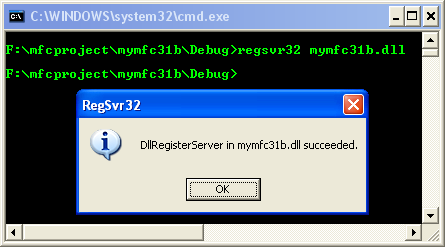
Figure 31: Registering mymfc31b.dll using regsvr32 at command prompt.
ClassWizard generated the CText class as an ordinary Automation component. The IPersistStream interface was added manually. Look carefully at the XPersistStream::Load and XPersistStream::Save functions. The Load() function allocates heap memory and then calls IStream::Read to load the contents of the stream. The Save() function copies the object's data to the stream by calling IStream::Write.
Further reading and digging:
-
Win32 process, thread and synchronization story can be found starting from Module R.
-
MSDN What's New (MFC Feature Pack) - feature pack.
-
DCOM at MSDN.
-
COM+ at MSDN.
-
COM at MSDN.
-
Unicode and Multi-byte character set: Story and program examples.