< C++ Formatted I/O 1 | Main | C++ File I/O 1 >|Site Index |Download >
MODULE 18a
C++ STREAM FORMATTED I/O 2
-------------------------------------------------------------------------------------------
MODULE 5: C FORMATTED I/O
|
| My Training Period: xx hours
The source code for this tutorial is available inC++ Formatted I/O source codes.
18.4.4 Stream Format States
| ||||||||||||||||||||||||||||||||||||||||
18.4.5 Trailing Zeroes and Decimal Points
ios::showpoint – this flag is set to force a floating point number to be output with its decimal point and trailing zeroes. For example, floating point 88.0 will print 88 without showpoint set and 88.000000 (or many more 0s specified by current precision) with showpoint set.
// using showpoint, controlling the trailing zeroes and floating points
#include <iostream>
#include <iomanip>
using namespace std;
void main(void)
{
cout<<"Before using the ios::showpoint flag\n"
<<"------------------------------------"<<endl;
cout<<"cout prints 88.88000 as: "<<88.88000
<<"\ncout prints 88.80000 as: "<<88.80000
<<"\ncout prints 88.00000 as: "<<88.00000
<<"\n\nAfter using the ios::showpoint flag\n"
<<"-----------------------------------"<<endl;
cout.setf(ios::showpoint);
cout<<"cout prints 88.88000 as: "<<88.88000
<<"\ncout prints 88.80000 as: "<<88.80000
<<"\ncout prints 88.00000 as: "<<88.00000<<endl;
}
Output:

18.4.6 Justification
Use for left, right or internal justification.
ios::left – enables fields to be left-justified with padding characters to the right.
ios::right – enables fields to be right-justified with padding characters to the left.
The character to be used for padding is specified by thefill or setfill.
internal – this flag indicates that a number’s sign (or base if ios::showbase flag is set) should be left-justified within a field, the number’s magnitude should be right-justified and the intervening spaces should be padded with the fill character.
Theleft, right andinternal flags are contained in static data member ios::adjustfield, soios::adjustfield argument must be provided as the second argument to setf when setting the right, left or internal justification flags becauseleft, right andinternal are mutually exclusive.
// using setw(), setiosflags(), resetiosflags() manipulators
// and setf and unsetf member functions
#include <iostream>
#include <iomanip>
using namespace std;
void main(void)
{
long p = 123456789L;
// L - literal data type qualifier for long...
// F - float, UL unsigned integer...
cout<<"The default for 10 fields is right justified:\n"
<<setw(10)<<p
<<"\n\nUsing member function\n"
<<"---------------------\n"
<<"\nUsing setf() to set ios::left:\n"<<setw(10);
cout.setf(ios::left,ios::adjustfield);
cout<<p<<"\nUsing unsetf() to restore the default:\n";
cout.unsetf(ios::left);
cout<<setw(10)<<p
<<"\n\nUsing parameterized stream manipulators\n"
<<"---------------------------------------\n"
<<"\nUse setiosflags() to set the ios::left:\n"
<<setw(10)<<setiosflags(ios::left)<<p
<<"\nUsing resetiosflags() to restore the default:\n"
<<setw(10)<<resetiosflags(ios::left)
<<p<<endl;
}
Output:

Another program example:
// using setw(), setiosflags(), showpos and internal
#include <iostream>
#include <iomanip>
using namespace std;
void main(void)
{
cout<<setiosflags(ios::internal | ios::showpos)<<setw(12)<<12345<<endl;
}
Output:

18.4.7 Padding
fill() – this member function specify the fill character to be used with adjusted field. If no value is specified, spaces are used for padding. This function returns the prior padding character.
setfill() – this manipulator also sets the padding character.
// using fill() member function and setfill() manipulator
#include <iostream>
#include <iomanip>
using namespace std;
void main(void)
{
long p = 30000;
cout<<p
<<" printed using the default pad character\n"
<<"for right and left justified and as hex\n"
<<"with internal justification.\n"
<<"--------------------------------------------\n";
cout.setf(ios::showbase);
cout<<setw(10)<<p<<endl;
cout.setf(ios::left,ios::adjustfield);
cout<<setw(10)<<p<<endl;
cout.setf(ios::internal,ios::adjustfield);
cout<<setw(10)<<hex<<p<<"\n\n";
cout<<"Using various padding character"<<endl;
cout<<"-------------------------------"<<endl;
cout.setf(ios::right,ios::adjustfield);
cout.fill('#');
cout<<setw(10)<<dec<<p<<'\n';
cout.setf(ios::left,ios::adjustfield);
cout<<setw(10)<<setfill('$')<<p<<'\n';
cout.setf(ios::internal,ios::adjustfield);
cout<<setw(10)<<setfill('*')<<hex<<p<<endl;
}
Output:

18.4.8 Another Stream Base
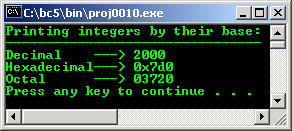
ios::basefield – includes thehex, oct anddec bits to specify that integers are to be treated as hexadecimal, octal and decimal values respectively
If none of these bits is set, stream insertions default to decimal. Integers starting with 0 are treated asoctal values, starting with0x or 0X are treated as hexadecimal values and all other integers are treated as decimal values. So, set the showbase if you want to force the base of values to be output.
A program example:
// using ios::showbase
#include <iostream>
#include <iomanip>
using namespace std;
void main(void)
{
long p = 2000;
cout<<setiosflags(ios::showbase)
<<"Printing integers by their base:\n"
<<"--------------------------------\n"
<<"Decimal ---> "<<p<<'\n'
<<"Hexadecimal---> "<<hex<<p<<'\n'
<<"Octal ---> "<<oct<<p<<endl;
}
Output:
18.4.9 Scientific Notation
|
// displaying floating number in system default, scientific and fixed format
#include <iostream>
using namespace std;
void main(void)
{
double p = 0.000654321, q = 9.8765e3;
cout<<"Declared variables\n"
<<"------------------\n"
<<"0.000654321"<<'\n'<<"9.8765e3"<<"\n\n";
cout<<"Default format:\n"
<<"---------------\n"
<<p<<'\t'<<q<<'\n'<<endl;
cout.setf(ios::scientific,ios::floatfield);
cout<<"Scientific format:\n"
<<"------------------\n"
<<p<<'\t'<<q<<'\n';
cout.unsetf(ios::scientific);
cout<<"\nDefault format after unsetf:\n"
<<"----------------------------\n"
<<p<<'\t'<<q<<endl;
cout.setf(ios::fixed,ios::floatfield);
cout<<"\nIn fixed format:\n"
<<"----------------\n"
<<p<<'\t'<<q<<endl;
}
Output:

18.4.10 Uppercase and Lowercase
ios::uppercase – this flag is set to force an uppercase X or E to be output with hexadecimal integers or scientific notation floating point values respectively.
When this flag is set, all letters in a hexadecimal values output uppercase.
// using ios::uppercase flag
#include <iostream>
#include <iomanip>
using namespace std;
void main(void)
{
long p = 12345678;
cout<<setiosflags(ios::uppercase)
<<"Uppercase letters in scientific\n"
<<"notation-exponents and hexadecimal values:\n"
<<"------------------------------------------\n"
<<5.7654e12<<'\n'
<<hex<<p<<endl;
}
Output:

Another program example.
// demonstrating the flags() member function any format
// flags() not specified in the argument to flags() are reset.
#include <iostream>
using namespace std;
void main(void)
{
long p = 2000;
double q = 0.00124345;
// set a new format state
cout<<"The value of flags variable is: "
<<cout.flags()<<'\n'
<<"Print long int and double in original format:\n"
<<p<<'\t'<<q<<"\n\n";
long OriginalFormat = cout.flags(ios::oct | ios::scientific);
// save the previous format state
cout<<"The value of the flags variable is: "
<<cout.flags()<<'\n'
<<"Print long int and double in a new format\n"
<<"specified using the flags member function:\n"
<<p<<'\t'<<q<<"\n\n";
cout.flags(OriginalFormat);
// restore the original format setting
cout<<"The value of the flags variable is: "
<<cout.flags()<<'\n'
<<"Print values in original format again:\n"
<<p<<'\t'<<q<<endl;
}
Sample output:
--------------------------------------------------------------------------------------------------

18.4.11 Stream Error States
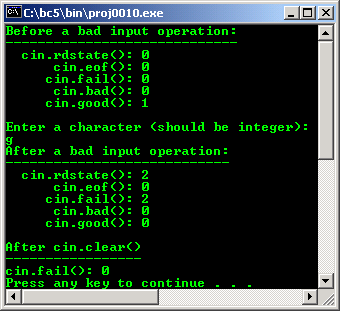
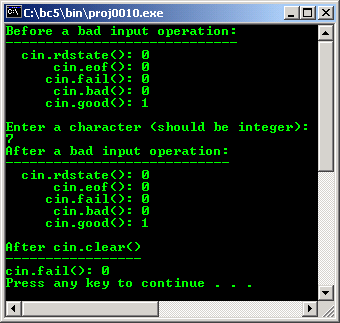
eofbit(ios::eofbit) is set automatically for an input stream when end-of-file is encountered. To determine if end-of-file has been encountered on a stream, eof() member function can be used. For example:
cin.eof()
Will returns true if end-of-file has been encountered on cin and false otherwise.
failbit(ios::failbit) is set for a stream when a format error occurs on the stream, but character has not been lost. fail() member function determines if a stream operation has failed, normally recoverable.
badbit(ios::badbit) – is set for a stream when an error occurs that results in the loss of data. bad() member function determines if a stream operation has failed, normally no recoverable.
goodbit(ios::goodbit) – is set for a stream if none of the bits eofbit(),failbit() or badbit() are set for the stream. good() member function returns true if the bad(),fail() and eof() functions would return false.
rdstate() member function returns the error state of the stream. For example
cout.rdstate()
Would return the state of the stream which could then be tested.
clear() member function is normally used to restore a streams state to good() so that I/O may proceed on the stream.
A program example:
// using eof(), fail(), bad(), good(), clear() and rdstate()
#include <iostream>
using namespace std;
void main(void)
{
int p;
cout<<"Before a bad input operation: \n"
<<"-----------------------------\n"
<<" cin.rdstate(): "<<cin.rdstate()
<<"\n cin.eof(): "<<cin.eof()
<<"\n cin.fail(): "<<cin.fail()
<<"\n cin.bad(): "<<cin.bad()
<<"\n cin.good(): "<<cin.good()
<<"\n\nEnter a character (should be integer): "<<endl;
cin>>p;
cout<<"After a bad input operation: \n"
<<"----------------------------\n"
<<" cin.rdstate(): "<<cin.rdstate()
<<"\n cin.eof(): "<<cin.eof()
<<"\n cin.fail(): "<<cin.fail()
<<"\n cin.bad(): "<<cin.bad()
<<"\n cin.good(): "<<cin.good()<<"\n\n";
cin.clear();
cout<<"After cin.clear()\n"
<<"-----------------\n"
<<"cin.fail(): "<<cin.fail()<<endl;
}
Output:
// displaying floating number in system
// default, scientific and fixed format
#include <iostream>
usingnamespace std;
void main(void)
{
double p = 0.000654321, q = 9.8765e3;
cout<<"Declared variables\n"
<<"------------------\n"
<<"0.000654321"<<'\n'<<"9.8765e3"<<"\n\n";
cout<<"Default format:\n"
<<"---------------\n"
<<p<<'\t'<<q<<'\n'<<endl;
cout.setf(ios::scientific,ios::floatfield);
cout<<"Scientific format:\n"
<<"------------------\n"
<<p<<'\t'<<q<<'\n';
cout.unsetf(ios::scientific);
cout<<"\nDefault format after unsetf:\n"
<<"----------------------------\n"
<<p<<'\t'<<q<<endl;
cout.setf(ios::fixed,ios::floatfield);
cout<<"\nIn fixed format:\n"
<<"----------------\n"
<<p<<'\t'<<q<<endl;
}
Output:

///// -padding.cpp- /////
// using fill() member function and setfill() manipulator
#include <iostream>
#include <iomanip>
using namespace std;
int main(void)
{
long p = 30000;
cout<<p <<" printed using the default character pad\n"
<<"for right and left justified and as hex\n"
<<"with internal justification.\n"
<<"----------------------------------------\n";
cout.setf(ios::showbase);
cout<<setw(10)<<p<<endl;
cout.setf(ios::left, ios::adjustfield);
cout<<setw(10)<<p<<endl;
cout.setf(ios::internal, ios::adjustfield);
cout<<setw(10)<<hex<<p<<"\n\n";
cout<<"Using character padding"<<endl;
cout<<"-----------------------"<<endl;
cout.setf(ios::right, ios::adjustfield);
cout.fill('#');
cout<<setw(10)<<dec<<p<<'\n';
cout.setf(ios::left, ios::adjustfield);
cout<<setw(10)<<setfill('$')<<p<<'\n';
cout.setf(ios::internal, ios::adjustfield);
cout<<setw(10)<<setfill('*')<<hex<<p<<endl;
return 0;
}
[bodo@bakawali ~]$ g++ padding.cpp -o padding
[bodo@bakawali ~]$ ./padding
30000 printed using the default character pad
for right and left justified and as hex
with internal justification.
----------------------------------------
30000
30000
0x 7530
Using character padding
-----------------------
#####30000
30000$$$$$
0x****7530
tenouk fundamental of C++ object oriented tutorial
Further C++ formatted I/O reading:
The source code for this tutorial is available inC++ Formatted I/O source codes.
Check the best selling C / C++, Object Oriented and pattern analysis books at Amazon.com.