|<Windows Process & Threads Programming 8 |Main |Windows Process & Threads Programming 10 >|Site Index |Download |
MODULE U3
PROCESSES AND THREADS: Win32/WINDOWS APIs
Part 9: More Program Examples
What we will learn in this session?
Changing Environment Variables.
Waiting for Multiple Objects.
| My Training Period: xx hours. Before you begin, read someinstruction here.
The expected abilities to be acquired:
Note: For Multithreaded program examples, you have to set your project toMultithread project type.
Changing Environment Variables
Each process has an environment block associated with it. The environment block consists of a null-terminated block of null-terminated strings (meaning there are two null bytes at the end of the block), where each string is in the form: name=value. All strings in the environment block must be sorted alphabetically by name. The sort is case-insensitive, Unicode order, without regard to locale. Because the equal sign is a separator, it must not be used in the name of an environment variable. By default, a child process inherits a copy of the environment block of the parent process. The following example demonstrates how to create a new environment block to pass to a child process.
// ForWinXp #define _WIN32_WINNT 0x0501 #include <windows.h> #include <stdio.h> // Make sure do not exceed the maximum of the environment block size // supported by your Windows OS version...else there will be an error // message... #define BUFSIZE 1024
|
void MyErrorExit(LPTSTR lpszMessage)
{
fprintf(stderr, "%s\n", lpszMessage);
// Exit peacefully...
ExitProcess(0);
}
int main()
{
LPTSTR lpszCurrentVariable;
TCHAR tchNewEnv[BUFSIZE];
BOOL fSuccess;
STARTUPINFO siStartInfo;
PROCESS_INFORMATION piProcInfo;
ZeroMemory(&siStartInfo,sizeof(siStartInfo));
siStartInfo.cb = sizeof(siStartInfo);
ZeroMemory(&piProcInfo,sizeof(piProcInfo));
// Copy environment strings into an environment block.
lpszCurrentVariable = tchNewEnv;
if (lstrcpy(lpszCurrentVariable, "MyTestVersion=SP 2.0") == NULL)
MyErrorExit("lstrcpy() for new environment string failed.");
else
printf("lstrcpy() for new environment string is OK.\n");
lpszCurrentVariable += lstrlen(lpszCurrentVariable) + 1;
if (lstrcpy(lpszCurrentVariable, "MyTestSetting=TestValue") == NULL)
MyErrorExit("lstrcpy() for new environment string failed.");
else
printf("lstrcpy() for new environment string is OK.\n");
// Terminate the block with a NULL byte.
lpszCurrentVariable += lstrlen(lpszCurrentVariable) + 1;
*lpszCurrentVariable = '\0';
// Create the child process, specifying a new environment block.
fSuccess = CreateProcess(NULL, "c:\\windows\\system32\\mem.exe", NULL, NULL, TRUE, 0,
(LPVOID) tchNewEnv, // new environment block, here just 2 entries, a dummy...
NULL, &siStartInfo, &piProcInfo);
if (!fSuccess)
MyErrorExit("CreateProcess(), with new environment block failed.");
else
printf("CreateProcess(), with new environment block is OK.\n");
return 0;
}
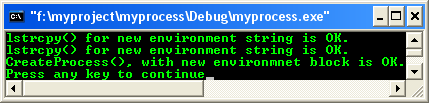
Just click the Close button. Our two environment variables in the block are not complete, not for Win32 (32 bit), hence not usable for Windows OS, just for testing.
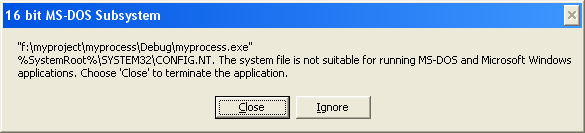
A sample output:
If you want the child process to inherit most of the parent's environment with only a few changes:
Save the current values,
Make changes for the child process to inherit,
Create the child process, and then
Restore the saved values,
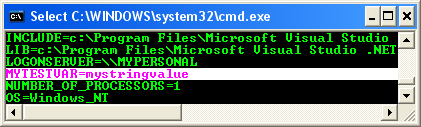
As shown in the following code. For our testing and playing, the following environment variable has been added.
C:\>set MYTESTVAR=mystringvalue
// ForWinXp #define _WIN32_WINNT 0x0501 #include <windows.h> #include <stdio.h> #define BUFSIZE 4029
void MyErrorExit(LPTSTR lpszMessage) { fprintf(stderr, "%s\n", lpszMessage); // Exit peacefully... ExitProcess(0); }
int main() { LPTSTR lpszOldValue; TCHAR tchBuf[BUFSIZE]; BOOL fSuccess; STARTUPINFO siStartInfo; PROCESS_INFORMATION piProcInfo;
|
ZeroMemory(&siStartInfo,sizeof(siStartInfo));
siStartInfo.cb = sizeof(siStartInfo);
ZeroMemory(&piProcInfo,sizeof(piProcInfo));
// lpszOldValue gets current value of "MYTESTVAR", or NULL if "MYTESTVAR"
// environment variable does not exist. Set "MYTESTVAR" to new value ("mynewstringvalue"),
// create child process, then use SetEnvironmentVariable() to restore
// original value of "MYTESTVAR". If lpszOldValue is NULL, the "MYTESTVAR"
// variable will be deleted.
lpszOldValue = ((GetEnvironmentVariable("MYTESTVAR", tchBuf, BUFSIZE) > 0) ? tchBuf : NULL);
// Set a new value for the child process to inherit, "mynewstringvalue".
if (!SetEnvironmentVariable("MYTESTVAR", "mynewstringvalue"))
MyErrorExit("SetEnvironmentVariable() for child process failed.");
else
printf("SetEnvironmentVariable() for child process is OK.\n");
// Create a child process.
fSuccess = CreateProcess(NULL, "c:\\windows\\system32\\mem.exe", NULL, NULL, TRUE, 0,
NULL, // inherit parent's environment
NULL, &siStartInfo, &piProcInfo);
if (!fSuccess)
MyErrorExit("CreateProcess(), child failed.");
else
printf("CreateProcess(), child is OK.\n");
// Restore the parent's environment.
if (!SetEnvironmentVariable("MYTESTVAR", lpszOldValue))
MyErrorExit("SetEnvironmentVariable(), restore the parent's environment variables failed.");
else
printf("CreateProcess(), restore the parent's environment variables is OK.\n");
return 0;
}
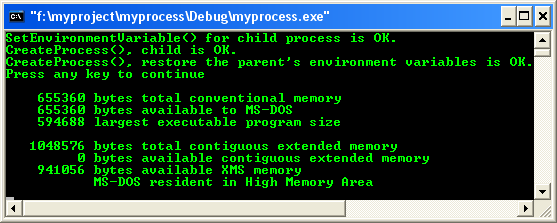
A sample output:
Finally, don’t forget to delete our environment variable used in this testing by providing empty variable string as shown below.
C:\>set MYTESTVAR=
Note that altering the environment variables of a child process during process creation is the only way one process can directly change the environment variables of another process. A process can never directly change the environment variables of another process that is not a child of that process.The following example, taken from a console process, prints the contents of the process's environment block.
// ForWinXp
#define _WIN32_WINNT 0x0501
#include <windows.h>
#include <stdio.h>
void MyErrorExit(LPTSTR lpszMessage)
{
fprintf(stderr, "%s\n", lpszMessage);
// Exit peacefully...
ExitProcess(0);
}
int main(int argc,char argv[])
{
LPTSTR lpszVariable;
LPVOID lpvEnv;
// Get a pointer to the environment block.
lpvEnv = GetEnvironmentStrings();
// If the returned pointer is NULL, exit.
if (lpvEnv == NULL)
MyErrorExit("GetEnvironmentStrings() failed.");
else
printf("GetEnvironmentStrings() is OK.\n\n");
// Variable strings are separated by NULL byte, and the block is
// terminated by a NULL byte.
for (lpszVariable = (LPTSTR) lpvEnv; *lpszVariable; lpszVariable++)
{
while (*lpszVariable)
putchar(*lpszVariable++);
putchar('\n');
}
if(FreeEnvironmentStrings((LPSTR)lpvEnv) == 0)
printf("GetEnvironmentStrings() failed.\n");
else
printf("\nGetEnvironmentStrings() is OK.\n");
return 0;
}
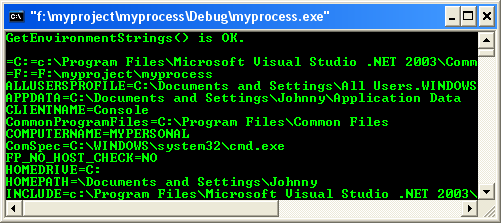
A sample output:
Waiting for Multiple Objects
The following example uses the CreateEvent() function to create two event objects. It then uses theWaitForMultipleObjects() function to wait for the state of one of the objects to be set to signaled.
// ForWinXp
#define _WIN32_WINNT 0x0501
#include <windows.h>
#include <stdio.h>
int main()
{
HANDLE hEvents[2];
DWORD i, dwEvent;
// Create two event objects.
for (i = 0; i < 2; i++)
{
hEvents[i] = CreateEvent(
NULL, // no security attributes
FALSE, // auto-reset event object
FALSE, // initial state is non-signaled
NULL); // unnamed object
if (hEvents[i] == NULL)
{
printf("CreateEvent() error: %d\n", GetLastError());
ExitProcess(0);
}
else
printf("CreateEvent() #%d is OK.\n", i);
}
// The creating thread waits for other threads or processes
// to signal the event objects.
dwEvent = WaitForMultipleObjects(
2, // number of objects in array
hEvents, // array of objects
FALSE, // wait for any
5000); // 5000 ms
// Return value indicates which event is signaled.
switch (dwEvent)
{
// hEvent[0] was signaled.
case WAIT_OBJECT_0 + 0:
{
// TODO: Perform tasks required by this event.
printf("hEvent[%d] was signaled.\n", i);
break;
}
// hEvent[1] was signaled.
case WAIT_OBJECT_0 + 1:
{
// TODO: Perform tasks required by this event.
printf("hEvent[%d] was signaled.\n", i);
break;
}
// Return value is invalid.
default:
printf("Wait error: %d\n", GetLastError());
// Exit peacefully...
ExitProcess(0);
}
return 0;
}
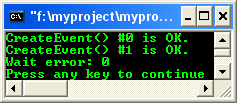
A sample output:
-----------------------------------------------End: Processes & Threads program examples--------------------------------------------
Further reading and digging:
Microsoft C references, online MSDN.
Microsoft Visual C++, online MSDN.
ReactOS - Windows binary compatible OS - C/C++ source code repository, Doxygen.
Linux Access Control Lists (ACL) info can be found atAccess Control Lists.
For Multi-bytes, Unicode characters and Localization please refer to Locale, wide characters & Unicode (Story) and Windows users & groups programming tutorials (Implementation).
Structure, enum, union and typedef story can be found C/C++ struct, enum, union & typedef.
Check the best selling C / C++ and Windows books at Amazon.com.