| Previous | Main | Next | Site Index | Download | Disclaimer | Privacy |
Using Borland C++ BuilderX (Multi platform)
|


-
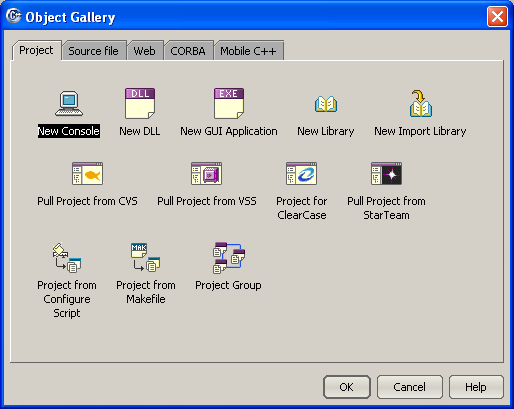
In the following Object Gallery, select New Console icon and click OK button.
-
Enter the project name and choose the desired path. Then click the Next button.

-
The nice part of this compiler, depend on your installation (Windows, Linux or Solaris), choose the target platform of your project. For this example, choose the Borland Win32 Compiler Tools. Then click the Next button.

-
Specify the source filename for this project. For this example, sourcefile1 has been entered. Then click Finish button.

-
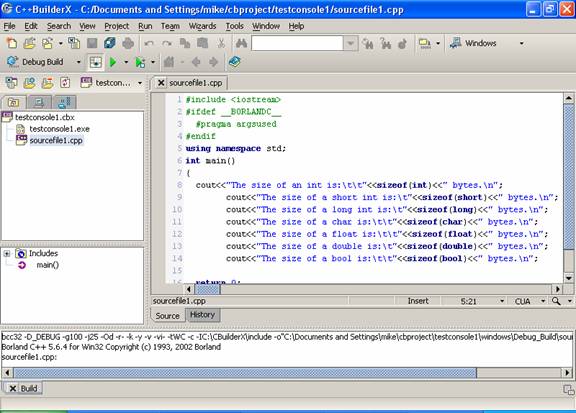
The following programming environment will be displayed. Now we are ready to enter the source codes. Type the C++ codes or copy and paste into the right window, the editor :o).

-
The following program example can be used for your first project.
// By using predefined sizeof() function,
// displaying the data type size, 1 byte = 8 bits
#include <iostream>
using namespace std;
int main()
{
cout<<"The size of an int is:\t\t"<<sizeof(int)<<" bytes.\n";
cout<<"The size of a short int is:\t"<<sizeof(short)<<" bytes.\n";
cout<<"The size of a long int is:\t"<<sizeof(long)<<" bytes.\n";
cout<<"The size of a char is:\t\t"<<sizeof(char)<<" bytes.\n";
cout<<"The size of a float is:\t\t"<<sizeof(float)<<" bytes.\n";
cout<<"The size of a double is:\t"<<sizeof(double)<<" bytes.\n";
cout<<"The size of a bool is:\t\t"<<sizeof(bool)<<" bytes.\n";
return 0;
}

-
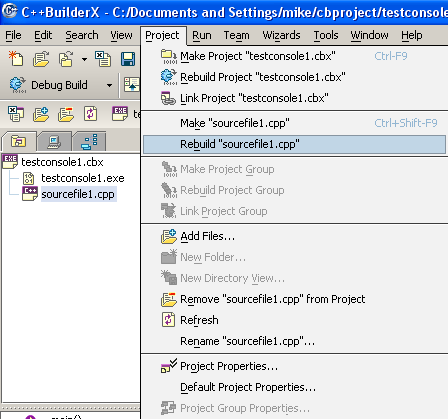
Now you are ready to build (compile and link) your project. Select Project menu and select Rebuild "your_source_file_name.cpp". Any error or warning will be displayed in the bottom window.
|
|
|
-
If there is no error, you are ready to run your program. Click Run menu and select Run Project sub menu.

-
The output will be displayed in the bottom window.

-
Let try another program example that prompting user input.
#include <iostream>
using namespace std;
int main()
{
int job_code, car_allowance;
int housing_allowance, entertainment_allowance;
cout<<"Available job codes: 1 or non 1:\n"<<endl;
cout<<"Enter job code: ";
cin>>job_code;
if(job_code==1)
{
car_allowance = 200.00;
housing_allowance = 800.00;
entertainment_allowance = 250.00;
cout<<"Benefits: \n";
cout<<"Car allowance: "<<car_allowance<<endl;
cout<<"Housing allowance: "<<housing_allowance<<endl;
cout<<"Entertainment allowance: "<<entertainment_allowance<<endl;
}
else
{
car_allowance = 100.00;
housing_allowance = 400.00;
entertainment_allowance = 150.00;
cout<<"Benefits: \n";
cout<<"Car allowance: "<<car_allowance<<endl;
cout<<"Housing allowance: "<<housing_allowance<<endl;
cout<<"Entertainment allowance: "<<entertainment_allowance<<endl;
}
return 0;
}
The output sample:

-
Well, very nice compiler huh!. By the way, don’t forget to explore other menus, short cuts etc. and the GUI programming.
---www.tenouk.com---
Further digging:
| Previous | Main | Next | Site Index | Download | Disclaimer | Privacy |