|< Windows User Accounts & Groups Programming 2 | Main | Windows User Accounts & Groups Programming 4 >|Site Index |Download |
MODULE N
WINDOWS OS
.::USER ACCOUNTS AND GROUPS: STORY & PROGRAM EXAMPLES::.
PART 3
What do we have in this Module?
-
NetUserChangePassword() Example Code
-
NetLocalGroupAdd() Example Code
-
NetLocalGroupAddMembers() Example Code
My Training Period: xx hours. Before you begin, read someinstruction here. This is a continuation from previousWindows User Accounts & Groups Programming 2.
The expected skills:
NetUserChangePassword()Example Code
The following code sample demonstrates how to change a user's password with a call to theNetUserChangePassword() function. All parameters to the function are required.
//******* mychangepass.cpp *********** #define _WIN32_WINNT 0x0501 // Wide character/Unicode based program #ifndef UNICODE #define UNICODE #endif
#include <windows.h> #include <stdio.h> #include <lm.h>
// This program accept 4 arguments, a servername, a username, an old password // and new password. Make sure the old password is entered correctly int wmain(int argc, wchar_t *argv[ ]) { DWORD dwError = 0; NET_API_STATUS nStatus;
// All parameters are required. if(argc != 5) { fwprintf(stderr, L"Usage: %s ServerName UserName OldPassword NewPassword\n", argv[0]); // Just exit, no further processing exit(1); } |
// Call the NetUserChangePassword function.
nStatus = NetUserChangePassword(argv[1], argv[2], argv[3], argv[4]);
// If the call succeeds, inform the user.
if(nStatus == NERR_Success)
fwprintf(stderr, L"Password for %s user has been changed successfully\n", argv[2]);
// Otherwise, print the system error.
else
fprintf(stderr, "A system error has occurred: %d\n", nStatus);
return 0;
}
A sample output:
E:\myproject\win32prog\Debug>mychangepass
Usage: mychangepass ServerName UserName OldPassword NewPassword
E:\myproject\win32prog\Debug> mychangepass mypersonal myuser#1 12345678 87654321
Password for myuser#1 user has been changed successfully
E:\myproject\win32prog\Debug>
The NetLocalGroupAdd() Example Code
The following program example creates a local group.
//********* mylgroup.cpp **********
// For WinXp
#define _WIN32_WINNT 0x0501
// Wide character/Unicode based program
#ifndef UNICODE
#define UNICODE
#endif
#include <windows.h>
#include <stdio.h>
#include <lm.h>
// This program accept 3 arguments: servername, GroupName and Comment.
int wmain(int argc, wchar_t *argv[])
{
LOCALGROUP_INFO_1 lgi1;
DWORD dwLevel = 1;
DWORD dwError = 0;
NET_API_STATUS nStatus;
if(argc != 4)
{
fwprintf(stderr, L"Usage: %s ServerName GroupName Comment\n", argv[0]);
// Just exit, no further processing
exit(1);
}
// Set up the LOCALGROUP_INFO_1 structure.
// Assign the group name and comment
lgi1.lgrpi1_name = argv[2]; // Local group name
lgi1.lgrpi1_comment = argv[3];// Comment
// Call the NetLocalGroupAdd() function, specifying level 1.
nStatus = NetLocalGroupAdd(argv[1],
dwLevel,
(LPBYTE)&lgi1,
&dwError);
// If the call succeeds, inform the user.
if(nStatus == NERR_Success)
fwprintf(stderr, L"%s local group has been created successfully on %s machine.\n", argv[2], argv[1]);
// Otherwise, print the system error.
else
fprintf(stderr, "A system error has occurred: %d\n", nStatus);
return 0;
}
A sample output:
E:\myproject\win32prog\Debug>mylgroup
Usage: mylgroup ServerName GroupName Comment
E:\myproject\win32prog\Debug>mylgroup mypersonal mytestgroup "Just a test local group creation"
mytestgroup local group has been created successfully on mypersonal machine.
E:\myproject\win32prog\Debug>
Verify our task.

Figure 1:mytestgroup group has been created.
NetLocalGroupAddMembers() Example Code
The following example demonstrates how to add user or group as a member of group.
//********* myaddmember.cpp **********
// For WinXp
#define _WIN32_WINNT 0x0501
// Wide character/Unicode based program
#ifndef UNICODE
#define UNICODE
#endif
#include <windows.h>
#include <stdio.h>
#include <lm.h>
// This program accept 3 arguments: servername, GroupName and
// MemberAccountName (DomainName\AccountName).
int wmain(int argc, wchar_t *argv[ ])
{
LOCALGROUP_MEMBERS_INFO_3 lgmi3;
DWORD dwLevel = 3;
DWORD totalEntries = 1;
NET_API_STATUS nStatus;
if(argc != 4)
{
fwprintf(stderr, L"Usage: %s ServerName GroupName MemberAccountName-(DomainName\\AccountName)\n", argv[0]);
// Just exit, no further processing
exit(1);
}
// Set up the LOCALGROUP_MEMBERS_INFO_3 structure.
// Assign the member account name in form of
// DomainName\AccountName
lgmi3.lgrmi3_domainandname = argv[3];
// Call the NetLocalGroupAddMembers() function, specifying level 3.
// Level 0 can use SID
nStatus = NetLocalGroupAddMembers(argv[1],
argv[2],
dwLevel,
(LPBYTE)&lgmi3,
totalEntries);
// If the call succeeds, inform the user.
if(nStatus == NERR_Success)
fwprintf(stderr, L"%s has been added successfully to %s on %s machine.\n", argv[3], argv[2], argv[1]);
// Otherwise, print the system error.
else
fwprintf(stderr, L"A system error has occurred: %d\n", nStatus);
return 0;
}
A sample output:
F:\myproject\win32prog\Debug>myaddmember
Usage: myaddmember ServerName GroupName MemberAccountName-(DomainName\AccountName)
F:\myproject\win32prog\Debug>myaddmember mypersonal mytestgroup mypersonal\myuser#1
mypersonal\myuser#1 has been added successfully to mytestgroup on mypersonal machine.
F:\myproject\win32prog\Debug>myaddmember mypersonal mytestgroup mypersonal\myuser#2
mypersonal\myuser#2 has been added successfully to mytestgroup on mypersonal machine.
F:\myproject\win32prog\Debug>myaddmember mypersonal mytestgroup mypersonal\myuser#3
mypersonal\myuser#3 has been added successfully to mytestgroup on mypersonal machine.
F:\myproject\win32prog\Debug>myaddmember mypersonal Administrators mypersonal\myuser#1
mypersonal\myuser#1 has been added successfully to Administrators on mypersonal machine.
F:\myproject\win32prog\Debug>myaddmember mypersonal "Power Users" mypersonal\myuser#1
mypersonal\myuser#1 has been added successfully to Power Users on mypersonal machine.
F:\myproject\win32prog\Debug>myaddmember mypersonal Administrators mypersonal\mytestgroup
mypersonal\mytestgroup has been added successfully to Administrators on mypersonal machine.
F:\myproject\win32prog\Debug>
When a user account has been added to the Users local group, then it is usable. You can verify it through the Win Xp login screen. From the output, the restricted usermyuser#1 etc. can be added as a member of Power Users and Administrators groups because the user that runs the program is a member of Administrators group. Note that the last output had shown we successfully addedmytestgroup as a member of Administrators group.
 |
Figure 2: Three members were added to mytestgroup group.
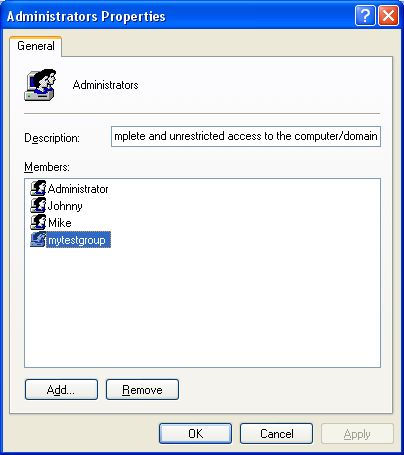
Figure 3:mytestgroup group was added to Administrators group.
The following is the previous example that has been run on Windows 2000 Server Domain Controller (DC) of kpts.org domain. The DC logged on as Domain Administrator and the compiler used was Visual C++ 6.0.
//********* mydomusrgrp.cpp **********
// For Win 2000
#define _WIN32_WINNT 0x0500
// Wide character/Unicode based program
#ifndef UNICODE
#define UNICODE
#endif
#include <windows.h>
#include <stdio.h>
#include <lm.h>
// This program accept 3 arguments: servername, GroupName and MemberAccountName (DomainName\AccountName).
int wmain(int argc, wchar_t *argv[ ])
{
LOCALGROUP_MEMBERS_INFO_3 lgmi3;
DWORD dwLevel = 3;
DWORD totalEntries = 1;
NET_API_STATUS nStatus;
if(argc != 4)
{
fwprintf(stderr, L"Usage: %s ServerName GroupName MemberAccountName-(DomainName\\AccountName)\n", argv[0]);
// Just exit, no further processing
exit(1);
}
// Set up the LOCALGROUP_MEMBERS_INFO_3 structure.
// Assign the member account name in form of thr DomainName\AccountName
lgmi3.lgrmi3_domainandname = argv[3];
// Call the NetLocalGroupAddMembers() function, specifying level 3. Level 0 can use SID
nStatus = NetLocalGroupAddMembers(argv[1],
argv[2],
dwLevel,
(LPBYTE)&lgmi3,
totalEntries);
// If the call succeeds, inform the user.
if(nStatus == NERR_Success)
fwprintf(stderr, L"%s has been added successfully to %s group on %s machine.\n", argv[3], argv[2], argv[1]);
// Otherwise, print the system error.
else
fwprintf(stderr, L"A system error has occurred: %d\n", nStatus);
return 0;
}
A sample output:
C:\myproject\win32prog\Debug>mydomusrgrp
Usage: mydomusrgrp ServerName GroupName MemberAccountName-(DomainName\AccountName)
C:\myproject\win32prog\Debug>mydomusrgrp tutorkpts Administrators kpts.org\anonymdomuser
kpts.org\anonymdomuser has been added successfully to Administrators group on tutorkpts machine.
Then verify our task.
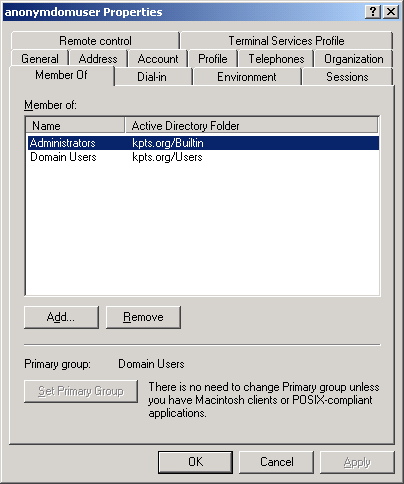
Figure 4:anonymdomuser user has been added to Domain Administrators built-in group.
Further reading and digging:
Check the best selling C, C++ and Windows books at Amazon.com.
Microsoft C references, online MSDN.
Microsoft Visual C++, online MSDN.
ReactOS - Windows binary compatible OS - C/C++ source code repository, Doxygen.
Linux Access Control Lists (ACL) info can be found atAccess Control Lists.
For Multi-bytes, Unicode characters and Localization please refer to Locale, wide characters & Unicode (Story) and Windows users & groups programming tutorials (Implementation).
Structure, enum, union and typedef story can be foundC/C++ struct, enum, union & typedef.
Notation used in MSDN is Hungarian Notation instead of CamelCase and is discussedWindows programming notations.
Windows data type information is inWindows data types used in Win32 programming.