| Tenouk C & C++ | MFC Home | ATL and ActiveX Controls 2 | ATL and ActiveX Controls 4 | Download | Site Index |
ATL and ActiveX Controls 3
Program examples compiled using Visual C++ 6.0 compiler on Windows XP Pro machine with Service Pack 2. Topics and sub topics for this tutorial are listed below. Don’t forget to read Tenouk’s small disclaimer. The supplementary note for this tutorial is control class.
-
The Myatldicesvr Program From Scratch...continue
|
|
Edit the LoadBitmap() function by adding the switch statement to select different dice color.
|
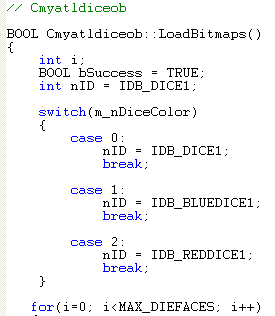
Listing 16.
Edit the RollDice() function.
STDMETHODIMP Cmyatldiceob::RollDice()
{
// TODO: Add your implementation code here
if(::IsWindow(m_hWnd))
{
SetTimer(1, 250);
}
return S_OK;
}

Listing 17.
Edit OnTimer() function to reflect our new functionality.
LRESULT OnTimer(UINT uMsg, WPARAM wParam, LPARAM lParam, BOOL& bHandled)
{
// TODO : Add Code for message handler.
// Call DefWindowProc if necessary.
if(m_nTimesRolled > m_nTimesToRoll)
{
m_nTimesRolled = 0;
KillTimer(1);
Fire_DiceRolled(m_nFirstDieValue, m_nSecondDieValue);
if(m_nFirstDieValue == m_nSecondDieValue)
{
Fire_Doubles(m_nFirstDieValue);
}
if(m_nFirstDieValue == 1 && m_nSecondDieValue == 1)
{
Fire_SnakeEyes();
}
}
else
{
m_nFirstDieValue = (rand() % (MAX_DIEFACES)) + 1;
m_nSecondDieValue = (rand() % (MAX_DIEFACES)) + 1;
FireViewChange();
m_nTimesRolled++;
}
bHandled = TRUE;
return 0;
}
Adding a property page so that user can easily use/change our control properties. Add new ATL object by selecting the Insert New ATL Object.
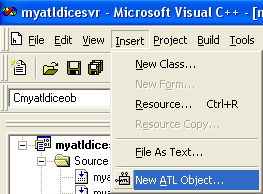
Figure 39: Inserting new ATL object.
Select Controls in Category list and Property Page in Objects list. Then click the Next button
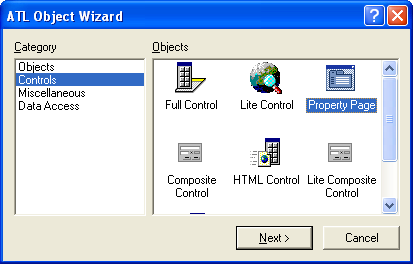
Figure 40: Selecting Property Object for control’s property page.
Type in a meaningful name such as DiceMainPropPage as shown below in the Short Name field.

Figure 41: Entering new ATL object’s name.
Just accept the default setting for Attributes page.
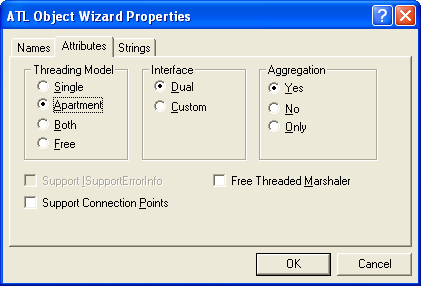
Figure 42: Accepting the defaults option of the Attributes.
Type in meaningful strings for Strings page and click the OK button.
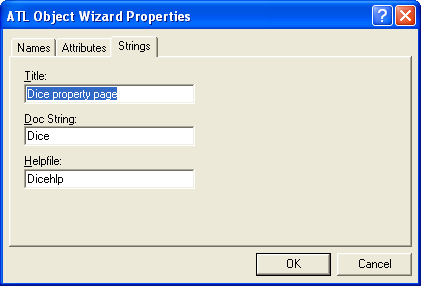
Figure 43: Entering some strings for our control’s property page.
Add Static text, Combo box and Edit control to the blank IDD_DICEMAINPROPPAGE template. Use IDC_COLOR and IDC_TIMESTOROLL as their IDs respectively. Leave others as default.
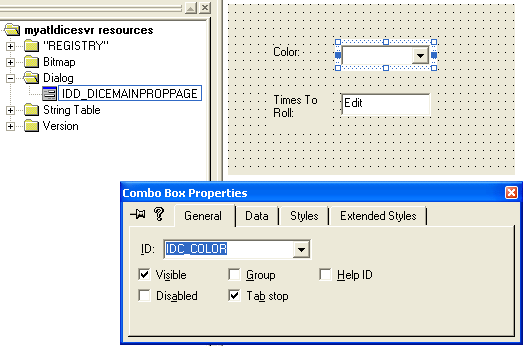
Figure 44: Adding Static text, Combo box and Edit control to the blank property page template.
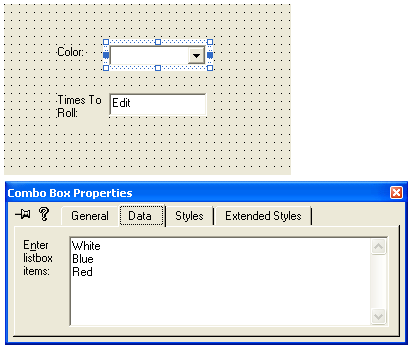
Figure 45: Combo box, IDC_COLOR property.
|
Figure 46: Edit control’s property. |
|

Add Windows message handlers as shown in the following Table using ClassView to CDiceMainPropPage class.
|
ID/Class |
Windows message |
Functions |
|
IDC_COLOR |
CBN_SELENDOK |
OnColorChange() |
|
IDC_TIMESTOROLL |
EN_CHANGE |
OnTimesToRollChange() |
|
CDiceMainPropPage |
WM_INITDIALOG |
- |
|
Table 1. |
||
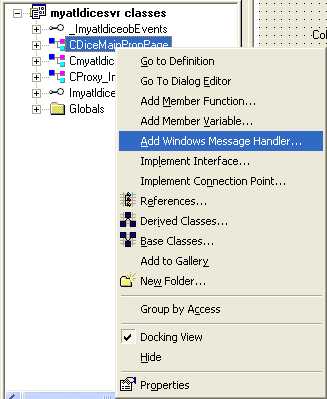
Figure 47: Adding Windows message handlers to CDiceMainPropPage class.
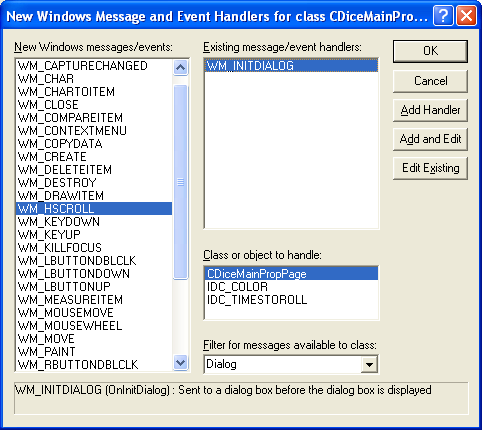
Figure 48: Adding WM_INITDIALOG handler to CDiceMainPropPage class.
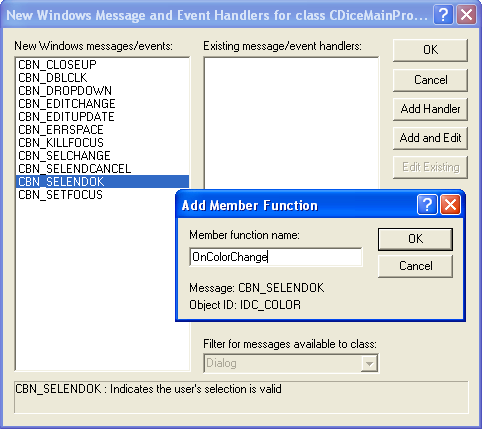
Figure 49: Adding CBN_SELENDOK handler to CDiceMainPropPage class.
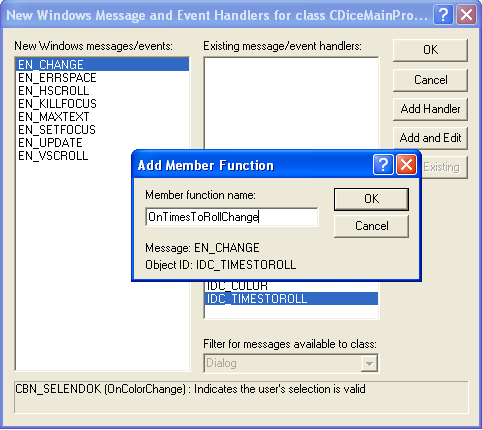
Figure 50: Adding EN_CHANGE handler to CDiceMainPropPage class.
Before we forget, add the following property entries to myatldiceob.h file manually.
PROP_ENTRY("DiceColor", 2, CLSID_DiceMainPropPage)
PROP_ENTRY("TimesToRoll", 3, CLSID_DiceMainPropPage)
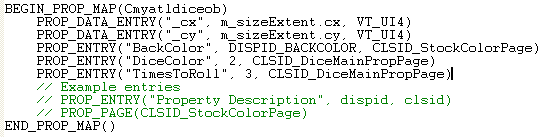
Listing 18.
Edit the Apply() method in DiceMainPropPage.h file.
STDMETHOD(Apply)(void)
{
ATLTRACE(_T("CDiceMainPropPage::Apply\n"));
for (UINT i = 0; i < m_nObjects; i++)
{
USES_CONVERSION;
ATLTRACE(_T("CDiceMainPropPage::Apply\n"));
for (UINT i = 0; i < m_nObjects; i++)
{
CComQIPtr<IATLDiceObj, &IID_IATLDiceObj> pATLDiceObj(m_ppUnk[i]);
HWND hWndComboBox = GetDlgItem(IDC_COLOR);
short nColor = (short)::SendMessage(hWndComboBox, CB_GETCURSEL, 0, 0);
if(nColor >= 0 && nColor <= 2) {
if FAILED(pATLDiceObj->put_DiceColor(nColor))
{
CComPtr<IErrorInfo> pError;
CComBSTR strError;
GetErrorInfo(0, &pError);
pError->GetDescription(&strError);
MessageBox(OLE2T(strError), _T("Error"), MB_ICONEXCLAMATION);
return E_FAIL;
}
}
short nTimesToRoll = (short)GetDlgItemInt(IDC_TIMESTOROLL);
if FAILED(pATLDiceObj->put_TimesToRoll(nTimesToRoll))
{
CComPtr<IErrorInfo> pError;
CComBSTR strError;
GetErrorInfo(0, &pError);
pError->GetDescription(&strError);
MessageBox(OLE2T(strError), _T("Error"), MB_ICONEXCLAMATION);
return E_FAIL;
}
}
m_bDirty = FALSE;
return S_OK;
}
m_bDirty = FALSE;
return S_OK;
}
Add the handlers’ codes.
LRESULT OnInitDialog(UINT uMsg, WPARAM wParam, LPARAM lParam, BOOL& bHandled)
{
// TODO : Add Code for message handler. Call DefWindowProc if necessary.
HWND hWndComboBox = GetDlgItem(IDC_COLOR);
::SendMessage(hWndComboBox, CB_ADDSTRING, 0, (LPARAM)"White");
::SendMessage(hWndComboBox, CB_ADDSTRING, 0, (LPARAM)"Blue");
::SendMessage(hWndComboBox, CB_ADDSTRING, 0, (LPARAM)"Red");
bHandled = TRUE;
return 0;
}
LRESULT OnColorChange(WORD wNotifyCode, WORD wID, HWND hWndCtl, BOOL& bHandled)
{
// TODO : Add Code for control notification handler.
SetDirty(TRUE);
return 0;
}
LRESULT OnTimesToRollChange(WORD wNotifyCode, WORD wID, HWND hWndCtl, BOOL& bHandled)
{
// TODO : Add Code for control notification handler.
SetDirty(TRUE);
return 0;
}
Manually add the Show() and SetObjects() methods. Take note that if you use different interface name for the ATL object name for example, you have to change the related codes accordingly.
STDMETHOD(Show)(UINT nCmdShow)
{
HRESULT hr;
USES_CONVERSION;
if(nCmdShow == SW_SHOW || nCmdShow == SW_SHOWNORMAL)
{
for (UINT i = 0; i < m_nObjects; i++)
{
CComQIPtr<Imyatldiceob, &IID_Imyatldiceob> pmyatldiceob(m_ppUnk[i]);
short nColor = 0;
if FAILED(pmyatldiceob->get_DiceColor(&nColor))
{
CComPtr<IErrorInfo> pError;
CComBSTR strError;
GetErrorInfo(0, &pError);
pError->GetDescription(&strError);
MessageBox(OLE2T(strError), _T("Error"), MB_ICONEXCLAMATION);
return E_FAIL;
}
HWND hWndComboBox = GetDlgItem(IDC_COLOR);
::SendMessage(hWndComboBox, CB_SETCURSEL, nColor, 0);
short nTimesToRoll = 0;
if FAILED(pmyatldiceob->get_TimesToRoll(&nTimesToRoll))
{
CComPtr<IErrorInfo> pError;
CComBSTR strError;
GetErrorInfo(0, &pError);
pError->GetDescription(&strError);
MessageBox(OLE2T(strError), _T("Error"), MB_ICONEXCLAMATION);
return E_FAIL;
}
SetDlgItemInt(IDC_TIMESTOROLL, nTimesToRoll, FALSE);
}
}
m_bDirty = FALSE;
hr = IPropertyPageImpl<CDiceMainPropPage>::Show(nCmdShow);
return hr;
}
STDMETHOD(SetObjects)(ULONG nObjects, IUnknown** ppUnk)
{
HRESULT hr = IPropertyPageImpl<CDiceMainPropPage>::SetObjects(nObjects, ppUnk);
return hr;
}
Further reading and digging:
-
DCOM at MSDN.
-
COM+ at MSDN.
-
COM at MSDN.
-
Win32 process, thread and synchronization story can be found starting from Module R.
-
MSDN MFC 9.0 class library online documentation - latest version.
-
Unicode and Multibyte character set: Story and program examples.